<?xml version="1.0" encoding="utf-8"?>
<feed xmlns="http://www.w3.org/2005/Atom">
  <title>Programming Cloud-Native</title>
  
  <subtitle>Programming Cloud-Native</subtitle>
  <link href="/atom.xml" rel="self"/>
  
  <link href="http://tech.gitple.io/"/>
  <updated>2022-09-22T00:31:13.651Z</updated>
  <id>http://tech.gitple.io/</id>
  
  <author>
    <name>Gitple Inc.</name>
    
  </author>
  
  <generator uri="http://hexo.io/">Hexo</generator>
  
  <entry>
    <title>GitpleLive React Sample Application</title>
    <link href="http://tech.gitple.io/2022/09/21/gitplelive-sample/"/>
    <id>http://tech.gitple.io/2022/09/21/gitplelive-sample/</id>
    <published>2022-09-21T07:12:00.000Z</published>
    <updated>2022-09-22T00:31:13.651Z</updated>
    
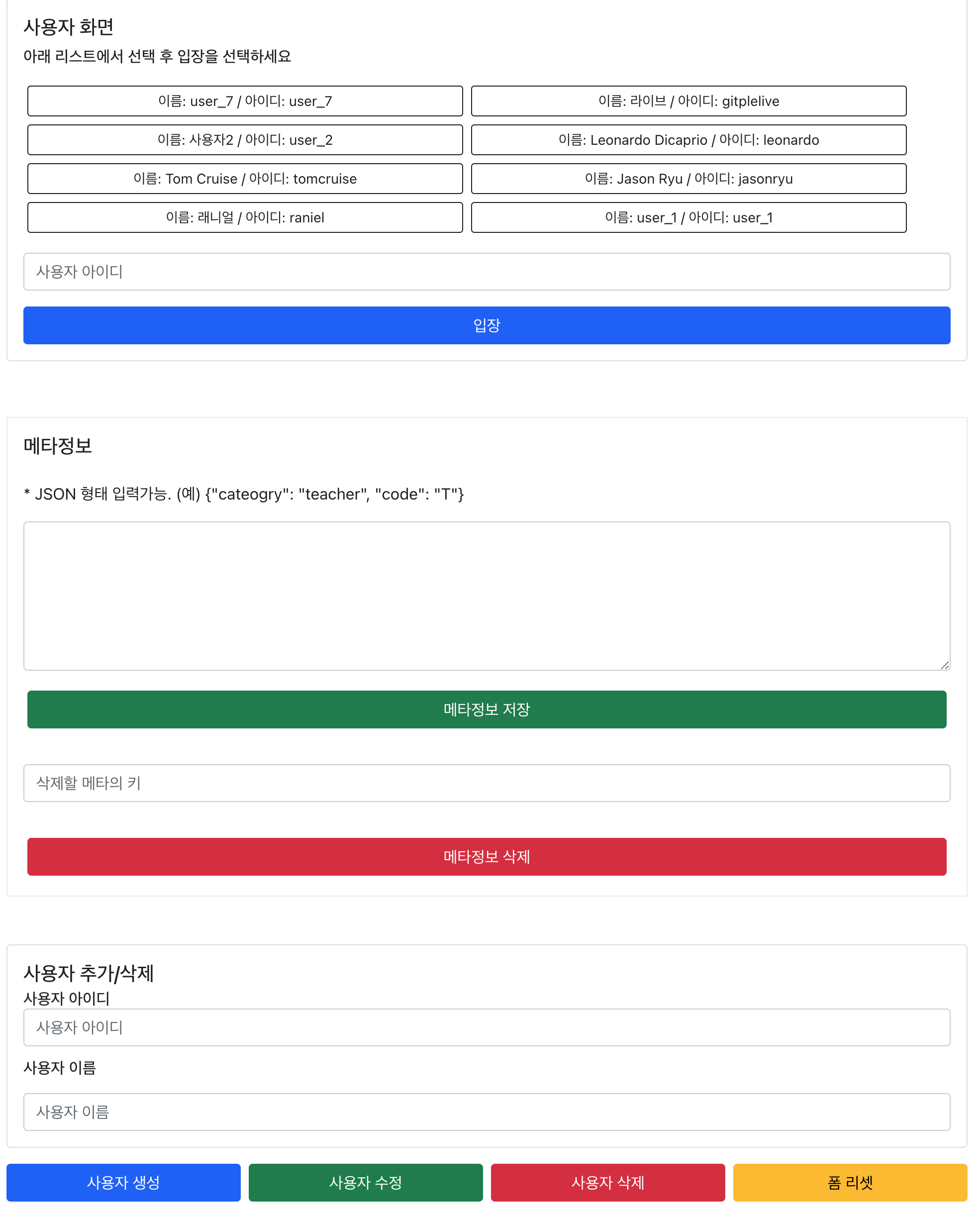
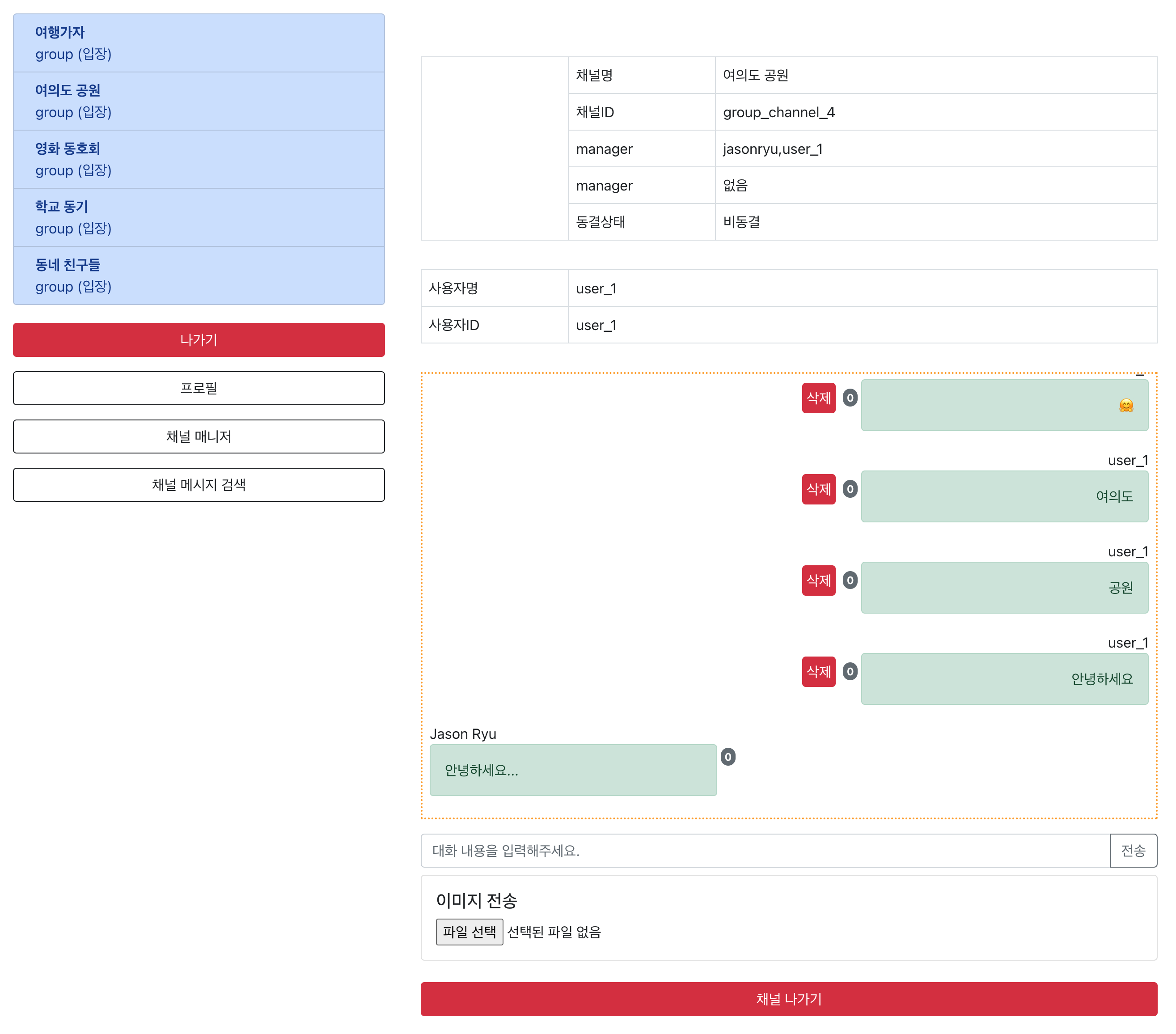
    <content type="html"><![CDATA[<p>Gitple에서 새롭게 런칭한 GitpleLive 채팅 API를 사용하여 스터디 프로젝트로 Sample Application을 만들어보았습니다.</p><p>React에 Typescript를 사용하여 개발했습니다.</p><h3 id="1-개발-범위"><a href="#1-개발-범위" class="headerlink" title="1. 개발 범위"></a>1. 개발 범위</h3><ul><li>소규모 그룹 단체 채팅방</li><li>채널 만들기/수정/참여/메타정보 입력,삭제</li><li>사용자 만들기/삭제/메타정보 입력,삭제</li><li>메시지 보기/수정/삭제/메타정보 입력,삭제</li></ul><h3 id="2-사용-기술"><a href="#2-사용-기술" class="headerlink" title="2. 사용 기술"></a>2. 사용 기술</h3><ul><li>React + Typescript</li><li>React Router</li><li>React Bootstrap</li><li>Recoil (상태 관리 Library)</li><li>Lodash (JavaScript utility library)</li><li>MQTT (경량형 메시지 프로토콜)</li></ul><h3 id="3-GitpleLive-채팅-API-서비스"><a href="#3-GitpleLive-채팅-API-서비스" class="headerlink" title="3. GitpleLive 채팅 API 서비스"></a>3. GitpleLive 채팅 API 서비스</h3><ul><li>GitpleLive는 SaaS 형태의 채팅 API &amp; SDK를 제공하는 채팅앱 개발용 Kit 입니다. </li></ul><h3 id="4-사용-라이브러리"><a href="#4-사용-라이브러리" class="headerlink" title="4. 사용 라이브러리"></a>4. 사용 라이브러리</h3><ul><li>gitpleLive Restful API 와 GitpleLive SDK(mqtt 이벤트 처리부를 SDK형태로 제작)를 사용 SDK는 Typescript + MQTT로 제작하였고 mqtt 모듈을 포함하여 npm pack명령어를 통해 tgz파일로 배포하였습니다.</li><li>browserify와 jscompress(<a href="https://jscompress.com/">https://jscompress.com</a>, UglifyJS 3과 babel-minify를 사용)통해 브라우저에서도 지원이 가능한 javascript 파일도 제작했습니다. package.json에 gitplelive sdk를 추가하여 사용했습니다. 브라우저 기반에선 script tag를 통해 사용이 가능합니다.</li></ul><figure class="highlight javascript"><table><tr><td class="gutter"><pre><span class="line">1</span><br></pre></td><td class="code"><pre><span class="line"><span class="string">&quot;gitplelive&quot;</span>: <span class="string">&quot;file:./gitplelive-v0.0.6.tgz&quot;</span></span><br></pre></td></tr></table></figure><h3 id="5-기본-설정"><a href="#5-기본-설정" class="headerlink" title="5. 기본 설정"></a>5. 기본 설정</h3><h4 id="A-1-Recoil-전역-상태관리-라이브러리-리코일을-사용하기-위해서-npm-install-recoil-또는-yarn-add-를-실행합니다"><a href="#A-1-Recoil-전역-상태관리-라이브러리-리코일을-사용하기-위해서-npm-install-recoil-또는-yarn-add-를-실행합니다" class="headerlink" title="A-1. Recoil (전역 상태관리 라이브러리 리코일을 사용하기 위해서 npm install recoil 또는 yarn add 를 실행합니다."></a>A-1. Recoil (전역 상태관리 라이브러리 리코일을 사용하기 위해서 npm install recoil 또는 yarn add 를 실행합니다.</h4><figure class="highlight typescript"><table><tr><td class="gutter"><pre><span class="line">1</span><br><span class="line">2</span><br><span class="line">3</span><br><span class="line">4</span><br><span class="line">5</span><br><span class="line">6</span><br><span class="line">7</span><br><span class="line">8</span><br><span class="line">9</span><br><span class="line">10</span><br><span class="line">11</span><br><span class="line">12</span><br><span class="line">13</span><br><span class="line">14</span><br><span class="line">15</span><br><span class="line">16</span><br><span class="line">17</span><br><span class="line">18</span><br><span class="line">19</span><br><span class="line">20</span><br></pre></td><td class="code"><pre><span class="line"><span class="keyword">import</span> <span class="title class_">React</span> <span class="keyword">from</span> <span class="string">&#x27;react&#x27;</span>;</span><br><span class="line"><span class="keyword">import</span> <span class="title class_">ReactDOM</span> <span class="keyword">from</span> <span class="string">&#x27;react-dom/client&#x27;</span>;</span><br><span class="line"><span class="keyword">import</span> <span class="string">&#x27;./index.css&#x27;</span>;</span><br><span class="line"><span class="keyword">import</span> <span class="title class_">App</span> <span class="keyword">from</span> <span class="string">&#x27;./App&#x27;</span>;</span><br><span class="line"><span class="keyword">import</span> reportWebVitals <span class="keyword">from</span> <span class="string">&#x27;./reportWebVitals&#x27;</span>;</span><br><span class="line"><span class="keyword">import</span> &#123;</span><br><span class="line">    <span class="title class_">RecoilRoot</span></span><br><span class="line">&#125; <span class="keyword">from</span> <span class="string">&#x27;recoil&#x27;</span>;</span><br><span class="line"></span><br><span class="line"><span class="keyword">const</span> root = <span class="title class_">ReactDOM</span>.<span class="title function_">createRoot</span>(</span><br><span class="line">    <span class="variable language_">document</span>.<span class="title function_">getElementById</span>(<span class="string">&#x27;root&#x27;</span>) <span class="keyword">as</span> <span class="title class_">HTMLElement</span></span><br><span class="line">);</span><br><span class="line"></span><br><span class="line">root.<span class="title function_">render</span>(</span><br><span class="line">        <span class="language-xml"><span class="tag">&lt;<span class="name">RecoilRoot</span>&gt;</span></span></span><br><span class="line"><span class="language-xml">            <span class="tag">&lt;<span class="name">App</span>/&gt;</span></span></span><br><span class="line"><span class="language-xml">        <span class="tag">&lt;/<span class="name">RecoilRoot</span>&gt;</span></span></span><br><span class="line">);</span><br><span class="line"></span><br><span class="line"><span class="title function_">reportWebVitals</span>();</span><br></pre></td></tr></table></figure><ul><li>/src/index.tsx</li></ul><p>Recoil을 사용하기 위해 RecoilRoot를 사용하여 <app /> 태그를 감싸 하위 컴포넌트들이 Recoil 객체를 사용할 수 있도록 합니다.</p><h4 id="A-2-Recoil-대상에-대한-state와-model-설정"><a href="#A-2-Recoil-대상에-대한-state와-model-설정" class="headerlink" title="A-2. Recoil 대상에 대한 state와 model 설정"></a>A-2. Recoil 대상에 대한 state와 model 설정</h4><p>채팅의 상태값을 나타내는 StatusModel을 Recoil로 사용해봤습니다.</p><figure class="highlight typescript"><table><tr><td class="gutter"><pre><span class="line">1</span><br><span class="line">2</span><br><span class="line">3</span><br><span class="line">4</span><br><span class="line">5</span><br></pre></td><td class="code"><pre><span class="line"><span class="keyword">export</span> <span class="keyword">interface</span> <span class="title class_">StatusModel</span> &#123;</span><br><span class="line">    <span class="attr">user_id</span>: <span class="built_in">string</span>,</span><br><span class="line">    <span class="attr">name</span>: <span class="built_in">string</span>,</span><br><span class="line">    <span class="attr">profile_url</span>: <span class="built_in">string</span>,</span><br><span class="line">&#125;</span><br></pre></td></tr></table></figure><ul><li>/src/models/status.model.ts</li></ul><h4 id="A-3-Recoil의-상태-값을-가질-State-설정"><a href="#A-3-Recoil의-상태-값을-가질-State-설정" class="headerlink" title="A-3. Recoil의 상태 값을 가질 State 설정"></a>A-3. Recoil의 상태 값을 가질 State 설정</h4><figure class="highlight typescript"><table><tr><td class="gutter"><pre><span class="line">1</span><br><span class="line">2</span><br><span class="line">3</span><br><span class="line">4</span><br><span class="line">5</span><br><span class="line">6</span><br><span class="line">7</span><br><span class="line">8</span><br><span class="line">9</span><br><span class="line">10</span><br><span class="line">11</span><br></pre></td><td class="code"><pre><span class="line"><span class="keyword">import</span> &#123; atom &#125; <span class="keyword">from</span> <span class="string">&#x27;recoil&#x27;</span></span><br><span class="line"><span class="keyword">import</span> &#123; <span class="title class_">StatusModel</span> &#125; <span class="keyword">from</span> <span class="string">&#x27;../models/status.model&#x27;</span></span><br><span class="line"></span><br><span class="line"><span class="keyword">export</span> <span class="keyword">const</span> statusState = atom&lt;<span class="title class_">StatusModel</span>&gt;(&#123;</span><br><span class="line">    <span class="attr">key</span>: <span class="string">&#x27;chat/status&#x27;</span>,</span><br><span class="line">    <span class="attr">default</span>: &#123;</span><br><span class="line">        <span class="attr">user_id</span>: <span class="string">&quot;&quot;</span>,</span><br><span class="line">        <span class="attr">name</span>: <span class="string">&quot;&quot;</span>,</span><br><span class="line">        <span class="attr">profile_url</span>: <span class="string">&quot;&quot;</span>,</span><br><span class="line">    &#125;</span><br><span class="line">&#125;)</span><br></pre></td></tr></table></figure><ul><li>/src/recoil/chat.ts</li></ul><h4 id="B-React-Router"><a href="#B-React-Router" class="headerlink" title="B. React Router"></a>B. React Router</h4><p>라우팅 시스템을 이용하기 위해 BrowserRouter, Routes, Route 모듈을 사용합니다.</p><figure class="highlight typescript"><table><tr><td class="gutter"><pre><span class="line">1</span><br><span class="line">2</span><br><span class="line">3</span><br><span class="line">4</span><br><span class="line">5</span><br><span class="line">6</span><br><span class="line">7</span><br><span class="line">8</span><br><span class="line">9</span><br><span class="line">10</span><br><span class="line">11</span><br><span class="line">12</span><br><span class="line">13</span><br><span class="line">14</span><br><span class="line">15</span><br><span class="line">16</span><br><span class="line">17</span><br><span class="line">18</span><br><span class="line">19</span><br><span class="line">20</span><br><span class="line">21</span><br><span class="line">22</span><br><span class="line">23</span><br><span class="line">24</span><br><span class="line">25</span><br><span class="line">26</span><br><span class="line">27</span><br><span class="line">28</span><br><span class="line">29</span><br></pre></td><td class="code"><pre><span class="line"><span class="keyword">import</span> <span class="title class_">React</span>, &#123;useEffect&#125; <span class="keyword">from</span> <span class="string">&quot;react&quot;</span>;</span><br><span class="line"><span class="keyword">import</span> &#123;<span class="title class_">BrowserRouter</span>, <span class="title class_">Routes</span>, <span class="title class_">Route</span>&#125; <span class="keyword">from</span> <span class="string">&quot;react-router-dom&quot;</span>;</span><br><span class="line"><span class="keyword">import</span> <span class="string">&quot;./App.css&quot;</span>;</span><br><span class="line"><span class="keyword">import</span> <span class="title class_">ChatApp</span> <span class="keyword">from</span> <span class="string">&#x27;./components/ChatApp&#x27;</span></span><br><span class="line"><span class="keyword">import</span> <span class="title class_">Profile</span> <span class="keyword">from</span> <span class="string">&#x27;./components/Profile&#x27;</span></span><br><span class="line"><span class="keyword">import</span> &#123;useRecoilState&#125; <span class="keyword">from</span> <span class="string">&quot;recoil&quot;</span>;</span><br><span class="line"><span class="keyword">import</span> &#123;<span class="title class_">StatusModel</span>&#125; <span class="keyword">from</span> <span class="string">&quot;./models/status.model&quot;</span>;</span><br><span class="line"><span class="keyword">import</span> &#123;statusState&#125; <span class="keyword">from</span> <span class="string">&quot;./recoil/chat&quot;</span>;</span><br><span class="line"><span class="keyword">import</span> <span class="title class_">AdminCT</span> <span class="keyword">from</span> <span class="string">&quot;./components/admin/AdminCT&quot;</span>;</span><br><span class="line"><span class="keyword">import</span> <span class="title class_">SearchCT</span> <span class="keyword">from</span> <span class="string">&quot;./components/admin/SearchCT&quot;</span>;</span><br><span class="line"></span><br><span class="line"><span class="keyword">function</span> <span class="title function_">App</span>(<span class="params"></span>) &#123;</span><br><span class="line"><span class="keyword">const</span> [myStatus, setMyStatus] = useRecoilState&lt;<span class="title class_">StatusModel</span>&gt;(statusState)</span><br><span class="line"></span><br><span class="line"><span class="comment">// ...(중간 코드 생략)</span></span><br><span class="line">  </span><br><span class="line">   <span class="keyword">return</span> (</span><br><span class="line">       <span class="language-xml"><span class="tag">&lt;<span class="name">BrowserRouter</span>&gt;</span></span></span><br><span class="line"><span class="language-xml">           <span class="tag">&lt;<span class="name">Routes</span>&gt;</span></span></span><br><span class="line"><span class="language-xml">               <span class="tag">&lt;<span class="name">Route</span> <span class="attr">path</span>=<span class="string">&quot;/&quot;</span> <span class="attr">element</span>=<span class="string">&#123;</span>&lt;<span class="attr">ChatApp</span> /&gt;</span>&#125;&gt;<span class="tag">&lt;/<span class="name">Route</span>&gt;</span></span></span><br><span class="line"><span class="language-xml">               <span class="tag">&lt;<span class="name">Route</span> <span class="attr">path</span>=<span class="string">&quot;/profile&quot;</span> <span class="attr">element</span>=<span class="string">&#123;</span>&lt;<span class="attr">Profile</span> /&gt;</span>&#125;&gt;<span class="tag">&lt;/<span class="name">Route</span>&gt;</span></span></span><br><span class="line"><span class="language-xml">               <span class="tag">&lt;<span class="name">Route</span> <span class="attr">path</span>=<span class="string">&quot;/admin&quot;</span> <span class="attr">element</span>=<span class="string">&#123;</span>&lt;<span class="attr">AdminCT</span> /&gt;</span>&#125;&gt;<span class="tag">&lt;/<span class="name">Route</span>&gt;</span></span></span><br><span class="line"><span class="language-xml">               <span class="tag">&lt;<span class="name">Route</span> <span class="attr">path</span>=<span class="string">&quot;/search&quot;</span> <span class="attr">element</span>=<span class="string">&#123;</span>&lt;<span class="attr">SearchCT</span> /&gt;</span>&#125;&gt;<span class="tag">&lt;/<span class="name">Route</span>&gt;</span></span></span><br><span class="line"><span class="language-xml">           <span class="tag">&lt;/<span class="name">Routes</span>&gt;</span></span></span><br><span class="line"><span class="language-xml">       <span class="tag">&lt;/<span class="name">BrowserRouter</span>&gt;</span></span></span><br><span class="line">   )</span><br><span class="line">&#125;</span><br><span class="line"></span><br><span class="line"><span class="keyword">export</span> <span class="keyword">default</span> <span class="title class_">App</span>;</span><br></pre></td></tr></table></figure><h3 id="5-컴포넌트-구조"><a href="#5-컴포넌트-구조" class="headerlink" title="5. 컴포넌트 구조"></a>5. 컴포넌트 구조</h3><figure class="highlight plaintext"><table><tr><td class="gutter"><pre><span class="line">1</span><br><span class="line">2</span><br><span class="line">3</span><br><span class="line">4</span><br><span class="line">5</span><br><span class="line">6</span><br><span class="line">7</span><br><span class="line">8</span><br><span class="line">9</span><br><span class="line">10</span><br><span class="line">11</span><br><span class="line">12</span><br><span class="line">13</span><br><span class="line">14</span><br><span class="line">15</span><br><span class="line">16</span><br></pre></td><td class="code"><pre><span class="line">├── src/</span><br><span class="line">│   ├── components/</span><br><span class="line">│   │   ├── admin/</span><br><span class="line">│   │   │   ├── AdminChannel.tsx</span><br><span class="line">│   │   │   ├── AdminCT.tsx</span><br><span class="line">│   │   │   ├── AdminMessage.tsx</span><br><span class="line">│   │   │   └── SearchCT.tsx</span><br><span class="line">│   ├── Channel.tsx</span><br><span class="line">│   ├── ChannelList.tsx</span><br><span class="line">│   ├── Chat.tsx</span><br><span class="line">│   ├── ChatApp.tsx</span><br><span class="line">│   ├── ChatCT.tsx</span><br><span class="line">│   ├── Header.tsx</span><br><span class="line">│   ├── Message.tsx</span><br><span class="line">│   ├── Pofile.tsx</span><br><span class="line">│   └── SIgnCT.tsx</span><br></pre></td></tr></table></figure><h3 id="6-비동기-통신을-위한-모듈-파일-구성"><a href="#6-비동기-통신을-위한-모듈-파일-구성" class="headerlink" title="6. 비동기 통신을 위한 모듈 파일 구성"></a>6. 비동기 통신을 위한 모듈 파일 구성</h3><figure class="highlight plaintext"><table><tr><td class="gutter"><pre><span class="line">1</span><br><span class="line">2</span><br><span class="line">3</span><br><span class="line">4</span><br><span class="line">5</span><br></pre></td><td class="code"><pre><span class="line">├── services</span><br><span class="line">│   ├── channel.service.ts</span><br><span class="line">│   ├── gitpleLive.service.ts</span><br><span class="line">│   ├── message.service.ts</span><br><span class="line">│   └── user.services..ts</span><br></pre></td></tr></table></figure><h4 id="A-channel-message-user-uservices-ts-등에서-http-common-ts을-import하여-axios-비동기-통신-라이브러리-를-사용할-수-있습니다"><a href="#A-channel-message-user-uservices-ts-등에서-http-common-ts을-import하여-axios-비동기-통신-라이브러리-를-사용할-수-있습니다" class="headerlink" title="A. channel,message,user.uservices.ts 등에서  http-common.ts을 import하여 axios(비동기 통신 라이브러리)를 사용할 수 있습니다."></a>A. channel,message,user.uservices.ts 등에서  http-common.ts을 import하여 axios(비동기 통신 라이브러리)를 사용할 수 있습니다.</h4><figure class="highlight json"><table><tr><td class="gutter"><pre><span class="line">1</span><br><span class="line">2</span><br><span class="line">3</span><br></pre></td><td class="code"><pre><span class="line"><span class="punctuation">&#123;</span></span><br><span class="line">  <span class="attr">&quot;proxy&quot;</span><span class="punctuation">:</span> <span class="string">&quot;https://&#123;APIURL&#125;&quot;</span></span><br><span class="line"><span class="punctuation">&#125;</span></span><br></pre></td></tr></table></figure><h4 id="B-package-json-에서-proxy로-api-url을-지정했습니다-이럴-경우-axios를-사용할-때-기본-URL을-생략하고-사용할-수-있습니다"><a href="#B-package-json-에서-proxy로-api-url을-지정했습니다-이럴-경우-axios를-사용할-때-기본-URL을-생략하고-사용할-수-있습니다" class="headerlink" title="B. package.json 에서 proxy로 api url을 지정했습니다. 이럴 경우 axios를 사용할 때 기본 URL을 생략하고 사용할 수 있습니다."></a>B. package.json 에서 proxy로 api url을 지정했습니다. 이럴 경우 axios를 사용할 때 기본 URL을 생략하고 사용할 수 있습니다.</h4><figure class="highlight typescript"><table><tr><td class="gutter"><pre><span class="line">1</span><br><span class="line">2</span><br><span class="line">3</span><br><span class="line">4</span><br><span class="line">5</span><br><span class="line">6</span><br><span class="line">7</span><br><span class="line">8</span><br><span class="line">9</span><br><span class="line">10</span><br></pre></td><td class="code"><pre><span class="line"><span class="keyword">import</span> axios <span class="keyword">from</span> <span class="string">&quot;axios&quot;</span>;</span><br><span class="line"><span class="keyword">export</span> <span class="keyword">default</span> axios.<span class="title function_">create</span>(&#123;</span><br><span class="line">   <span class="attr">baseURL</span>: <span class="string">&quot;/v1&quot;</span>,</span><br><span class="line">   <span class="attr">headers</span>: &#123;</span><br><span class="line">       <span class="string">&quot;Content-type&quot;</span>: <span class="string">&quot;application/json&quot;</span>,</span><br><span class="line">       <span class="string">&quot;ORGANIZATION_API_KEY&quot;</span>: process.<span class="property">env</span>.<span class="property">REACT_APP_ORGANIZATION_API_KEY</span> || <span class="string">&#x27;&#x27;</span>,</span><br><span class="line">       <span class="string">&quot;APP_ID&quot;</span>: process.<span class="property">env</span>.<span class="property">REACT_APP_APP_ID</span> || <span class="string">&#x27;&#x27;</span>,</span><br><span class="line">       <span class="string">&quot;APP_API_KEY&quot;</span>: process.<span class="property">env</span>.<span class="property">REACT_APP_APP_API_KEY</span> || <span class="string">&#x27;&#x27;</span>,</span><br><span class="line">   &#125;</span><br><span class="line">&#125;);</span><br></pre></td></tr></table></figure><h4 id="C-‘-env’파일에-선언되어있는-REACT-APP-환경변수를-사용하여-필요한-Key-ID등을-할당-했습니다"><a href="#C-‘-env’파일에-선언되어있는-REACT-APP-환경변수를-사용하여-필요한-Key-ID등을-할당-했습니다" class="headerlink" title="C. ‘.env’파일에 선언되어있는 REACT_APP_* 환경변수를 사용하여 필요한 Key, ID등을 할당 했습니다."></a>C. ‘.env’파일에 선언되어있는 REACT_APP_* 환경변수를 사용하여 필요한 Key, ID등을 할당 했습니다.</h4><figure class="highlight typescript"><table><tr><td class="gutter"><pre><span class="line">1</span><br><span class="line">2</span><br><span class="line">3</span><br><span class="line">4</span><br><span class="line">5</span><br><span class="line">6</span><br><span class="line">7</span><br><span class="line">8</span><br><span class="line">9</span><br><span class="line">10</span><br><span class="line">11</span><br><span class="line">12</span><br><span class="line">13</span><br><span class="line">14</span><br><span class="line">15</span><br><span class="line">16</span><br><span class="line">17</span><br><span class="line">18</span><br></pre></td><td class="code"><pre><span class="line"><span class="keyword">import</span> http <span class="keyword">from</span> <span class="string">&quot;../modules/http-common&quot;</span>;</span><br><span class="line"><span class="keyword">import</span> &#123;<span class="title class_">MessageCreateModel</span>, <span class="title class_">MessageExecuteModel</span>, <span class="title class_">MessageModel</span>&#125; <span class="keyword">from</span> <span class="string">&quot;../models/message.model&quot;</span>;</span><br><span class="line"><span class="keyword">import</span> &#123;fdatasync&#125; <span class="keyword">from</span> <span class="string">&quot;fs&quot;</span>;</span><br><span class="line"></span><br><span class="line"><span class="keyword">class</span> <span class="title class_">MessageDataService</span> &#123;</span><br><span class="line"></span><br><span class="line">   <span class="title function_">get</span>(<span class="params">channel_id: <span class="built_in">string</span>, params: &#123;&#125; = &#123;&#125;</span>)  &#123;</span><br><span class="line">       <span class="keyword">return</span> http.<span class="property">get</span>&lt;<span class="title class_">MessageModel</span>&gt;(<span class="string">`/group/channels/<span class="subst">$&#123;channel_id&#125;</span>/messages`</span>,</span><br><span class="line">           &#123;params&#125;);</span><br><span class="line">   &#125;</span><br><span class="line">   <span class="title function_">create</span>(<span class="params">channel_id: <span class="built_in">string</span>, data: MessageCreateModel</span>) &#123;</span><br><span class="line">       <span class="keyword">return</span> http.<span class="title function_">post</span>(<span class="string">`/group/channels/<span class="subst">$&#123;channel_id&#125;</span>/messages`</span>, data);</span><br><span class="line">       <span class="comment">// return http.post(`/messages/create/channels/$&#123;id&#125;`, data);</span></span><br><span class="line">   &#125;</span><br><span class="line"></span><br><span class="line">   <span class="comment">// (중간 코드 생략) </span></span><br><span class="line">&#125;</span><br><span class="line"><span class="keyword">export</span> <span class="keyword">default</span> <span class="keyword">new</span> <span class="title class_">MessageDataService</span>();</span><br></pre></td></tr></table></figure><h4 id="D-API별로-service-ts-파일을-생성하여-기능-구현"><a href="#D-API별로-service-ts-파일을-생성하여-기능-구현" class="headerlink" title="D. API별로 *.service.ts 파일을 생성하여 기능 구현."></a>D. API별로 *.service.ts 파일을 생성하여 기능 구현.</h4><h3 id="7-플로우"><a href="#7-플로우" class="headerlink" title="7. 플로우"></a>7. 플로우</h3><h4 id="A-로그인-페이지-SignCT-tsx"><a href="#A-로그인-페이지-SignCT-tsx" class="headerlink" title="A. 로그인 페이지 (SignCT.tsx)"></a>A. 로그인 페이지 (SignCT.tsx)</h4><p><img src="/images/gitplelive/01.png" alt="로그인 페이지"></p><p>제일 처음 보는 로그인 페이지입니다. 로그인 기능과 사용자를 생성,수정,삭제할 수 있는 기능, 메타 데이터를 등록할 수 있는 곳 입니다.</p><h4 id="B-채팅-페이지-ChatCT-tsx"><a href="#B-채팅-페이지-ChatCT-tsx" class="headerlink" title="B. 채팅 페이지 (ChatCT.tsx)"></a>B. 채팅 페이지 (ChatCT.tsx)</h4><p><img src="/images/gitplelive/02.png" alt="채팅 페이지"></p><p>좌측 채널 리스트를 선택하여 채팅방에 입장 할 수 있고 text, image 메시지를 보낼 수 있다. 본인의 글은 삭제가 가능하며 메시지를 보낼 땐 API를 호출하고 메시지를 받을 땐 미리 제작한 gitplelive sdk를 사용합니다.</p><p>메시지를 보내는 방법은 api를 호출하면 되는 간단한 방법이므로 sdk로 이벤트를 받는 방법과 메시지에 담겨 있는 read_reciept 타임스탬프를 통해 메시지별로 몇 명이 읽었는지 알아내는 방법에 대해서 알아보기로 하겠습니다.</p><p>채팅 영역의 구조는 아래와 같습니다.</p><figure class="highlight plaintext"><table><tr><td class="gutter"><pre><span class="line">1</span><br><span class="line">2</span><br><span class="line">3</span><br><span class="line">4</span><br><span class="line">5</span><br></pre></td><td class="code"><pre><span class="line">├── ChatCT.tsx/</span><br><span class="line">│   ├── ChannelList.tsx/</span><br><span class="line">│   │   ├── Channel.tsx/</span><br><span class="line">│   ├── Chat.tsx/</span><br><span class="line">│   │   └── Message.tsx/</span><br></pre></td></tr></table></figure><p>&lt;채팅 이벤트를 받는 부분&gt;</p><figure class="highlight typescript"><table><tr><td class="gutter"><pre><span class="line">1</span><br><span class="line">2</span><br><span class="line">3</span><br><span class="line">4</span><br><span class="line">5</span><br><span class="line">6</span><br><span class="line">7</span><br><span class="line">8</span><br><span class="line">9</span><br><span class="line">10</span><br><span class="line">11</span><br><span class="line">12</span><br><span class="line">13</span><br><span class="line">14</span><br><span class="line">15</span><br><span class="line">16</span><br><span class="line">17</span><br><span class="line">18</span><br><span class="line">19</span><br><span class="line">20</span><br><span class="line">21</span><br><span class="line">22</span><br><span class="line">23</span><br><span class="line">24</span><br><span class="line">25</span><br><span class="line">26</span><br><span class="line">27</span><br><span class="line">28</span><br><span class="line">29</span><br><span class="line">30</span><br><span class="line">31</span><br><span class="line">32</span><br><span class="line">33</span><br><span class="line">34</span><br></pre></td><td class="code"><pre><span class="line"><span class="title function_">useEffect</span>(<span class="function">() =&gt;</span> &#123;</span><br><span class="line">    <span class="keyword">const</span> <span class="attr">userInfo</span>: <span class="title class_">GitpleLive</span>.<span class="property">UserInfo</span> = &#123;</span><br><span class="line">        <span class="attr">user_id</span>: myStatus.<span class="property">user_id</span></span><br><span class="line">    &#125;;</span><br><span class="line"></span><br><span class="line">    <span class="keyword">const</span> gitpleLive = <span class="title function_">getGitpleLive</span>();</span><br><span class="line"></span><br><span class="line">    gitpleLive.<span class="title function_">connectUser</span>(userInfo);</span><br><span class="line"></span><br><span class="line">    gitpleLive.<span class="title function_">on</span>(<span class="string">&#x27;connect&#x27;</span>, <span class="function">() =&gt;</span> &#123;</span><br><span class="line">        <span class="variable language_">console</span>.<span class="title function_">log</span>(<span class="string">&#x27;GitpleLive Connect&#x27;</span>);</span><br><span class="line">    &#125;);</span><br><span class="line"></span><br><span class="line">    gitpleLive.<span class="title function_">on</span>(<span class="string">&#x27;disconnect&#x27;</span>, <span class="function">() =&gt;</span> &#123;</span><br><span class="line">        <span class="variable language_">console</span>.<span class="title function_">log</span>(<span class="string">&#x27;GitpleLive Disconnect&#x27;</span>);</span><br><span class="line">    &#125;);</span><br><span class="line"></span><br><span class="line">    gitpleLive.<span class="title function_">on</span>(<span class="string">&#x27;error&#x27;</span>, <span class="function">(<span class="params">data</span>) =&gt;</span> &#123;</span><br><span class="line">        <span class="variable language_">console</span>.<span class="title function_">log</span>(<span class="string">&#x27;GitpleLive Error:&#x27;</span>, data);</span><br><span class="line">    &#125;);</span><br><span class="line"></span><br><span class="line">    gitpleLive.<span class="title function_">on</span>(<span class="string">&quot;group:message_send&quot;</span>, <span class="function">(<span class="params">channel: GitpleLive.Channel, message: <span class="built_in">any</span></span>) =&gt;</span> &#123;</span><br><span class="line">        <span class="variable language_">console</span>.<span class="title function_">log</span>(<span class="string">&#x27;=== group:message_send ===&#x27;</span>);</span><br><span class="line">        <span class="variable language_">console</span>.<span class="title function_">log</span>(<span class="string">&quot;channel:&quot;</span>, channel);</span><br><span class="line">        <span class="variable language_">console</span>.<span class="title function_">log</span>(<span class="string">&quot;message:&quot;</span>, message);</span><br><span class="line">        <span class="title function_">setSendMessageEventModel</span>(&#123;</span><br><span class="line">            <span class="attr">category</span>: <span class="string">&quot;group:message_send&quot;</span>,</span><br><span class="line">            <span class="attr">app_id</span>: <span class="string">&quot;&quot;</span>,</span><br><span class="line">            <span class="attr">message</span>: message,</span><br><span class="line">        &#125;);</span><br><span class="line">    &#125;);</span><br><span class="line"></span><br><span class="line">    <span class="comment">/// (이하 생략)</span></span><br><span class="line">&#125;</span><br></pre></td></tr></table></figure><ul><li>미리 만들어 놓은 GitpleLive SDK를 통해 이벤트를 수신합니다. 수신시 setSendMessageEventModel(useState)를 통해 객체를 변화 시키고 hook으로 감지하여 메시지 리스트에 추가 합니다.</li></ul><p>&lt;읽은 카운트를 표시하는 부분&gt;</p><p>Message.tsx 에서 unread(읽지 않은 사용자 수)를 계산 한다. 채널 정보에 있는 read_receipt(읽기 영수증) 과 message의 생성 시간을 비교하여 계산한다</p><figure class="highlight typescript"><table><tr><td class="gutter"><pre><span class="line">1</span><br><span class="line">2</span><br><span class="line">3</span><br><span class="line">4</span><br><span class="line">5</span><br></pre></td><td class="code"><pre><span class="line">    <span class="string">&quot;read_receipt&quot;</span>: &#123;</span><br><span class="line">    <span class="string">&quot;user_1&quot;</span>: <span class="number">1663057055113</span>,</span><br><span class="line">    <span class="string">&quot;user_2&quot;</span>: <span class="number">1662009830269</span>,</span><br><span class="line">    <span class="string">&quot;user_3&quot;</span>: <span class="number">1663643430480</span></span><br><span class="line">&#125;</span><br></pre></td></tr></table></figure><ul><li>read_receipt의 구조</li></ul><figure class="highlight typescript"><table><tr><td class="gutter"><pre><span class="line">1</span><br><span class="line">2</span><br><span class="line">3</span><br><span class="line">4</span><br><span class="line">5</span><br><span class="line">6</span><br><span class="line">7</span><br><span class="line">8</span><br><span class="line">9</span><br><span class="line">10</span><br><span class="line">11</span><br><span class="line">12</span><br><span class="line">13</span><br><span class="line">14</span><br><span class="line">15</span><br><span class="line">16</span><br><span class="line">17</span><br><span class="line">18</span><br><span class="line">19</span><br><span class="line">20</span><br><span class="line">21</span><br></pre></td><td class="code"><pre><span class="line"><span class="keyword">const</span> <span class="title function_">renderUnread</span> = (<span class="params">message: MessageModel</span>) =&gt; &#123;</span><br><span class="line">   <span class="keyword">if</span> (!mySelChannel.<span class="property">read_receipt</span>) &#123;</span><br><span class="line">       <span class="keyword">return</span> (</span><br><span class="line">           <span class="language-xml"><span class="tag">&lt;&gt;</span><span class="tag">&lt;/&gt;</span></span></span><br><span class="line">       )</span><br><span class="line">   &#125;</span><br><span class="line"></span><br><span class="line">   <span class="keyword">let</span> <span class="attr">unread</span>: <span class="built_in">number</span> = <span class="title class_">Object</span>.<span class="title function_">keys</span>(mySelChannel.<span class="property">read_receipt</span>).<span class="property">length</span>;</span><br><span class="line"></span><br><span class="line">   <span class="keyword">for</span> (<span class="keyword">let</span> writer <span class="keyword">in</span> mySelChannel.<span class="property">read_receipt</span>) &#123;</span><br><span class="line">       <span class="keyword">if</span> (message.<span class="property">created_at</span> &lt;= mySelChannel.<span class="property">read_receipt</span>[writer]) &#123;</span><br><span class="line">           unread--;</span><br><span class="line">       &#125;</span><br><span class="line">   &#125;</span><br><span class="line"></span><br><span class="line">   <span class="keyword">return</span> (</span><br><span class="line">       <span class="language-xml"><span class="tag">&lt;<span class="name">Badge</span> <span class="attr">pill</span> <span class="attr">bg</span>=<span class="string">&quot;secondary&quot;</span> <span class="attr">className</span>=<span class="string">&quot;p-1 m-1&quot;</span>&gt;</span></span></span><br><span class="line"><span class="language-xml">           &#123;unread&#125;</span></span><br><span class="line"><span class="language-xml">        <span class="tag">&lt;/<span class="name">Badge</span>&gt;</span></span></span><br><span class="line">   )</span><br><span class="line">&#125;</span><br></pre></td></tr></table></figure><p>이상 gitplelive api와 gitplelive sdk를 이용해 리액트 샘플 앱을 만드는데 중요하다고 생각했던 부분에 대해서 기술 하였습니다.</p><p>리액트를 class기반이 아닌 function 컴포넌트 기반으로 hook과 recoil을 사용해보며 새로운 지식을 습득하였습니다. 더불어 간단하지만 typescript 기반으로 mqtt를 사용하는 sdk를 만들었고 browserify 모듈을 사용하여 브라우저에서도 쓸 수 있는 번들링 기법도 알게 되었습니다.</p><p>읽어 주셔서 감사합니다.</p>]]></content>
    
    <summary type="html">


        &lt;p&gt;Gitple에서 새롭게 런칭한 GitpleLive 채팅 API를 사용하여 스터디 프로젝트로 Sample Application을 만들어보았습니다.&lt;/p&gt;
&lt;p&gt;React에 Typescript를 사용하여 개발했습니다.&lt;/p&gt;
&lt;h3 id=&quot;1-개발-
      
    
    </summary>
    
      <category term="Blog" scheme="http://tech.gitple.io/categories/Blog/"/>
    
    
      <category term="Frontend" scheme="http://tech.gitple.io/tags/Frontend/"/>
    
      <category term="Typescript" scheme="http://tech.gitple.io/tags/Typescript/"/>
    
      <category term="Chat" scheme="http://tech.gitple.io/tags/Chat/"/>
    
      <category term="React" scheme="http://tech.gitple.io/tags/React/"/>
    
      <category term="Recoil" scheme="http://tech.gitple.io/tags/Recoil/"/>
    
      <category term="MQTT" scheme="http://tech.gitple.io/tags/MQTT/"/>
    
  </entry>
  
  <entry>
    <title>네트워크 및 http 기초와 실습</title>
    <link href="http://tech.gitple.io/2021/09/07/network-http-practice/"/>
    <id>http://tech.gitple.io/2021/09/07/network-http-practice/</id>
    <published>2021-09-07T08:00:00.000Z</published>
    <updated>2022-09-21T07:09:57.827Z</updated>
    
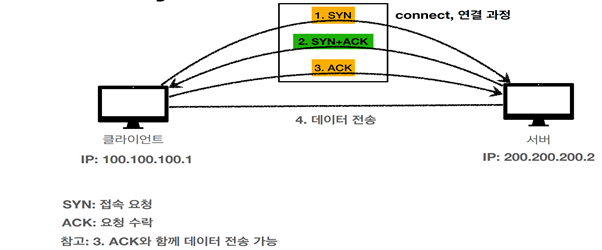
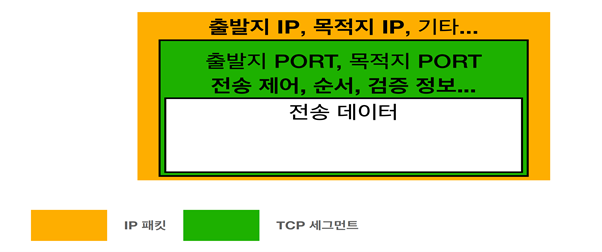
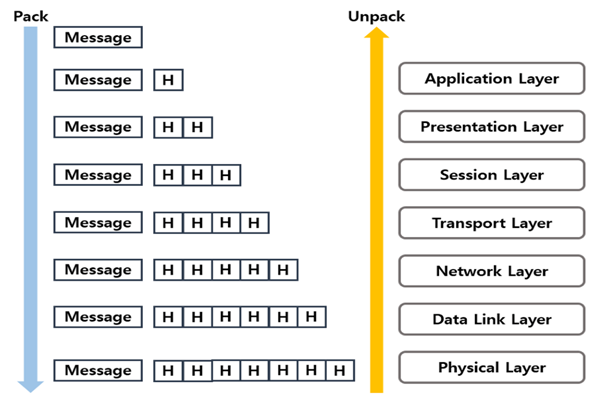
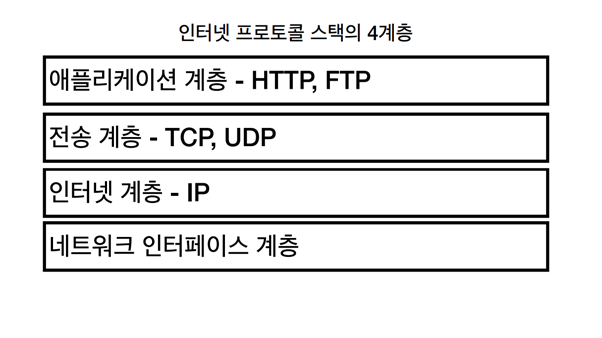
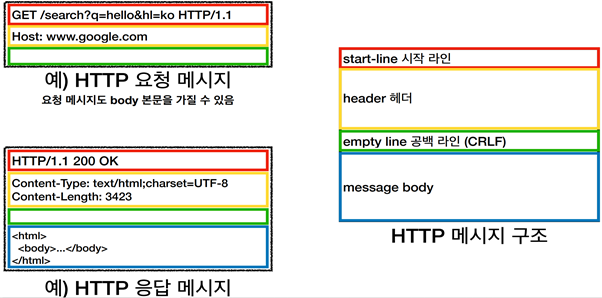
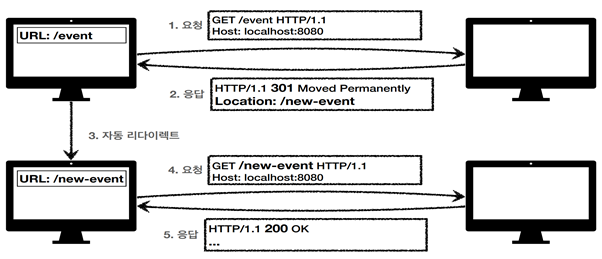
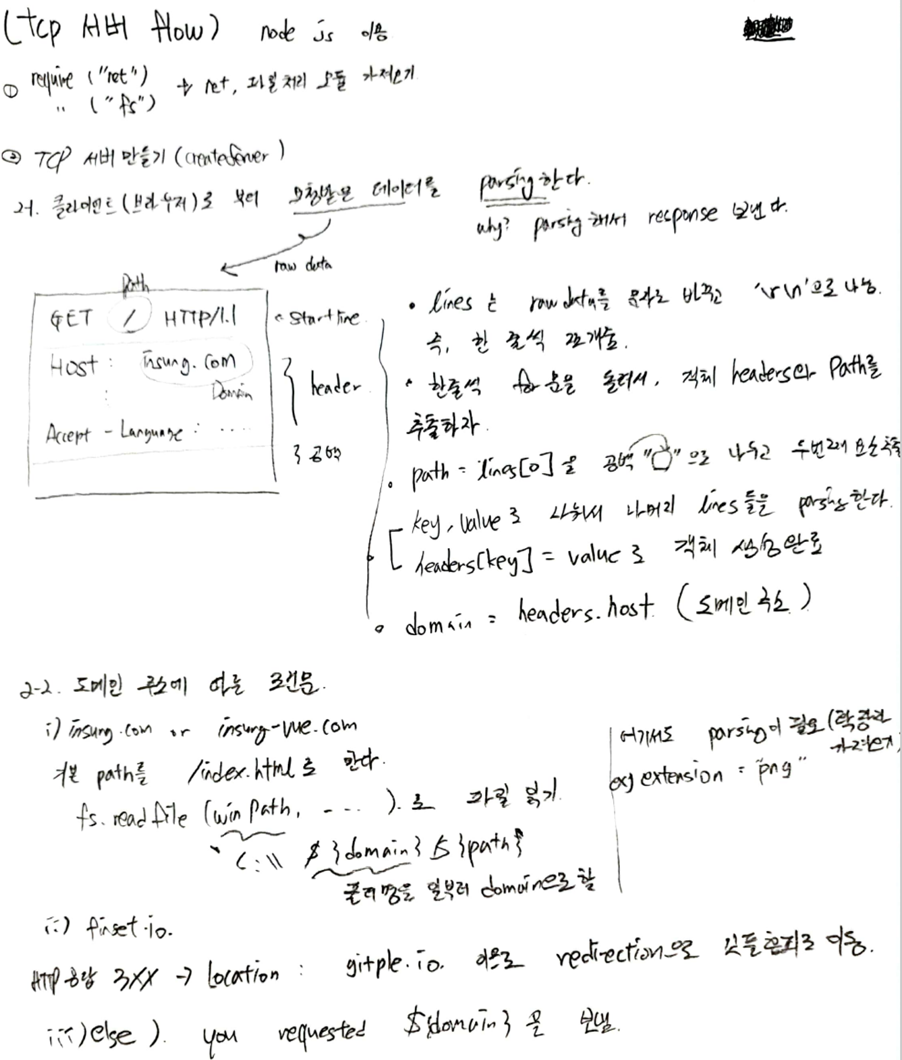
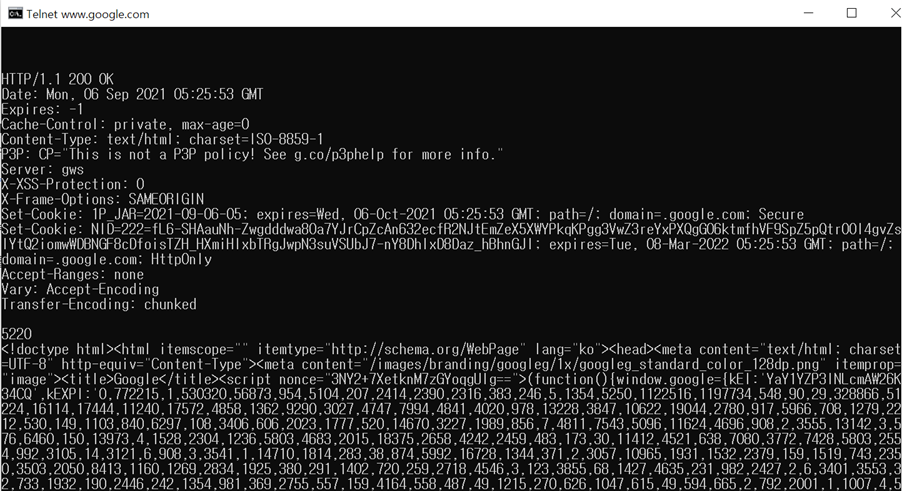
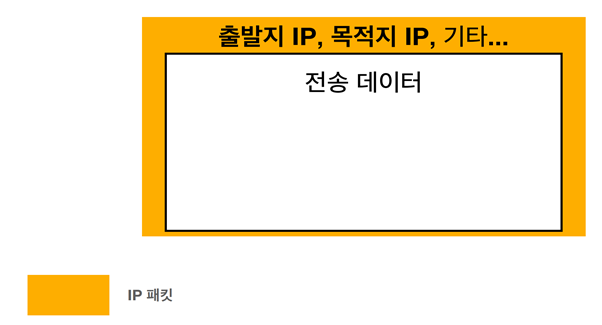
    <content type="html"><![CDATA[<h1 id="인터넷-네트워크"><a href="#인터넷-네트워크" class="headerlink" title="인터넷 네트워크"></a>인터넷 네트워크</h1><p>인터넷과 네트워크는 일상생활에서도 많이 쓰는 용어이지만, 내부 동작 원리나 개념에 대해서 아는 것은 부끄럽지만 전무했다. 그래서 이번에 세미나를 준비하면서 공부하고 배우고 이해한 것들 것 정리하고자 한다. 인터넷과 네트워크는 굉장히 광범위한 주제이지만, 아래와 같이 나눠서 설명할 것이다. http프로토콜에 대해서는 따로 다룰 예정이다.</p><br/><h3 id="lt-인터넷-네트워크-gt"><a href="#lt-인터넷-네트워크-gt" class="headerlink" title="&lt;인터넷 네트워크&gt;"></a>&lt;인터넷 네트워크&gt;</h3><ol><li>인터넷과 네트워크란?</li><li>IP</li><li>TCP/UDP</li><li>PORT</li><li>DNS</li><li>네트워크 계층</li></ol><br/><ul><li><h3 id="인터넷과-네트워크란"><a href="#인터넷과-네트워크란" class="headerlink" title="인터넷과 네트워크란?"></a>인터넷과 네트워크란?</h3>먼저 이 둘의 정의를 알아보자. </li></ul><p>인터넷은 전 세계의 컴퓨터들이 서로 연결되어 있는 아주 거대한 네트워크를 말한다.</p><p>그럼 네트워크는 뭘까?<br>네트워크는 데이터를 교환하기 위해 전송매체를 매개로 서로 연결되어 있는 것이다.</p><br/><ul><li><h3 id="IP-internet-protocol"><a href="#IP-internet-protocol" class="headerlink" title="IP(internet protocol)"></a>IP(internet protocol)</h3>IP를 직역하면 인터넷 통신규약을 말한다. 그리고 정의는 다음과 같다. </li></ul><p>컴퓨터들이 서로를 인식하고 통신을 하기 위해서 사용하는 특수한 번호, 주소를 ip라고 한다. </p><p>IP의 역할은 컴퓨터 간의 데이터 전달이다. 그래서 패킷(packet: package + bucket 의 합성어)이라는 통신 단위로 데이터를 전달한다. ip패킷에는 출발지ip와 목적지ip, 그리고 전송데이터가 담겨있다. </p><img width="433" src="/images/ipPacket.png"><출처: 김영한 ‘모든 개발자를 위한 HTTP 웹 기본 지식’ 인프런 강의 자료><p>그러나 IP로 데이터를 전달하는 것에는 한계점들이 존재한다.</p><p>첫 번째, 비연결성이다. 클라이언트가 서버로 데이터를 보낼 때, 서버가 데이터를 받을 수 있는 상태인지 모르고 보낸다. 즉, 서버가 데이터를 못 받을 수도 있다는 것이다.</p><p>두 번째, 비신뢰성이다. 클라이언트가 서버로 데이터를 보내는 과정에서, 중간에 패킷이 소실되거나 패킷이 순서대로 오지 않는 경우가 발생할 수도 있다.</p><p>그리고 이런 한계점들을 보완하기 위해 등장한 것이 바로 TCP이다.</p><br/><ul><li><h3 id="TCP-UDP"><a href="#TCP-UDP" class="headerlink" title="TCP/UDP"></a>TCP/UDP</h3><h4 id="TCP"><a href="#TCP" class="headerlink" title="TCP"></a><strong>TCP</strong></h4>TCP는 transmission control protocol의 약자로, ‘전송 제어 프로토콜’ 이라고 부른다. 이는 신뢰할 수 있는 프로토콜이며 대부분 사람들이 사용한다. 웹, 이메일, 파일전송 등 정확한 데이터 전달에 쓰인다.</li></ul><p>Tcp는 3가지 중요한 특징을 가진다. </p><ol><li>   데이터를 보낼 때 순서가 보장된다 즉, ip의 비신뢰성 문제를 해결해준다.</li><li>   데이터를 보낼 때 전달을 보증한다. 즉, ip의 비연결성 문제를 해결해준다.</li><li>   3 way handshake(가상 연결)</li></ol><p>마지막 3 way handshake에 대해 알아보자.</p><p>클라이언트와 서버가 데이터 전송이 가능한 상태가 되기 위해서는, 3가지 과정을 거친다. </p><p>첫 번째, 클라이언트가 접속 요청하는 SYN(synchronize) 패킷을 서버에 보낸다. </p><p>두 번째, 서버가 클라이언트에게 요청을 수락하는 ACK(acknowledge)와 클라이어트에 연결 요청하는 SYN을 보낸다.</p><p>마자막, 클라이언트가 서버의 요청을 수락하는 ACK를 서버에게 보낸다.</p><p>이 과정은 마치 서버와 클라이언트가 다음과 같이 대화하는 것으로 비유할 수 있다.</p><p><strong>Step1)</strong> 클라이언트: 서버야, 내 말 들리냐(SYN)?</p><p><strong>Step2)</strong> 서버: 응. 잘 들려(ACK), 넌 내 말 들려(SYN)?</p><p><strong>Step3)</strong> 클라이언트: 응 잘 들려(ACK).</p><p><img width="433" src="/images/3wayhandshake.png">&lt;출처: 김영한 ‘모든 개발자를 위한 HTTP 웹 기본 지식’ 인프런 강의 자료&gt;</p><p>그래서 3단계를 거치면 데이터 전송이 가능해지고, 마지막 단계와 동시에 데이터를 전달하기도 한다.</p><p>TCP의 헤더 혹은 통신단위는 세그멘트이다. IP가 패킷이라면, TCP는 세그멘트이다. 세그멘트에는 출발지 PORT, 목적지 PORT, 그리고 전송제어, 순서, 검증 정보 등을 담고 있으며, 세그멘트 내에는 메시지 바디를 감싸고 있다. 여기서 새로운 용어가 등장한다. PORT는 무엇인가..? 먼저, UDP 알아보고 살펴보자..</p><p><img width="433" src="/images/tcpsegment.png">&lt;출처: 김영한 ‘모든 개발자를 위한 HTTP 웹 기본 지식’ 인프런 강의 자료&gt;</p><br/><h4 id="UDP"><a href="#UDP" class="headerlink" title="UDP"></a><strong>UDP</strong></h4><p>UDP는 user datagram protocol으로, 사용자 데이터그램 프로토콜이다. Tcp의 3가지 특징을 가지고 있지 않으며, 데이터를 일방적으로(단방향) 보낸다. </p><p>이 친구의 장점은 단순하고 빠르다는 것이다. 그래서 http/3버전은 UDP를 기반으로 하였다. </p><p>EX) 음악, 동영상 스트리밍 서비스 </p><br/><ul><li><h3 id="PORT"><a href="#PORT" class="headerlink" title="PORT"></a>PORT</h3>포트는 같은 IP내에서 프로세스를 구분하는 것을 말한다. </li></ul><p>0번에서 65535번까지 할당이 가능하며, 잘 알려진 WELL-KNOWN 포트는 0번 1023번이다. 참고로, HTTP는 80번, HTTPS는 443번이다.</p><br/><ul><li><h3 id="DNS"><a href="#DNS" class="headerlink" title="DNS"></a>DNS</h3>DNS까지 알아보고 가자. </li></ul><p>DNS는 클라이언트에게는 너무나도 고마운 존재이다. 왜냐하면 기존의 IP는 100.100.100.1 처럼 길고 숫자들을 모두 기억하기도 힘들다. 그 뿐만이 아니다. IP주소는 변경될 수도 있다. DNS는 위 불편함을 다 해결해준다. DNS는 <a href="http://www.naver.com이나/">www.naver.com이나</a> <a href="http://www.google.com/">www.google.com</a> 같은 것이다. </p><p>비유하자면, ip가 010-xxxx-xxxx라면, DNS는 앞 전화번호를 등록한 전화번호부이다. DNS서버에서 알아서 IP변경을 관리해주며, 클라이언트에서 DNS를 요청하면 DNS서버에서 DNS에 매치되는 IP를 클라이언트로 보내준다.</p><br/><ul><li><h3 id="네트워크-계층-OSI-7계층과-TCP-IP-4계층"><a href="#네트워크-계층-OSI-7계층과-TCP-IP-4계층" class="headerlink" title="네트워크 계층(OSI 7계층과 TCP/IP 4계층)"></a>네트워크 계층(OSI 7계층과 TCP/IP 4계층)</h3>&lt;OSI(open systems interconnection) 7계층&gt;<table><thead><tr><th>계층</th><th>내용</th></tr></thead><tbody><tr><td>7계층 application layer응용 계층</td><td>http, DNS, FTP 등 프로토콜, 사용자가 네트워크 접근해주는 계층</td></tr><tr><td>6계층 presentation layer 표현 계층</td><td>확장자나 인코딩 포함, 데이터를 정해진 표현 형태로 변환</td></tr><tr><td>5계층 session layer 세션 계층</td><td>포트 연결, ssh 등 프로토콜 포함, 포트 번호기반 통신 쎄션 구성</td></tr><tr><td>4계층 transport layer 전송계층</td><td>TCP, UDP프로토콜</td></tr><tr><td>3계층 network layer 네트워크 계층</td><td>IP프로토콜</td></tr><tr><td>2계층 datalink layer 데이터 링크 계층</td><td>MAC어드레스간 주소 접근담당</td></tr><tr><td>1계층 physical layer 물리 계층</td><td>네트워크 하드웨어 전송기술</td></tr></tbody></table></li></ul><br/><p>OSI 각 계층 통과법:<br><img width="433" src="/images/osilayer.png">&lt;출처: 김영한 ‘모든 개발자를 위한 HTTP 웹 기본 지식’ 인프런 강의 자료&gt;</p><p>메시지를 네트워크 전송 시에는 계층을 내려가면서 header를 추가한다. </p><p>네트워크로부터 메시지를 전송 받을 때에는, 아랫 계층부터 위로 올라오면서 차례대로 header를 분석해서 최종적인 메시지를 받는다.</p><br/><p>&lt;TCP/IP 4계층&gt;<br><img width="433" src="/images/tcpiplayer.png">&lt;출처: 김영한 ‘모든 개발자를 위한 HTTP 웹 기본 지식’ 인프런 강의 자료&gt;</p><br/><h1 id="HTTP"><a href="#HTTP" class="headerlink" title="HTTP"></a>HTTP</h1><p>이제 HTTP에 대해 알아볼 것이다. 기본적이고 중요한 내용을 요약해서 정리할 것이다. URI에 대한 개념도 알아두면, 좋을 것 같아서 목차에 넣긴 했다..</p><ol><li>   URI</li><li>   HTTP와 그 특징</li><li>   HTTP 메시지</li><li>   HTTP 메서드</li><li>   HTTP STATUS</li></ol><br/><ul><li><h3 id="URI"><a href="#URI" class="headerlink" title="URI"></a>URI</h3>URI는 Uniform Resource Identifier 의 약자로 리소스를 식별하는 통일된 방식을 말한다. URI는 URL과 URN을 포괄하는 개념이라고 생각하면 된다. 우리에게 친숙한 URL은 리소스가 있는 위치를 지정하고, URN은 리소스에 이름을 부여한다. 후자는 거의 쓰지 않는다고 한다. URI는 URL이다. 그러나 URL은 URI가 아니다.</li></ul><p>다음은 URL의 예시이다. </p><p><img width="433" src="/images/url.png">&lt;출처: 김영한 ‘모든 개발자를 위한 HTTP 웹 기본 지식’ 인프런 강의 자료&gt;</p><p>https는 프로토콜을 의미하고, 호스트명은 <a href="http://www.google.com/">www.google.com</a> 이다. 포트번호는 443번이지만 현재 생략된 상태이다. ‘/search’는 path를 의미한다. 그리고 ‘?q=hello&amp;hl=ko’는 쿼리스트링, 쿼리 파라미터를 의미한다.</p><br/><ul><li><h3 id="HTTP와-그-특징"><a href="#HTTP와-그-특징" class="headerlink" title="HTTP와 그 특징"></a>HTTP와 그 특징</h3>HTTP(hypertext transfer protocol)는 웹에서 정보를 주고 받을 수 있는 프로토콜이다. 그리고 거의 모든 것을 전송 할 수 있다. html문서, text문서, 이미지, 음성, 영상, JSON, XML 등 거의 모든 형태의 데이터를 전송 가능하다. </li></ul><p>http버전은 0.9를 시작으로 1.0, 1.1, 2, 3 등 다양한데, 우리가 가장 많이 사용하고 중요한 버전은 1997년에 만들어진 1.1버전이다. </p><p>특징은 크게 3가지로 볼 수 있다.</p><ol><li><p>   Client server 구조이다.<br>Request-response 구조로, 클라이언트는 서버에 요청을 보내고 응답을 대기하며, 서버는 요청에 대한 결과를 만들어서 응답한다.</p></li><li><p>   무상태 프로토콜 (stateless)<br>서버가 클라이언트의 상태를 보존하지 않는 것이 무상태이다. 서버 확장성을 높일 수 있다는 장점이 있으며, 단점이 있다면 클라이언트가 추가로 데이터를 많이 전송해야 한다는 것이다. 상태를 기억하는 방법도 존재한다. 브라우저 쿠키와 쎄션을 이용하는 것이다.<br>정리하면, 서버가 클라이언트가 이전에 요청한 결과에 대해 까먹는 것이라고 생각하면 된다.</p></li><li><p>   비 연결성<br>클라이언트 요청 -&gt; 서버 응답 -&gt; tcp/ip 연결 종료<br>위 단계에서 말하고자 하는 것은 서버가 응답을 준 이후에, tcp/ip 연결을 종료한다는 것이다. 이는 서버 자원을 효율적으로 사용 할 수 있다는 장점이 있다.</p></li></ol><ul><li><h3 id="HTTP-메시지"><a href="#HTTP-메시지" class="headerlink" title="HTTP 메시지"></a>HTTP 메시지</h3></li></ul><p>일단 기본적인 http메시지 구조는 아래와 같다.</p><ol><li>   Start-line</li><li>   Header: http 전송에 필요한 모든 부가정보</li><li>   Empty line(공백)</li><li>   Message body: 실제 전송할 데이터</li></ol><p><img width="433" src="/images/httpmessage.png">&lt;출처: 김영한 ‘모든 개발자를 위한 HTTP 웹 기본 지식’ 인프런 강의 자료&gt;</p><ul><li><h3 id="HTTP-메서드"><a href="#HTTP-메서드" class="headerlink" title="HTTP 메서드"></a>HTTP 메서드</h3>여러가지 종류가 있다. 그러나 중요한 것, 많이 쓰는 것 위주로 정리해서 GET, POST, PUT, PATCH, DELETE 5가지를 볼 것이다.</li></ul><ol><li><p>   GET METHOD<br>리소스를 조회하는 메서드이다. </p></li><li><p>   POST METHOD<br>요청 데이터를 처리하는 메서드이다. 메시지 바디를 통해 서버로 요청 데이터를 전달하고 서버는 요청 데이터를 처리한다. 신규 리소스 등록이나 프로세스 처리사용 등에 쓰인다. 다른 메서드로 처리하기 애매한 경우에도 사용 할 수 있어서 만능 메서드이기도 하다.</p></li><li><p>   PUT METHOD<br>리소스를 완전히 대체하는 메서드이다. ‘완전히’ 라는 말에 주목해야 한다. 폴더에 파일을 덮어쓰는 것이라 생각하면 편하다. 리소스가 있으면 기존의 리소스 날라가고 새로운 리소스로 완전히 대체한다. 리소스가 기존에 없다면, 그냥 새로운 리소스가 등록되는 것이다.</p></li><li><p>   PATCH METHOD<br>그렇다면 부분적으로 리소스를 변경할 때에는 어떻게 해야할까? 이 경우에는 PUT이 아닌 PATCH 메서드를 사용하면 된다. PATCH 메서드는 리소스를 부분적으로 변경하는 메서드이다.</p></li><li><p>   DELETE METHOD<br>직역 그대로 그냥 리소스를 제거하는 메서드이다.</p></li></ol><ul><li><h3 id="HTTP-메서드-3가지-속성"><a href="#HTTP-메서드-3가지-속성" class="headerlink" title="HTTP 메서드 3가지 속성"></a>HTTP 메서드 3가지 속성</h3></li></ul><p>첫 번째, 안전하다. 이거는 메서드를 호출해도 리소스를 변경하지 않는다는 것이다. 예를 들면 GET메서드이다.</p><p>두 번째, 멱등이다. 메서드를 한 번, 두 번, 10번 호춮하든 결과는 언제나 똑같다는 것이다. 예를 들면, 이 역시 GET메서드이다.</p><p>세 번째, 캐시 가능이다.</p><ul><li><h3 id="HTTP-STATUS"><a href="#HTTP-STATUS" class="headerlink" title="HTTP STATUS"></a>HTTP STATUS</h3>HTTP 상태코드(STATUS)는 클라이언트가 보낸 요청의 처리상태를 응답에서 알려주는 기능이다. </li></ul><p>1XX(Informational): 100번대는 요청이 수신되어 처리중인 상태이다. 거의 사용하지 않는다고 한다.</p><p>2XX(Successful): 200번대는 요청이 정상처리 된 상태이다.</p><p>3XX(Redirection): 요청 완료하려면 추가 행동이 필요하다.</p><p>4XX(Client Error): 클라이언트 오류로, 잘못된 문법 등으로 서버가 요청을 수행할 수 없다.</p><p>5XX(Server Error): 서버 오류로, 서버가 정상요청을 처리하지 못한다.</p><table><thead><tr><th>2xx</th><th>3xx</th><th>4xx</th><th>5xx</th></tr></thead><tbody><tr><td>200 Ok</td><td>300 Multiple Choices</td><td>400 Bad Request</td><td>500 Internal Server Error</td></tr><tr><td>201 Created</td><td>301 Moved Permanently</td><td>401 Unauthorized</td><td>503 Service Unavailable</td></tr><tr><td>202 Accepted</td><td>302 Found</td><td>403 Forbidden</td><td></td></tr><tr><td>204 No Content</td><td>303 See Other</td><td>404 Not Found</td><td></td></tr><tr><td></td><td>304 Not Modified</td><td></td><td></td></tr><tr><td></td><td>307 Temporary Redirect</td><td></td><td></td></tr><tr><td></td><td>308 Permanent Redirect</td><td></td><td></td></tr></tbody></table><br/><h3 id="3XX-대의-상태코드-리다이렉션에-대해-이해해보자"><a href="#3XX-대의-상태코드-리다이렉션에-대해-이해해보자" class="headerlink" title="3XX 대의 상태코드 리다이렉션에 대해 이해해보자."></a>3XX 대의 상태코드 리다이렉션에 대해 이해해보자.</h3><p>웹브라우저는 3xx응답 결과에 따라, Location 헤더가 있으면 그 Location 위치로 자동이동한다. 영구 리다이렉션은 특정리소스 URI로 영구이동한다. </p><p>301은 리다이렉트 후 요청 메서드로 get을 쓰며, 308은 리다이렉트 후 요청 메서드로 그 전의 메서드를 동일하게 사용한다. 일시 다이렉션은 일시적인 변경을 말한다.(ex: 301,303,307)</p><p><img width="433" src="/images/httpredirection.png">&lt;출처: 김영한 ‘모든 개발자를 위한 HTTP 웹 기본 지식’ 인프런 강의 자료&gt;</p><h1 id="실습"><a href="#실습" class="headerlink" title="실습"></a>실습</h1><h1 id="tcp-서버-클라이언트-구현-및-http-test-tool-사용하기"><a href="#tcp-서버-클라이언트-구현-및-http-test-tool-사용하기" class="headerlink" title="tcp 서버 클라이언트 구현 및 http test tool 사용하기"></a>tcp 서버 클라이언트 구현 및 http test tool 사용하기</h1><h3 id="참고-클라이언트가-html-문서를-획득하는-과정"><a href="#참고-클라이언트가-html-문서를-획득하는-과정" class="headerlink" title="참고: 클라이언트가 html 문서를 획득하는 과정"></a>참고: 클라이언트가 html 문서를 획득하는 과정</h3><ol><li>   웹브라우저가 설치된 클라이언트 컴퓨터 혹은 스마트폰에서 url을 통해 서버요청(https request)을 한다.</li><li>   클라이언트로부터 https 요청 받은 서버는 정당한 요청인지 확인한다.</li><li>   서버는 클라이언트가 요청한 웹문서가 자신에게 있는지 검색한다.</li><li>   해당 문서를 찾으면, 서버는 응답(https response)으로 웹문서(index.html)을 보낸다.</li></ol><p>이제 http 기초에 대해서도 알았으니, 실제로 node js로 tcp 서버와 클라이언트를 구현해보자.</p><p><strong>소스코드가 올라간 깃허브 주소</strong>: <a href="https://github.com/insung1939/server-client/branches">https://github.com/insung1939/server-client/branches</a> </p><img width="433" src="/images/tcpserverflow.png"><h3 id="HTTP-TEST-TOOLS"><a href="#HTTP-TEST-TOOLS" class="headerlink" title="HTTP TEST TOOLS"></a>HTTP TEST TOOLS</h3><h3 id="1-telnet-텔넷"><a href="#1-telnet-텔넷" class="headerlink" title="1.    telnet(텔넷)"></a>1.    telnet(텔넷)</h3><p>텔넷은 보통 네트워크 포트 확인용으로 많이 쓰인다. 그러나 http request도 가능하고 응답도 받을 수 있다. 보안에 취약한 이유로 윈도우 10에서는 텔넷 서비스를 기본 설정으로 비활성화한다. </p><p>제어판에서 프로그램&gt;프로그램 및 기능&gt; 윈도우 기능 켜기/끄기 에서 텔넷 클라이언트를 선택하면 사용 할 수 있다. </p><p>사용법: telnet ‘ip주소 혹은 DNS’ 포트번호<br> -&gt; 해당 ip 포트에 접속한다.</p><p>http request 메시지를 스펙에 맞게 작성한 후 엔터 -&gt; response를 확인할 수 있다.</p><p>&lt;텔넷 사용예제&gt;<br>//안보이는데 직접 쳐야한다ㅠㅠ<br>telnet <a href="http://www.google.com/">www.google.com</a> 80 (ip주소 포트번호) </p><p>GET / HTTP/1.1</p><p>Host: <a href="http://www.google.com/">www.google.com</a></p><p>CRLF(공백)</p><img width="433" src="/images/telnetexample.png"><p>//타이핑하는 글자가 보고 싶을 때는..?</p><ul><li>telnet </li><li>   open <a href="http://www.google.com/">www.google.com</a> 80</li><li>   GET / HTTP/1.1 … (HTTP메시지 작성)</li></ul><h3 id="2-Curl"><a href="#2-Curl" class="headerlink" title="2.    Curl"></a>2.    Curl</h3><p>curl은 오픈 소스로 개발되어 윈도우와 리눅스에 기본 설치되고 있는 웹 개발 툴이다. Curl을 사용하면 HTTP, HTTPS 등 지원되는 프로토콜 중 하나를 사용하여 데이터를 다운로드하거나 업로드할 수 있다.</p><p>curl 사용법: curl [옵션] [url]</p><p>curl <a href="https://www.naver.com/">https://www.naver.com</a> -&gt;naver.com 홈페이지의 소스코드를 보여준다.</p><p>&lt;url의 http 헤더를 가져오기(대문자 i 임), 서버 응답의 헤더를 가져오기&gt;</p><p>curl -I –http1.1 <a href="http://www.google.com/">www.google.com/</a></p><p>curl -I <a href="https://www.google.com/">https://www.google.com</a><br>//헤더와 바디 전부 원한다면 소문자 i 를 쓰면 된다.</p><h3 id="3-포스트맨-postman"><a href="#3-포스트맨-postman" class="headerlink" title="3.    포스트맨(postman)"></a>3.    포스트맨(postman)</h3><p>Postman은 개발한 API를 테스트하고, 테스트 결과를 공유할 수도 있다.<br>Gui로 http요청하고 응답 값 확인해서 테스트 가능하다.<br>&lt;사용법&gt;<br>-좌측 상단의 workspace로 가기.<br>-New 에서 http request 클릭하고 url을 입력한다.<br>-파리미터를 추가할 수 있으며 send를 클릭하면 response를 받을 수 있다.</p>]]></content>
    
    <summary type="html">


        &lt;h1 id=&quot;인터넷-네트워크&quot;&gt;&lt;a href=&quot;#인터넷-네트워크&quot; class=&quot;headerlink&quot; title=&quot;인터넷 네트워크&quot;&gt;&lt;/a&gt;인터넷 네트워크&lt;/h1&gt;&lt;p&gt;인터넷과 네트워크는 일상생활에서도 많이 쓰는 용어이지만, 내부 동작 원리나 개념에 
      
    
    </summary>
    
      <category term="Blog" scheme="http://tech.gitple.io/categories/Blog/"/>
    
    
      <category term="node" scheme="http://tech.gitple.io/tags/node/"/>
    
  </entry>
  
  <entry>
    <title>깃플 스터디 프로젝트</title>
    <link href="http://tech.gitple.io/2021/06/28/blog-study-project/"/>
    <id>http://tech.gitple.io/2021/06/28/blog-study-project/</id>
    <published>2021-06-28T07:34:00.000Z</published>
    <updated>2022-09-21T07:09:57.826Z</updated>
    
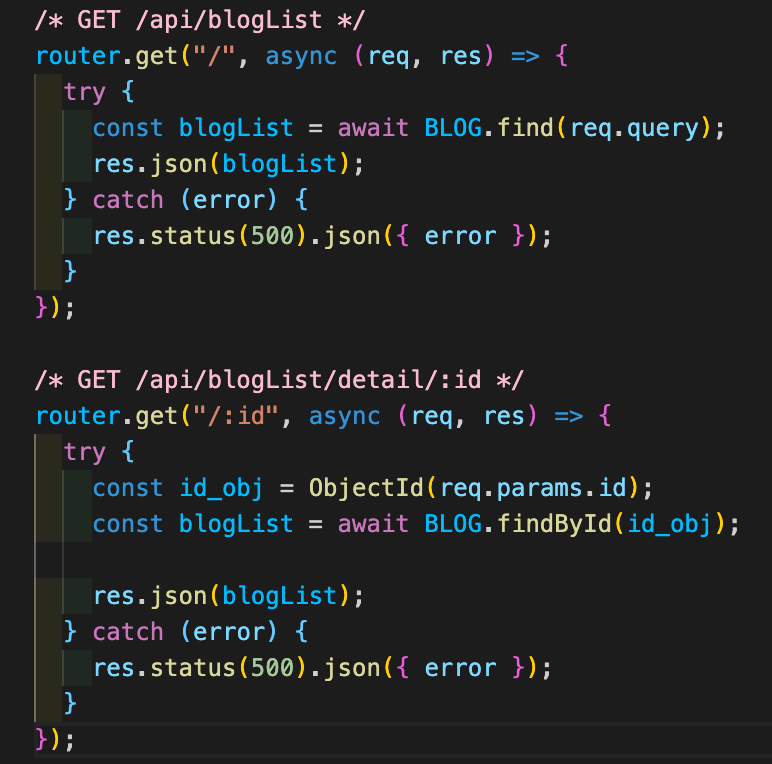
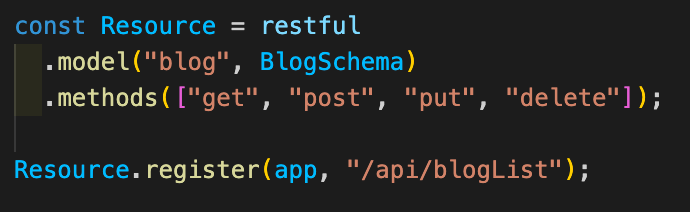
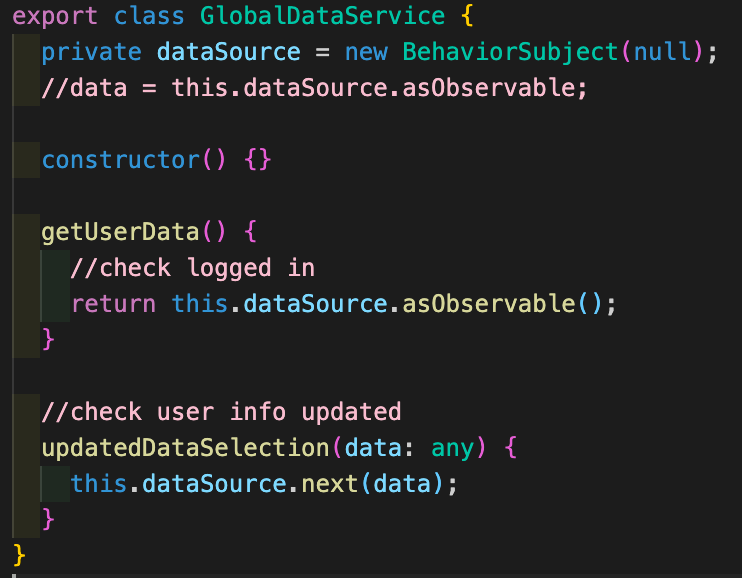
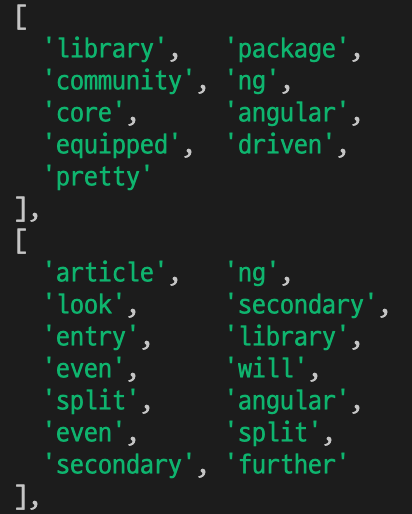
    <content type="html"><![CDATA[<h1 id="Study-Project-📚"><a href="#Study-Project-📚" class="headerlink" title="Study Project 📚"></a>Study Project 📚</h1><p>깃플의 전반적인 기술 스택을 익히기 위해 신입 개발자에게 주어지는 스터디 프로젝트를 소개합니다 :)</p><h5 id="프로젝트-저장소-링크"><a href="#프로젝트-저장소-링크" class="headerlink" title="프로젝트 저장소 링크"></a><a href="https://github.com/yelin-gitple/study-project.git">프로젝트 저장소 링크</a></h5><br/><h3 id="✅-프로젝트-요구사항"><a href="#✅-프로젝트-요구사항" class="headerlink" title="✅ 프로젝트 요구사항"></a>✅ 프로젝트 요구사항</h3><ul><li>사용자 인증 (회원가입, 로그인, 로그아웃)</li><li>블로그 콘텐츠 관리 (CRUD)</li><li>전체 콘텐츠 키워드 Top 5 뽑기</li></ul><h3 id="🛠-프로젝트-기술-스택"><a href="#🛠-프로젝트-기술-스택" class="headerlink" title="🛠 프로젝트 기술 스택"></a>🛠 프로젝트 기술 스택</h3><h4 id="Client"><a href="#Client" class="headerlink" title="Client"></a>Client</h4><ul><li>Angular</li><li>Ngx-bootstrap</li></ul><h4 id="Server"><a href="#Server" class="headerlink" title="Server"></a>Server</h4><ul><li>Express</li><li>Node-restful</li><li>MongoDB</li><li>Redis</li><li>Passport / JWT</li></ul><h4 id="Common"><a href="#Common" class="headerlink" title="Common"></a>Common</h4><ul><li>Package manager: yarn</li><li>Lodash</li><li>Node-summarizer</li></ul><h1 id=""><a href="#" class="headerlink" title=""></a></h1><p>처음에 기술 스택을 보고 <strong>React</strong> 만 사용해봤기 때문에 Angular를 사용하는데 어려움이 있지 않을까 생각이 들었고🧐, 백엔드도 <strong>Firebase</strong>를 이용해 구현해본 경험 정도 뿐이라 정말 열심히 해야겠다고 결심하고 시작을 했습니다.</p><br/><h3 id="1-Angular-익히기"><a href="#1-Angular-익히기" class="headerlink" title="1. Angular 익히기"></a>1. Angular 익히기</h3><p>Angular 공식 사이트에 <a href="https://angular.io/guide/component-overview">자세한 설명</a>과 <a href="https://angular.io/tutorial">튜토리얼</a>이 잘 되어있어서 Angular를 익히는데 많은 도움이 되었습니다.</p><p>또한, 깃플 서비스 내부에 Form이 많이 이용된다고 시니어 개발자 분께서 말씀해주셔서 <a href="https://angular.io/guide/reactive-forms">Reactive Form</a>까지 학습을 진행 하였습니다.</p><p>Angular를 공부하며 느낀 React와의 차이점은</p><ul><li><strong>양방향 데이터 바인딩</strong></li><li><strong>Typescript</strong>기반</li><li>비동기 프로세스로 <strong>RxJS</strong> 사용</li></ul><p>이렇게 크게 3가지 정도였습니다.</p><h3 id="1-1-Route-설정하기"><a href="#1-1-Route-설정하기" class="headerlink" title="1-1. Route 설정하기"></a>1-1. Route 설정하기</h3><img width="433" alt="스크린샷 2021-06-23 오전 11 07 05" src="https://user-images.githubusercontent.com/85658560/123023941-43174e00-d413-11eb-8f03-27d04eef02bc.png"><p>페이지는 <strong>홈, 로그인, 회원가입, 디테일, 새 글 작성, 키워드</strong> 크게 이정도로 구성하였습니다.</p><h1 id="-1"><a href="#-1" class="headerlink" title=""></a></h1><h3 id="2-Express-node-restful"><a href="#2-Express-node-restful" class="headerlink" title="2. Express / node-restful"></a>2. Express / node-restful</h3><p>이미 만들어진 API를 사용하여 데이터를 받아오는 것은 많이 해봤지만, 직접 API를 만들어 본 경험은 없었기 때문에 개념을 이해하는 것부터 시간이 걸렸습니다🥲</p><p>먼저, Angular 공식사이트의 <a href="https://angular.io/tutorial/toh-pt6">Get data from a server</a>를 따라해 보면서 개념을 익히고 express로 서버를 만들어 적용해보는 방식으로 진행했습니다.</p><br/><h3 id="2-1-node-restful"><a href="#2-1-node-restful" class="headerlink" title="2-1. node-restful"></a>2-1. node-restful</h3><p>node-restful 라이브러리를 적용하기 전에는 각각 경로를 설정해주고 콜백함수 내부에서 로직을 처리해야 했었다면,</p><p>node-restful를 이용하면 <strong>register</strong>를 통해 간편하게 REST API를 구현할 수 있었습니다. (훨씬 코드가 간결해 진것을 볼수 있습니다👍)</p><br/><p><strong>node-restful 적용 전:</strong><br><img width="386" src="/images/screenshot2.png"></p><blockquote><p>GET 이외에도 POST, PUT, DELETE를 각각 설정해주어야 함</p></blockquote><br/><p><strong>node-restful 적용 후:</strong><br><img width="433" src="/images/screenshot3.png"></p><blockquote><p>methods()를 통해 한번에 처리됨</p></blockquote><h1 id="-2"><a href="#-2" class="headerlink" title=""></a></h1><h3 id="3-Passport-js-JWT"><a href="#3-Passport-js-JWT" class="headerlink" title="3. Passport.js / JWT"></a>3. Passport.js / JWT</h3><p>가장 이해하기 어려웠던 파트인 passport와 jwt로 사용자 인증 구현하기 입니다.<br>(아직까지도 완벽히 이해하지는 못한 개념..!!🤔)</p><p>간단히 설명하자면,</p><ul><li><p><strong>Passport.js</strong> - 서버에서 사용자 인증을 위해 사용하는 Node.js용 미들웨어</p></li><li><p><strong>JWT(Json Web Token)</strong> - 클라이언트/서버 통신시 정보를 JSON객체를 통해 안전하게 전송하고 권한을 위해 사용하는 웹 토큰</p></li></ul><p>▶️ 사용자가 로그인 하게되면 서버는 사용자에게 JWT를 발급해주고, 사용자는 이 JWT를 사용해 해당 토큰으로 허용되는 서버의 서비스에 접근하는 방식입니다.</p><br/><blockquote><p>로그인 하면 아래 그림과 같이 token이 발행되는 것을 볼수 있습니다.</p></blockquote> <img width="964" src="/images/screenshot4.png"><br/><br/><h3 id="3-1-User-state-관리"><a href="#3-1-User-state-관리" class="headerlink" title="3-1 User state 관리"></a>3-1 User state 관리</h3><p>⚠️ Authentication 구현 후, 한가지 문제는 <strong>1) 로그인 여부</strong>를 어떻게 확인할 것인지, <strong>2) 확인된 유저 정보를 어디 저장</strong>할 것인지 였습니다.</p><br/><p>❗️로그인 여부 확인</p><p>이 부분을 어떻게 해결할지 고민하다, 선임 개발자분께 여쭤보니 RxJS의 <strong>BehaviorSubject</strong>를 사용하면 될 거라고 말씀해 주셨습니다.</p><br/><ul><li><strong>BehaviorSubject</strong>: subscribe하는 시점의 가장 최신에 갱신된 값을 받음. asObservable()를 사용하여 데이터 변화 감지할 수 있음</li></ul><br/><img width="371" src="/images/screenshot5.png"/><p><strong>updatedDataSelection()</strong> 을 통해 로그인 된 유저 정보를 전달하고, <strong>getUserData()</strong> 로 현재 유저 정보를 받아옴</p><br/><br/><p>❗️유저 정보 저장</p><p>BehaviorSubject로 로그인 여부는 확인하였지만, 받아온 유저 정보가 새로고침하면 초기화 되는게 문제였습니다.</p><p><strong>원래는 브라우저에 저장하는 방식을 사용하진 않지만</strong> 스터디 프로젝트라는 점을 고려하여 localStorage를 사용하는 것으로 해결하였습니다.</p><h1 id="-3"><a href="#-3" class="headerlink" title=""></a></h1><h3 id="4-node-summarizer"><a href="#4-node-summarizer" class="headerlink" title="4. node-summarizer"></a>4. node-summarizer</h3><p><a href="https://github.com/SwapnikKatkoori/node-summarizer">node-summarizer</a>는 특정 텍스트(문장)가 주어지면 내부에 쓰인 단어들을 요약해서 보여주는 모듈입니다.</p><p>가장 많이 쓰인 키워드를 추출하는데 유용하게 쓰일 수 있습니다.</p><br/><p><strong>return되는 데이터 예시:</strong></p><img width="206" src="/images/screenshot6.png"><h1 id="-4"><a href="#-4" class="headerlink" title=""></a></h1><h3 id="🙌-마무리"><a href="#🙌-마무리" class="headerlink" title="🙌 마무리"></a>🙌 마무리</h3><p>프론트엔드 부터 백엔드까지 프로젝트의 처음과 끝을 다뤄본 적은 처음이어서 어려움에 많이 부딪히기도 했지만,</p><p>회사에서 사용하고 있는 기술스택을 경험해봤다는 점에서 의미있는 시간이었다고 생각합니다.☺️</p><p>이 스터디 프로젝트로 깃플에서 더 성장하고 발전하는 개발자가 되길 스스로 다짐하는 뜻깊은 2주였습니다!! ✌️</p>]]></content>
    
    <summary type="html">


        &lt;h1 id=&quot;Study-Project-📚&quot;&gt;&lt;a href=&quot;#Study-Project-📚&quot; class=&quot;headerlink&quot; title=&quot;Study Project 📚&quot;&gt;&lt;/a&gt;Study Project 📚&lt;/h1&gt;&lt;p&gt;깃플의 전반적인 기술 스택
      
    
    </summary>
    
      <category term="Blog" scheme="http://tech.gitple.io/categories/Blog/"/>
    
    
      <category term="angular4, typescript, mongoDB, express, passportJS, node-restful" scheme="http://tech.gitple.io/tags/angular4-typescript-mongoDB-express-passportJS-node-restful/"/>
    
  </entry>
  
  <entry>
    <title>깃플 스터디 프로젝트</title>
    <link href="http://tech.gitple.io/2021/05/03/study-project/"/>
    <id>http://tech.gitple.io/2021/05/03/study-project/</id>
    <published>2021-05-03T01:00:00.000Z</published>
    <updated>2022-09-21T07:09:57.827Z</updated>
    
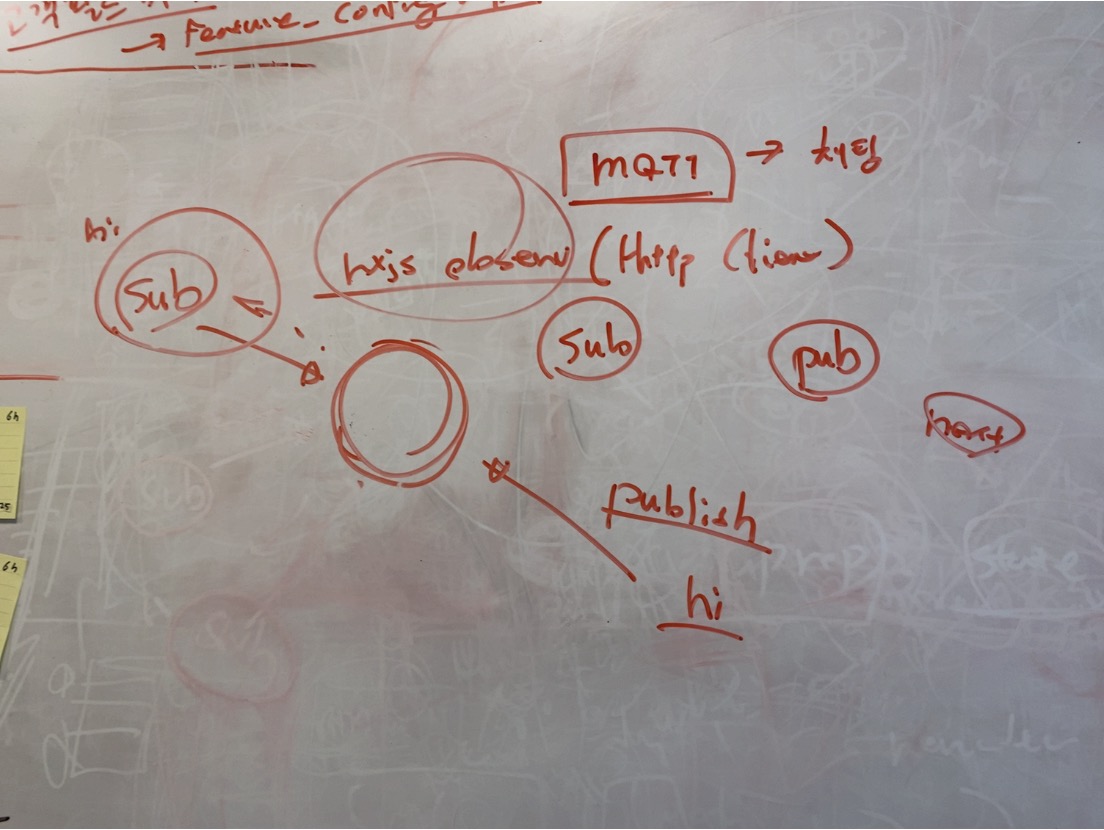
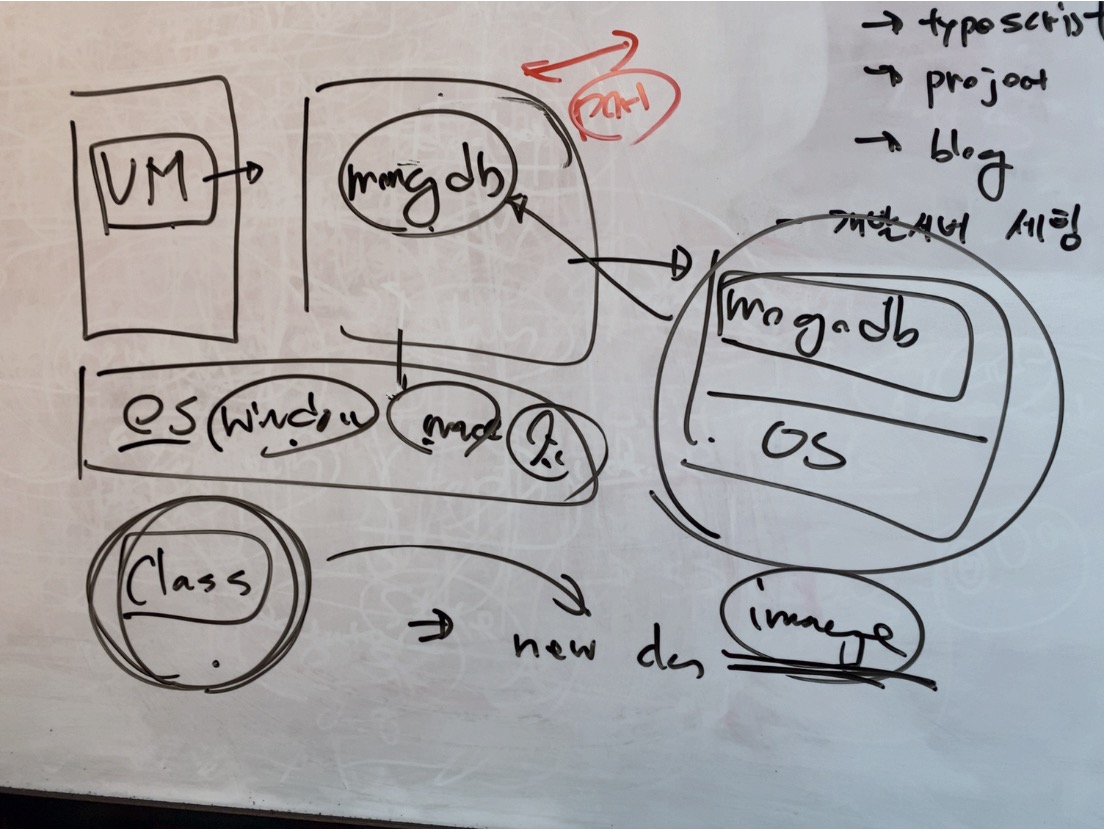
    <content type="html"><![CDATA[<p><img src="/images/studyproject_thumb.jpg" alt="스터디프로젝트 시작"><br>깃플 신규 입사자에게 주어진다는 스터디 프로젝트.<br>그 험난한 2주간의 여정을 소개합니다.</p><hr><h3 id="시나리오"><a href="#시나리오" class="headerlink" title="시나리오"></a>시나리오</h3><ul><li><p>사용자 인증</p><ul><li>회원 가입</li><li>로그인</li><li>로그아웃</li></ul></li><li><p>콘텐츠 관리</p><ul><li>콘텐츠 조회</li><li>콘텐츠 등록</li><li>콘텐츠 갱신</li><li>콘텐츠 삭제</li><li>전체 콘텐츠 키워드 5개 뽑기</li></ul></li></ul><h3 id="주어진-기술-스택"><a href="#주어진-기술-스택" class="headerlink" title="주어진 기술 스택"></a>주어진 기술 스택</h3><ul><li><p>Front</p><ul><li>Angular 4 (feat. TypeScript)</li><li>Bootstrap 4</li></ul></li><li><p>Server</p><ul><li>Node.js + Express </li><li>mongoose</li><li>Node-restful</li><li>Passport.js + jwt</li><li>Lodash</li></ul></li></ul><hr><p>( 프로젝트 코드는 <a href="https://github.com/sooyeon-gitple/study-project.git">여기</a>에 있습니다. )</p><p> 각 기술스택에 대한 특징과 소개는 먼저 입사하신 선배님이 <a href="https://tech.gitple.io/2019/11/22/gitple-techstack-study/">잘 정리해놓은 글</a> 이 있으므로 생략하기로 하고, 이 글에서는 직접 프로젝트를 하며 생각하고 느꼈던 점, 알게 된 점에 대해 편안하고 솔직히 써보겠습니다.</p><hr><h3 id="앵린이-현재-상황"><a href="#앵린이-현재-상황" class="headerlink" title="앵린이 현재 상황"></a>앵린이 현재 상황</h3><ul><li>Angular 4 : 전혀 모름.  컴포넌트 기반이라고 들음. </li><li>Typescript : 문서만 봤음</li><li>Node.js + Express : 써본적 있는 것 같은데 가물가물함.</li><li>mongoose : 마찬가지로 전생의 기억</li><li>Passport.js : 인증하는거(?)</li><li>jwt : Client side 에서 헤더에 넣어 날리는거다(?)</li><li>Node-restful : node도 알고 restful 도 아는데 이건 뭔지 모름.</li></ul><hr><h3 id="스터디-프로젝트-시작"><a href="#스터디-프로젝트-시작" class="headerlink" title="스터디 프로젝트 시작."></a>스터디 프로젝트 시작.</h3><h4 id="Angular-tutorial-앵린이의-여행"><a href="#Angular-tutorial-앵린이의-여행" class="headerlink" title="Angular tutorial : 앵린이의 여행"></a>Angular tutorial : 앵린이의 여행</h4><p> 공식 사이트의 Getting Started 를 읽어보고 무작정 튜토리얼을 따라해본다.<br> 튜토리얼이 잘 되어있으니 폼 만들기까지는 쭉 따라해보라는 앵린이 담당 선임 개발자님.<br> (내부적으로는 PD님으로 호칭 통일되어 있습니다. 수평적 구조 🤗)<br> Tour of Heroes 에서 기본적인 문법과 Service, Navitation, 서버에서 데이터 가져오기 등을 배운다.<br> (*한글 문서도 있습니다)<br> <a href="https://angular.io/tutorial">Angular Tutorial 바로가기</a></p><h4 id="Observable-🧐"><a href="#Observable-🧐" class="headerlink" title="Observable? 🧐"></a>Observable? 🧐</h4><p>CLI 로 생성한 Angular 패키지에는 RxJS가 기본으로 포함 되어있고,<br>이 튜토리얼에서도 서버와 통신시에 RxJS 를 사용한다.<br>Observable 이라는 개념이 와 닿지 않아서 질문 찬스를 씀.<br><img src="/images/whiteboard_observable.JPG" alt="화이트보드가 아직 좀 더러운 편"></p><p>Observable을 구독(subscribe) 해두면, 구독 취소(unsubscribe) ( 혹은 error, complete 호출) 전까지 데이터가 전달되는 방식이다.<br>쉽게 이해하기 어려웠는데, 일단 이벤트 리스너와 비슷한 개념으로 생각하고 코드를 작성하며 확인해보기로 하였다.</p><figure class="highlight javascript"><table><tr><td class="gutter"><pre><span class="line">1</span><br><span class="line">2</span><br><span class="line">3</span><br><span class="line">4</span><br><span class="line">5</span><br><span class="line">6</span><br><span class="line">7</span><br><span class="line">8</span><br><span class="line">9</span><br><span class="line">10</span><br><span class="line">11</span><br><span class="line">12</span><br><span class="line">13</span><br></pre></td><td class="code"><pre><span class="line"></span><br><span class="line"><span class="title function_">postContent</span>():<span class="keyword">void</span>&#123;</span><br><span class="line">  <span class="variable language_">this</span>.<span class="property">contentService</span>.<span class="title function_">postNewContent</span>(<span class="variable language_">this</span>.<span class="property">token</span>,<span class="variable language_">this</span>.<span class="property">postingModel</span>).<span class="title function_">subscribe</span>(</span><br><span class="line">    <span class="function"><span class="params">result</span> =&gt;</span>&#123;</span><br><span class="line">      <span class="keyword">if</span>(result?.<span class="property">_id</span>)&#123;</span><br><span class="line">        <span class="variable language_">this</span>.<span class="property">router</span>.<span class="title function_">navigate</span>([<span class="string">&#x27;/contents-list&#x27;</span>]); <span class="comment">//redirect </span></span><br><span class="line">      &#125;<span class="keyword">else</span>&#123;</span><br><span class="line">        <span class="variable language_">window</span>.<span class="title function_">alert</span>(<span class="string">&quot;글이 등록되지 않았습니다. 다시 시도해주세요.&quot;</span>)</span><br><span class="line">      &#125;</span><br><span class="line">    &#125;</span><br><span class="line">  )</span><br><span class="line">&#125;</span><br><span class="line"></span><br></pre></td></tr></table></figure><p>클릭시 글을 등록하는 부분의 코드인데, contentsService 의 Observable 을 리턴하는 함수를 구독하고, 통신 결과가 오면 결과에 따라 리스트로 Redirect 시키거나 알림 창을 띄우도록 작성하였다.<br>(이렇게 그냥 넘어가려 했으나 Observable 은 이후에 다시 나오게 되는데…)</p><h4 id="Global-state-가-필요한-것-같은데요-🙄"><a href="#Global-state-가-필요한-것-같은데요-🙄" class="headerlink" title="Global state 가 필요한 것 같은데요.. 🙄"></a>Global state 가 필요한 것 같은데요.. 🙄</h4><p>튜토리얼에서 배운대로 신나게 프로젝트를 구성하고 각 페이지를 만든 것 까지는 좋았으나, 한 가지 문제에 직면하게 된다.<br>최상단 템플릿인 app.component.html 에 네비게이션과 router-outlet (라우터 모듈에서 설정된 페이지가 이 태그 자리에 들어가게 된다)를 모두 때려넣은 앵린이.<br>최상단 템플릿이라고 해도 라우터 태그에게 무언가 데이터(!)를 인자(!)로 넘겨줄 수 는 없는것이었다.<br>게다가 라우터에 설정한 페이지들끼리도 (최상단 템플릿(부모)의 아래에 있는, sibling 페이지들…) 서로 정보를 주고 받을 수 없는 상황.<br>로그인 페이지에서 로그인을 해도, 네비게이션에서는 로그인 여부를 알 수 없는것…</p><p>이럴 때 방법은</p><ol><li>메뉴 구조를 바꾸기. 부모-자식 컴포넌트간에는 데이터를 넘겨 주고 받을 수 있다.</li><li>어느 컴포넌트에서도 접근 가능한 무언가의 저장소를 만들기.</li></ol><p>Redux 의 store 를 생각하며 2번 방법을 궁리해보았다.<br>인터넷 세상에는 역시 비슷한 생각을 하는 사람들이 있는지, Redux 와 비슷한 구조로 Global state 를 관리 할 수 있는 모듈이 많이 있었다.<br>그렇지만 익숙치 않은 환경에 뭔가를 또 추가한다는것이 맘에 걸려 1안을 고민하던 중, 천사같은 선임 개발자분께서 또 묘안을 주심.<br>RxJS 의 Observable 을 사용하여 notify-subscribe 하면, 각자 컴포넌트에서 무슨 일이 일어났는지 알 수 있을거라고.<br>Gitple 실제 코드에서도 위와 같은 원리로 작성한 모듈을 사용하고 있었고, 그 코드 일부를 배껴(!)서 원하던 바와 비슷하게 구현하게 된다.</p><figure class="highlight javascript"><table><tr><td class="gutter"><pre><span class="line">1</span><br><span class="line">2</span><br><span class="line">3</span><br><span class="line">4</span><br><span class="line">5</span><br><span class="line">6</span><br><span class="line">7</span><br><span class="line">8</span><br><span class="line">9</span><br><span class="line">10</span><br><span class="line">11</span><br><span class="line">12</span><br><span class="line">13</span><br><span class="line">14</span><br><span class="line">15</span><br><span class="line">16</span><br><span class="line">17</span><br><span class="line">18</span><br><span class="line">19</span><br></pre></td><td class="code"><pre><span class="line"></span><br><span class="line"><span class="comment">//login.component.ts</span></span><br><span class="line"></span><br><span class="line">  <span class="title function_">onSubmit</span>():<span class="keyword">void</span>&#123;</span><br><span class="line">    <span class="variable language_">this</span>.<span class="property">userService</span>.<span class="title function_">login</span>().<span class="title function_">subscribe</span>( <span class="function">(<span class="params">loginData:User</span>) =&gt;</span> &#123;</span><br><span class="line">      ...</span><br><span class="line">        <span class="variable language_">this</span>.<span class="property">_state</span>.<span class="title function_">notify</span>(<span class="string">&#x27;login&#x27;</span>,loginData);</span><br><span class="line">    ...</span><br><span class="line">    &#125;)</span><br><span class="line">  &#125;</span><br><span class="line"></span><br><span class="line"><span class="comment">//app.component.ts</span></span><br><span class="line"></span><br><span class="line"><span class="variable language_">this</span>.<span class="property">_state</span>.<span class="title function_">subscribe</span>(<span class="string">&#x27;login&#x27;</span>, <span class="function">(<span class="params">userData</span>) =&gt;</span> &#123;</span><br><span class="line">...</span><br><span class="line">        <span class="variable language_">this</span>.<span class="property">userData</span> = userData;</span><br><span class="line">...</span><br><span class="line">    &#125;);</span><br><span class="line"></span><br></pre></td></tr></table></figure><p>_state.notify 로 pub , _state.subscribe 로 sub (된다…! 👏 👏👏)</p><p>하지만 이렇게 사용 할 경우, pub 이 일어나야 sub 이 일어나는 특성상<br>온전히 Global store 처럼 언제나 저장된 그 상태를 가지고 올 수 있는 것은 아니므로 사용시 주의가 필요하다.</p><p>(*참고: 저는 state가 필요한 각 페이지의 onInit() 안에서 subscribe 해두었는데, 실제 그 페이지를 진입할 때 sub 하기 시작하므로 , 그 이전에 일어난 pub 에 대해서는 알 수 없었습니다.  잘못된 내용일 경우 수정하겠습니다.)</p><p>이렇게 해서 발급받은 token(jwt) 은 localStorage 에 고이 모셔두었다가,<br>사용자 인증이 필요한 활동(내 게시물 수정, 삭제, 새로고침시 다시 로그인하기 등)에 요긴하게 사용한다.</p><h4 id="갑자기-나타난-Docker-🐳"><a href="#갑자기-나타난-Docker-🐳" class="headerlink" title="갑자기 나타난 Docker 🐳"></a>갑자기 나타난 Docker 🐳</h4><p>여차저차하여 프론트단은 어느정도 마무리가 되고(물론 더미데이터로),<br>서버단 작업을 시작해야 하는 날이 되었다.<br>mongoDB는 자체적으로 제공해주는 서버에 업로드하는 형식으로만 사용해왔던 지난날..(무료 플랜 감사감사)<br>그럼 로컬에 설치해서 써보자며, 이왕 하는거 Docker Descktop 어플리케이션을 사용해서 만들면 아주 편하고 빠르게 만들 수 있다고 설치를 도와주셨다.<br><img src="/images/whiteboard_docker.JPG" alt="Docker 의 이미지와 컨테이너를 class 에 비교하여 설명해주신 흔적"> </p><p>실제로 Gitple 도 Docker 를 이용하여 안정적인 서비스를 하고 있다고 합니다 🌝</p><h4 id="CRUD-한방에-해결해주는-Node-restful"><a href="#CRUD-한방에-해결해주는-Node-restful" class="headerlink" title="CRUD 한방에 해결해주는 Node-restful"></a>CRUD 한방에 해결해주는 Node-restful</h4><p>비록 스터디 프로젝트이긴 하지만, 일반 업무 플로우와 동일하게 github 에 프로젝트 카드를 생성해주셨더랬다.<br>카드의 Server 란에 “node-restful” 이란 항목이 있었는데, 대체 무엇인가 여쭤봤더니 CRUD 한번에 만들어주니까, 찔러(!) 보면 알거라고 해주셨다.<br>정말일까? node-restful이 내 익스프레스에 대해 뭘 안다고 알아서 만들어주는걸까.<br>그런데 정말 모델을 만들고, endpoint 를 지정했더니 해당 url 의 CRUD (그리고 url/:id 의 CRUD 까지)가 가능해졌다.<br>비슷한 모듈이 이미 널리 쓰이고 있다는데, 유행에 뒤쳐져서 살아온건지, 이게 너무나 새롭고 신기했다. 이 날 좋아서 소리지르고 퇴근함.👾</p><h4 id="똑똑한-요약러-node-summarizer-🧠"><a href="#똑똑한-요약러-node-summarizer-🧠" class="headerlink" title="똑똑한 요약러 node-summarizer 🧠"></a>똑똑한 요약러 node-summarizer 🧠</h4><p>전체 콘텐츠 중 인기 top5 를 뽑는 미션이 있었는데, 여기에 사용할 모듈이 바로 node-summarizer 이다.<br>node-summarizer 의 요약 전략은 크게 2가지가 있는데, 빈도를 기준으로 하는것과, 텍스트 랭크를 기준으로 하는것이다.<br>인기 “단어”를 추출해야하기 때문에 문장 길이는 1로 설정하였고,<br>컨텐츠의 제목과 내용을 모두 모아서 요약처리 하였다.</p><figure class="highlight javascript"><table><tr><td class="gutter"><pre><span class="line">1</span><br><span class="line">2</span><br><span class="line">3</span><br><span class="line">4</span><br><span class="line">5</span><br><span class="line">6</span><br><span class="line">7</span><br></pre></td><td class="code"><pre><span class="line"></span><br><span class="line">&#123;</span><br><span class="line">    <span class="attr">summary</span>: <span class="string">&quot;&quot;</span>,    <span class="comment">//String of the summary</span></span><br><span class="line">    <span class="attr">sentence_list</span>: [],  <span class="comment">//List of all of the tokenized sentences in the given text</span></span><br><span class="line">    <span class="attr">nouns_and_adjactive_map</span>: <span class="title class_">Map</span>   <span class="comment">//Map of all of the sentences with the values being a list of nouns and adjactives in the                                        sentence</span></span><br><span class="line">&#125;</span><br><span class="line"></span><br></pre></td></tr></table></figure><p>위와 같은 결과를 돌려주는데, nouns_and_adjactive_map 의 텍스트 배열을 이용하여 top5를 추출하였다.<br>top5 페이지에 표시되는 frequency는 위의 nouns_and_adjactive_map 배열 내 등장한 빈도를 나타낸다. </p><hr><h4 id="프로젝트를-마치며"><a href="#프로젝트를-마치며" class="headerlink" title="프로젝트를 마치며"></a>프로젝트를 마치며</h4><p>스터디 프로젝트에 주어지는 기간은 본래 2주인데, 아직 부족한점이 많은것을 고려하여 며칠 더 기간을 늘려주셨다.<br>사실 시작하기 전부터 많은 걱정이 앞섰다.<br>‘2주 지났는데 아무것도 한게 없으면 어떡하지’<br>‘지금 이거 궁금한데 너무 멍청하고 기초적인 질문이면 어떡하지’<br>‘나 이렇게 못하는데 합격시킨거 후회하시면 어떡하지(😭!!)’ …등등</p><p>이번 스터디 프로젝는 실제 서비스에 비하면 너무나 보잘것 없는… 간단한 프로젝트였다. (라고 썼지만 사실 매우 헤멨으며 오래걸림 😭… )<br>그렇지만 새로운 발견을 하는 재미도 있었고, 만들어진 화면이 동작하는 걸 지켜보는 뿌듯함도 있었다. </p><p>규모야 어쨌든 실제 서비스와 동일한 기술 스택을 이용하여 처음부터 무언가를 만들어 보는 경험은 중요한 것 같다.<br>아마 앞으로 업무에 적응하는데에도 도움이 많이 될 듯 하다.</p><p>더불어 엉뚱한 질문에도 한결같은 자상한 답변을 받고,<br>진심어린 격려와 조언(그리고 썰렁한 농담🤣) 을 들을 수 있었던 지난 며칠은 너무나 행복했다고! 꼭! 적어두고 싶다.<br>앞으로도 깃플에서 행복한 개발 라이프가 계속되길 바라며…🌷 </p>]]></content>
    
    <summary type="html">


        &lt;p&gt;&lt;img src=&quot;/images/studyproject_thumb.jpg&quot; alt=&quot;스터디프로젝트 시작&quot;&gt;&lt;br&gt;깃플 신규 입사자에게 주어진다는 스터디 프로젝트.&lt;br&gt;그 험난한 2주간의 여정을 소개합니다.&lt;/p&gt;
&lt;hr&gt;
&lt;h3 id=&quot;시나리오
      
    
    </summary>
    
      <category term="Blog" scheme="http://tech.gitple.io/categories/Blog/"/>
    
    
      <category term="angular4, typescript, mongoDB, express, passportJS, node-restful" scheme="http://tech.gitple.io/tags/angular4-typescript-mongoDB-express-passportJS-node-restful/"/>
    
  </entry>
  
  <entry>
    <title>깃플 기술스택 구경하세요~ (스터디 프로젝트편)</title>
    <link href="http://tech.gitple.io/2019/11/22/gitple-techstack-study/"/>
    <id>http://tech.gitple.io/2019/11/22/gitple-techstack-study/</id>
    <published>2019-11-22T01:00:32.000Z</published>
    <updated>2022-09-21T07:09:57.827Z</updated>
    
    <content type="html"><![CDATA[<p>Gitple의 서비스를 구성하는 기술 중 가장 기본이 되는 기술 스택을 가볍게 경험할 수 있는 스터디 프로젝트를 소개하려 합니다.</p><p>Client App와 Server App를 간단히 살펴보며 사용된 기술 스택을 확인하고 유용한 패키지를 소개하겠습니다.</p><p>프로젝트 위치는 아래 저장소를 확인해주세요.</p><p>Github: <a href="https://github.com/taeheejang/gitple-study-project">Gitple-study-project</a></p><h1 id="시나리오"><a href="#시나리오" class="headerlink" title="시나리오"></a>시나리오</h1><ul><li>사용자 인증<ul><li>회원가입, 로그인, 로그아웃</li></ul></li><li>콘텐츠 관리<ul><li>조회, 등록, 갱신, 삭제</li><li>전체 콘텐츠 키워드 TOP 5</li></ul></li></ul><h1 id="기술-스택"><a href="#기술-스택" class="headerlink" title="기술 스택"></a>기술 스택</h1><p>프로젝트에서 사용되는 기술 및 패키지들은 아래와 같습니다.</p><h2 id="Common"><a href="#Common" class="headerlink" title="Common"></a>Common</h2><p>스터디 프로젝트에서는 공통적으로 Typescript를 사용하며 yarn을 통해 패키지를 관리합니다.</p><ul><li>Typescript - <a href="https://tech.gitple.io/2017/11/30/gitple-techstack-frontend-md/#angular-2-typescript">프론트엔드편 참고</a></li><li>yarn - <a href="https://tech.gitple.io/2017/11/30/gitple-techstack-frontend-md/#yarn-%ED%8C%A8%ED%82%A4%EC%A7%80-%EA%B4%80%EB%A6%AC">프론트엔드편 참고</a></li></ul><figure class="highlight bash"><table><tr><td class="gutter"><pre><span class="line">1</span><br><span class="line">2</span><br><span class="line">3</span><br><span class="line">4</span><br></pre></td><td class="code"><pre><span class="line">───gitple-study-project/</span><br><span class="line">   ├── client/</span><br><span class="line">   ├── server/</span><br><span class="line">   └── README.md</span><br></pre></td></tr></table></figure><h2 id="Client-App"><a href="#Client-App" class="headerlink" title="Client App"></a>Client App</h2><p>클라이언트 프로그램은 간단한 사용자 인증과 게시글 CRUD 화면으로 구성됩니다.</p><p>augular 4 cli로 프로젝트를 생성하였으며 bootstrap UI를 적용하였습니다.</p><ul><li>angular 4 - <a href="https://tech.gitple.io/2017/11/30/gitple-techstack-frontend-md/#angular-2-typescript">프론트엔드편 참고</a></li><li>bootstrap 4 - <a href="https://tech.gitple.io/2017/11/30/gitple-techstack-frontend-md/#bootstrap-4-sass">프론트엔드편 참고</a></li></ul><figure class="highlight bash"><table><tr><td class="gutter"><pre><span class="line">1</span><br><span class="line">2</span><br><span class="line">3</span><br><span class="line">4</span><br><span class="line">5</span><br><span class="line">6</span><br><span class="line">7</span><br><span class="line">8</span><br><span class="line">9</span><br><span class="line">10</span><br><span class="line">11</span><br><span class="line">12</span><br><span class="line">13</span><br><span class="line">14</span><br><span class="line">15</span><br><span class="line">16</span><br><span class="line">17</span><br><span class="line">18</span><br><span class="line">19</span><br><span class="line">20</span><br><span class="line">21</span><br><span class="line">22</span><br><span class="line">23</span><br><span class="line">24</span><br><span class="line">25</span><br><span class="line">26</span><br><span class="line">27</span><br><span class="line">28</span><br><span class="line">29</span><br><span class="line">30</span><br><span class="line">31</span><br><span class="line">32</span><br><span class="line">33</span><br><span class="line">34</span><br><span class="line">35</span><br><span class="line">36</span><br><span class="line">37</span><br><span class="line">38</span><br><span class="line">39</span><br><span class="line">40</span><br><span class="line">41</span><br><span class="line">42</span><br><span class="line">43</span><br><span class="line">44</span><br><span class="line">45</span><br><span class="line">46</span><br><span class="line">47</span><br><span class="line">48</span><br><span class="line">49</span><br><span class="line">50</span><br></pre></td><td class="code"><pre><span class="line">───client/</span><br><span class="line">   ├── e2e/</span><br><span class="line">   │   ├── app.e2e-spec.ts</span><br><span class="line">   │   ├── app.po.ts</span><br><span class="line">   │   └── tsconfig.e2e.json</span><br><span class="line">   ├── src/</span><br><span class="line">   │   ├── app/</span><br><span class="line">   │   │   ├── content-list/</span><br><span class="line">   │   │   │   ├── content-list.component.html</span><br><span class="line">   │   │   │   ├── content-list.component.scss</span><br><span class="line">   │   │   │   └── content-list.component.ts</span><br><span class="line">   │   │   ├── content-write/</span><br><span class="line">   │   │   │   ├── content-write.component.html</span><br><span class="line">   │   │   │   ├── content-write.component.scss</span><br><span class="line">   │   │   │   └── content-write.component.ts</span><br><span class="line">   │   │   ├── sign-in/</span><br><span class="line">   │   │   │   ├── sign-in.component.html</span><br><span class="line">   │   │   │   ├── sign-in.component.scss</span><br><span class="line">   │   │   │   └── sign-in.component.ts</span><br><span class="line">   │   │   ├── sign-up/</span><br><span class="line">   │   │   │   ├── sign-up.component.html</span><br><span class="line">   │   │   │   ├── sign-up.component.scss</span><br><span class="line">   │   │   │   └── sign-up.component.ts</span><br><span class="line">   │   │   ├── app.component.html</span><br><span class="line">   │   │   ├── app.component.scss</span><br><span class="line">   │   │   ├── app.component.spec.ts</span><br><span class="line">   │   │   ├── app.component.ts</span><br><span class="line">   │   │   └── app.module.ts</span><br><span class="line">   │   ├── assets/</span><br><span class="line">   │   │   └── .gitkeep</span><br><span class="line">   │   ├── environments/</span><br><span class="line">   │   │   ├── environment.prod.ts</span><br><span class="line">   │   │   └── environment.ts</span><br><span class="line">   │   ├── favicon.ico</span><br><span class="line">   │   ├── index.html</span><br><span class="line">   │   ├── main.ts</span><br><span class="line">   │   ├── polyfills.ts</span><br><span class="line">   │   ├── styles.scss</span><br><span class="line">   │   ├── test.ts</span><br><span class="line">   │   ├── tsconfig.app.json</span><br><span class="line">   │   ├── tsconfig.spec.json</span><br><span class="line">   │   └── typings.d.ts</span><br><span class="line">   ├── .angular-cli.json</span><br><span class="line">   ├── .editorconfig</span><br><span class="line">   ├── karma.conf.js</span><br><span class="line">   ├── package.json</span><br><span class="line">   ├── protractor.conf.js</span><br><span class="line">   ├── README.md</span><br><span class="line">   ├── tsconfig.json</span><br><span class="line">   └── tslint.json</span><br></pre></td></tr></table></figure><h2 id="Server-App"><a href="#Server-App" class="headerlink" title="Server App"></a>Server App</h2><p>서버 프로그램은 클라이언트 프로그램에서 호출할 REST API를 작성합니다.</p><p>node.js로 작성되며 express로 서버를 생성합니다. 콘텐츠 리스트 목록은 redis를 사용해 캐싱 되고 데이터베이스로 mongodb를 사용합니다.</p><ul><li>node.js &amp; express : 서버 생성</li><li>mongooose &amp; redis : 데이터베이스 &amp; 캐싱 - <a href="https://tech.gitple.io/2017/11/08/gitple-techstack-backend/#mongodb-nosql-db">백엔드편 참고</a></li><li>node-restful : restful api &lt;-&gt; mongodb 연동 패키지</li><li>passport &amp; jwt : 인증 처리</li><li>lodash : 데이터 가공 유틸</li></ul><figure class="highlight bash"><table><tr><td class="gutter"><pre><span class="line">1</span><br><span class="line">2</span><br><span class="line">3</span><br><span class="line">4</span><br><span class="line">5</span><br><span class="line">6</span><br><span class="line">7</span><br><span class="line">8</span><br><span class="line">9</span><br><span class="line">10</span><br><span class="line">11</span><br><span class="line">12</span><br><span class="line">13</span><br><span class="line">14</span><br><span class="line">15</span><br><span class="line">16</span><br></pre></td><td class="code"><pre><span class="line">───server/</span><br><span class="line">   ├── src/</span><br><span class="line">   │   ├── js/</span><br><span class="line">   │   │   ├── auth.ts</span><br><span class="line">   │   │   ├── authToken.ts</span><br><span class="line">   │   │   ├── db.ts</span><br><span class="line">   │   │   └── passport.ts</span><br><span class="line">   │   ├── routes/</span><br><span class="line">   │   │   ├── contents.ts</span><br><span class="line">   │   │   ├── keyword.ts</span><br><span class="line">   │   │   └── signup.ts</span><br><span class="line">   │   └── app.ts</span><br><span class="line">   ├── .<span class="built_in">env</span></span><br><span class="line">   ├── package.json</span><br><span class="line">   ├── README.md</span><br><span class="line">   └── tsconfig.json</span><br></pre></td></tr></table></figure><h1 id="패키지-소개"><a href="#패키지-소개" class="headerlink" title="패키지 소개"></a>패키지 소개</h1><h2 id="REST-API"><a href="#REST-API" class="headerlink" title="REST API"></a>REST API</h2><h3 id="node-restful-Github-node-restful"><a href="#node-restful-Github-node-restful" class="headerlink" title="node-restful - Github: node-restful"></a>node-restful - <a href="https://github.com/baugarten/node-restful">Github: node-restful</a></h3><p>rest는 http 프로토콜 인프라 상에서 자원의 표현으로 구분하여 자원의 상태를 주고받는 아키텍처 형식으로 분산 시스템 설계에 매우 유용하며 멀티 플랫폼 간의 데이터 통신이 간편합니다.</p><p>restful은 rest의 제약 조건 집합(아키텍처 스타일, 원칙)을 모두 만족하게 하는 것을 의미합니다.</p><p>이 스터디 프로젝트에서는 rest 응답과 mongodb와의 연동을 위해 node-restful이라는 모듈을 사용합니다. 이 모듈은 mongodb에 특화된 모듈로 rest 요청 및 처리를 간편하게 해줍니다.</p><h2 id="사용자-인증-passport-amp-jwt"><a href="#사용자-인증-passport-amp-jwt" class="headerlink" title="사용자 인증 - passport &amp; jwt"></a>사용자 인증 - passport &amp; jwt</h2><p>인증 처리를 위해 passport 미들웨어와 json web token 방식을 사용합니다.</p><h3 id="passport-Github-passport"><a href="#passport-Github-passport" class="headerlink" title="passport - Github: passport"></a>passport - <a href="https://github.com/jaredhanson/passport">Github: passport</a></h3><p>여러 인증 로직을 간편하게 사용할 수 있게 도와주는 미들웨어로 session, jwt, oAuth 등 여러 방식의 인증 로직을 제공합니다.</p><p>passport는 strategy를 인증 방식을 사용합니다.</p><p>strategy란 디자인 패턴의 하나로 객체들이 할 수 있는 행위 각각에 전략 클래스를 생성하고, 유사 행위들을 캡슐화하는 인터페이스를 정의하여, 객체의 행위를 동적으로 바꾸고 싶은 경우 직접 행위를 수정하지 않고 전략을 바꾸어 행위를 유연하게 확장하는 방법입니다.</p><p>passport는 이 starategy 전략을 사용하여 session, jwt, oAuth 등의 인증 방법을 구현해놓았습니다.</p><p>스터디 프로젝트에서는 local starategy와 jwt starategy를 사용하여 인증을 처리합니다.</p><p>local strategy 전략을 사용하여 sign in을 처리하고 jwt strategy를 사용하여 api 호출 시 요청에 대한 인증을 처리합니다.</p><h2 id="키워드-추출"><a href="#키워드-추출" class="headerlink" title="키워드 추출"></a>키워드 추출</h2><p>각 콘텐츠 내용에서 키워드를 추출하기 위해 TextRank 알고리즘을 이용합니다. 스터디 프로젝트에서는 node-summarizer을 사용해 키워드를 추출하고 lodash를 사용하여 데이터를 가공합니다. 가볍게 사용해보는 취지이므로 조사, 어미 등의 자연어 처리는 하지 않아 정확한 키워드 추출은 확인할 수 없지만 간단한 키워드 추출 및 가공 방식을 확인할 수 있습니다.</p><h3 id="node-summarizer-Github-node-summarizer"><a href="#node-summarizer-Github-node-summarizer" class="headerlink" title="node-summarizer - Github: node-summarizer"></a>node-summarizer - <a href="https://github.com/SwapnikKatkoori/node-summarizer">Github: node-summarizer</a></h3><p>TextRank는 그래프 기반의 순위화 알고리즘으로 Google의 PageRank 알고리즘을 활용한 알고리즘입니다. 스터디 프로젝트에서는 TextRank 알고리즘을 구현한 node-summarizer을 사용하여 간단하게 키워드를 추출합니다.</p><h3 id="lodash-Github-lodash"><a href="#lodash-Github-lodash" class="headerlink" title="lodash - Github: lodash"></a>lodash - <a href="https://github.com/lodash/lodash">Github: lodash</a></h3><p>lodash는 javascript 유틸리티 라이브러리로 숫자, 문자, 객체 등의 배열 처리 작업을 편리하게 해주는 도구입니다. 스터디 프로젝트에서는 javascript 기본 함수와 lodash를 적절히 사용하였지만 lodash를 더 활용하여 체이닝을 통해 간결하게 로직을 정리할 수도 있습니다.</p>]]></content>
    
    <summary type="html">


        &lt;p&gt;Gitple의 서비스를 구성하는 기술 중 가장 기본이 되는 기술 스택을 가볍게 경험할 수 있는 스터디 프로젝트를 소개하려 합니다.&lt;/p&gt;
&lt;p&gt;Client App와 Server App를 간단히 살펴보며 사용된 기술 스택을 확인하고 유용한 패키지를
      
    
    </summary>
    
      <category term="Blog" scheme="http://tech.gitple.io/categories/Blog/"/>
    
    
      <category term="Frontend" scheme="http://tech.gitple.io/tags/Frontend/"/>
    
      <category term="Angular" scheme="http://tech.gitple.io/tags/Angular/"/>
    
      <category term="Backend" scheme="http://tech.gitple.io/tags/Backend/"/>
    
      <category term="Typescript" scheme="http://tech.gitple.io/tags/Typescript/"/>
    
      <category term="NodeJs" scheme="http://tech.gitple.io/tags/NodeJs/"/>
    
      <category term="Express" scheme="http://tech.gitple.io/tags/Express/"/>
    
      <category term="JWT" scheme="http://tech.gitple.io/tags/JWT/"/>
    
      <category term="MongoDB" scheme="http://tech.gitple.io/tags/MongoDB/"/>
    
      <category term="Redis" scheme="http://tech.gitple.io/tags/Redis/"/>
    
      <category term="Bootstrap" scheme="http://tech.gitple.io/tags/Bootstrap/"/>
    
      <category term="Webpeck" scheme="http://tech.gitple.io/tags/Webpeck/"/>
    
      <category term="Yarn" scheme="http://tech.gitple.io/tags/Yarn/"/>
    
  </entry>
  
  <entry>
    <title>SaaS 경쟁력: 다운 타임없는! 잦은 릴리즈하는!</title>
    <link href="http://tech.gitple.io/2019/03/02/turple-why/"/>
    <id>http://tech.gitple.io/2019/03/02/turple-why/</id>
    <published>2019-03-02T01:12:32.000Z</published>
    <updated>2022-09-21T07:09:57.827Z</updated>
    
    <content type="html"><![CDATA[<p><img src="/images/turtle_base.jpg"> <small><center>출처:<a href="https://upload.wikimedia.org/wikipedia/commons/a/ae/Sagrada_Familia%2C_Turtle.jpg">wikipedia</a></center></small></p><p>스페인 바르셀로나에 위치한 <code>사그라다 파밀리아 대성당</code>을 받치고 있는 기둥입니다. 사그라다 파밀리아 대성당은 이미 성당으로서의 기능을 하고 있지만, 사진속 기둥위의 건물은 아직도 건설되고 있다는 점에서 클라우드 애플리케이션 아키텍처와 닮은 점이 많습니다.</p><p><a href="https://namu.wiki/w/%EC%82%AC%EA%B7%B8%EB%9D%BC%EB%8B%A4%20%ED%8C%8C%EB%B0%80%EB%A6%AC%EC%95%84%20%EB%8C%80%EC%84%B1%EB%8B%B9">사그라다 파밀리아 대성당 - 나무위키</a></p><blockquote><p>천재 건축가로 알려진 안토니오 가우디가 설계한 건축물이자 그가 심혈을 기울인 야심작으로, 기존 성당 건축의 특징을 잘 계승하면서도 가우디 특유의 개성이 잘 융합된 건물이라는 평가를 받고 있다. 1882년부터 착공에 들어간 이래 136년이 지난 지금도 계속 건축되고 있다. 가우디 사망 100주기인 2026년에 완공이 예정되어 있다. 그런데 가우디는 이 성당의 건설기간을 200년으로 잡았다. 한마디로 예상 완공년도를 2082년으로 잡은 것.</p></blockquote><p>여러분의 클라우드 애플리케이션에 대해 다음 두 가지 질문에 대해 답해 보세요.</p><h2 id="첫번째-질문-다운-타임-1시간-어떤-일이-발생할까요"><a href="#첫번째-질문-다운-타임-1시간-어떤-일이-발생할까요" class="headerlink" title="첫번째 질문: 다운 타임 1시간, 어떤 일이 발생할까요?"></a>첫번째 질문: 다운 타임 1시간, 어떤 일이 발생할까요?</h2><p>짧은 시간의 다운타임도 엄청난 손실을 유발합니다.</p><p>클라우드 서비스를 이용하는 일반 기업별, 1시간 다운타임에 대한 직접적인 경제 손실입니다.</p><ul><li>중소기업: 6만 달러 ~ 10만 달러</li><li>대기업: 50만달러 ~100만달러</li></ul><p><small>출처: <a href="https://dyn.com/blog/new-aberdeen-report-78-of-enterprise-websites-suffer-four-or-more-disruptions-per-month/">Aberdeen Report: 78% Of Enterprise Websites Suffer Four Or More Disruptions Per Month</a></small></p><p>하지만, 추가적인 피해는 더욱 심각합니다.</p><ul><li>고객이 떠납니다.<br>이용자는 참을 성이 없습니다. 최종 이용자는 웹사이트가 3초 이상 서비스가 원할하지 않으면 40%는 그 사이트를 떠납니다. 실망한 최종 이용자는 손쉽게 경쟁 클라우드 서비스로 이전합니다.</li><li>기업 평판에 치명적입니다.<br>웹사이트가 완전히 기능 을 상실할 경우 그 기간이 길든<br>짧든 상관없습니다. 해당 기업은 거의 확실하게 소셜미디어와 뉴스 등에서 부정적 이미지를 얻게 됩니다. 브랜드 이미지 및 신뢰도가 하락합니다.</li></ul><p><small>출처: <a href="http://www.ciokorea.com/news/31215">웹 다운타임을 심각하게 생각해야 하는 4가지 이유 - CIO korea</a></small></p><h2 id="두번째-질문-몇-시간-내로-긴급-소프트웨어-릴리즈-가능한가요"><a href="#두번째-질문-몇-시간-내로-긴급-소프트웨어-릴리즈-가능한가요" class="headerlink" title="두번째 질문: 몇 시간 내로, 긴급 소프트웨어 릴리즈 가능한가요?"></a>두번째 질문: 몇 시간 내로, 긴급 소프트웨어 릴리즈 가능한가요?</h2><p>서비스 영향없이 잦은 소프트웨어 개선 릴리즈를 하는 것이 지속적인 경쟁 우위 확보의 핵심입니다.</p><p>사실, 일반적인 기업의 소프트웨어 릴리즈는 적어도 며칠 걸립니다. 다음은 일반적인 기업의 <code>긴급 서비스 개선 패치 절차</code> 입니다.</p><ol><li>개발팀에서 긴급 패치를 작성하고 유닛 테스트 후, QA팀에 테스트를 의뢰합니다.</li><li>QA팀은 테스트 완료 후,</li><li>운영팀과 협조하여 고객에게 “30분간 서비스 중단 PM(정기 유지보수)”을 공지 합니다.</li><li>운영팀은 절차에 따라 서비스 이용률이 적은 새벽 시간에 정기유지보수(PM)를 실시 합니다.</li></ol><p>하지만, 클라우드 서비스를 하는 팀은 다음의 우려 없이 몇 시간내로 긴급 릴리즈 해야 합니다.</p><blockquote><p>서비스 내리고 공지하고 릴리즈 해야 해요!</p></blockquote><blockquote><p>성급한 릴리즈는 장애 발생시켜요. 충분한 테스트 후에 진행 해요!</p></blockquote><h2 id="깃플팀은…"><a href="#깃플팀은…" class="headerlink" title="깃플팀은…"></a>깃플팀은…</h2><p>클라우드 애플리케이션 서비스는 튼튼한 기반 위에서 안정적으로 수행하면서도 지속적으로 개선하는 것이 핵심경쟁력입니다.</p><p>깃플은 클라우드 아키텍처 뿐아니라 DevOps를 포함한 다양한 방법으로 해결하였습니다.</p><blockquote><p>깃플 서비스는 지난 한 해동안, 5분이상 다운타임이 단 한번도 없었습니다!</p></blockquote><blockquote><p>깃플 서비스는 매주 정기 릴리즈하고, 긴급 패치는 1시간 이내에 가능합니다!</p></blockquote><hr><p>깃플의 해결책을 <code>솔루션</code> + <code>컨설팅</code> + <code>매니지드서비스</code> 형태로 제품화하여 출시할 예정입니다. 관심있는 분들은 언제든지 깃플에 문의 주세요~</p>]]></content>
    
    <summary type="html">


        &lt;p&gt;&lt;img src=&quot;/images/turtle_base.jpg&quot;&gt; &lt;small&gt;&lt;center&gt;출처:&lt;a href=&quot;https://upload.wikimedia.org/wikipedia/commons/a/ae/Sagrada_Familia%2C_Tur
      
    
    </summary>
    
      <category term="Blog" scheme="http://tech.gitple.io/categories/Blog/"/>
    
      <category term="Dev" scheme="http://tech.gitple.io/categories/Blog/Dev/"/>
    
    
      <category term="SaaS" scheme="http://tech.gitple.io/tags/SaaS/"/>
    
      <category term="Cloud" scheme="http://tech.gitple.io/tags/Cloud/"/>
    
      <category term="Turple" scheme="http://tech.gitple.io/tags/Turple/"/>
    
  </entry>
  
  <entry>
    <title>온라인 서비스 결제, 그 험난한 여정</title>
    <link href="http://tech.gitple.io/2019/02/15/saas-billing/"/>
    <id>http://tech.gitple.io/2019/02/15/saas-billing/</id>
    <published>2019-02-15T01:12:32.000Z</published>
    <updated>2022-09-21T07:09:57.827Z</updated>
    
    <content type="html"><![CDATA[<p><img src="/images/creditcard.jpg"></p><p>국내에서 온라인 서비스 판매의 가장 큰 어려움인 신용카드 결제에 대한 경험을 공유합니다. </p><p>국내 전용 신용카드는 한달 정도 만에 손쉽게 지원할 수 있었습니다. 가장 큰 난관은 해외 고객이 이용할 수 있도록 해외 신용카드(비자, 마스터 등) 결제였습니다. 여러차례 시행착오를 겪고, 미국법인을 만들고, 미국 계좌를 만드는 등 몇 달의 어려움을 겪었습니다.</p><p>우리의 요구사항을 정리하고, 국내 카드, 해외 카드 적용한 과정을 상세히 설명해 보겠습니다.</p><h2 id="요구사항"><a href="#요구사항" class="headerlink" title="요구사항"></a>요구사항</h2><blockquote><ol><li>PC, MAC 및 모바일 웹에서 가능해야 한다.</li><li>구독형이므로 한번의 신용카드 등록 후,<ul><li>매달 정기적으로 결제 되어야 한다.</li><li>사용량 만큼 내는 종량제이므로 매달 결제 금액이 다르다.</li></ul></li><li>구매 영수증을 제공할 수 있어야 한다.</li></ol></blockquote><h2 id="국내전용-신용카드"><a href="#국내전용-신용카드" class="headerlink" title="국내전용 신용카드"></a>국내전용 신용카드</h2><p>먼저 난이도 낮은 국내 신용카드는 다음의 과정을 약 3주만에 2018년 1월 말에 연동 완료 했습니다.</p><ol><li><p>대표 전화번호<br>유선전화를 법인명의로 개설해야 합니다. 통신판매업 신고에 필요합니다.</p></li><li><p>통신판매업 신고<br>국내 전자상거래법에 따라, 온라인으로 상거래를 위해서는 통신판매업 등록을 해야한다.<br>법인 소재지 구청에서 발행하므로 다른 구로 법인 주소지 이전이 되면, 다시 받아야 합니다.</p></li><li><p>보증보험 가입<br>PG사 심사를 위해 필요합니다.</p></li><li><p>결제연동 서비스 가입 - <code>아임포트</code><br>PC, MAC 및 모바일 웹에서 결제 가능한 아임포트 결제 연동서비스를 이용하였습니다. 아임포트가 지원하는 PG사 중 반복 결제 가능하고, 가장 빠르게 심사를 진행가능하다는 KG 이니시스를 선택했습니다.</p></li><li><p>PG사 가맹점 가입 - <code>KG 이니시스</code><br>가장 오래 걸리는 절차입니다. 각 카드사별로 심사가 진행되는데 모든 카드사의 심사가 완료 될때 까지 최대 2주 소요됩니다.</p></li></ol><blockquote><p>2018년 1월 현재 기준 비용입니다.</p><ul><li>PG 가입비 : PG사 가입시 최초 1회 20만원(부가세 별도)</li><li>신용카드 정기결제 수수료율 : 3.2%(KG이니시스 3.5%)</li></ul></blockquote><ol start="6"><li>아임포트 테스트 및 적용</li></ol><p>매월 반복 결제를 위해서는 빌링키를 발급받고, 이 빌링키를 이용해서 subscribe/payments/again API를 통해 매월 정기 결제 요청합니다.</p><p>KG 이니시스의 경우 다음의 사항을 고려하셔야 합니다.</p><ul><li>KG 이니시스가 제공하는 결제창 팝업을 그대로 이용해야 하며, UI 변경이 불가능합니다. 구매자가 PG사와 직접 통신하는 방식입니다.</li><li>KG이니시스의 경우 수수료가 타 PG사보다 3.5%로 높고 인증시 공인인증서가 필요합니다. </li></ul><p>카드 등록시 공인인증서가 필요하지만, 심사 절차가 빠르기 때문에 KG 이니시스를 선택했었습니다. 유료전환고객의 불편을 조금이라도 줄이기 위해서, 공인인증서가 필요없는 다른 PG사로 변경하는 것을 심각하게 고려 중입니다. </p><h2 id="해외-카드"><a href="#해외-카드" class="headerlink" title="해외 카드"></a>해외 카드</h2><p>2018년 9월부터 여러가지 방법을 모색하다가 후 결국 11월말에 해외 결제 가능하게 되었습니다.</p><ol><li><p>PG 사 선정</p><ul><li>국내 PG사<br>국내 거의 모든 PG사에 문의한 결과, 부정적인 답변을 받았습니다.<blockquote><p>소프트웨어 온라인 서비스 판매에 대한 해외카드 결제는 허용하지 않는다. 실물이 없어 빈번한 결제 사고 발생 우려로 허용하지 않는 것이 정책이다.</p></blockquote></li></ul><blockquote><p>해외카드 결제는 지원한다. 하지만, 종량제 반복 결제는 지원하지 않는다.</p></blockquote><ul><li><p>2checkout 및 paypal<br>국내은행의 외환계좌로 등록 가능합니다. 하지만, 종량제 반복 결제가 불가능합니다.</p></li><li><p>stripe<br>종량제 반복 결제가 가능하며, 연동이 아주 쉽다는 평이었습니다. 지원가능한 국가의 계좌가 필요한데, 한국은 지원 대상국에 포함되어 있지 않습니다.</p></li></ul></li><li><p>미국 법인 설립<br>국내 계좌를 stripe에 연결 할 수 없습니다. 미국 계좌를 만들기 위해 미국 법인, Gitple LLC 설립했습니다. </p></li></ol><blockquote><p>미국 법인을 설립한 또다른 이유는 아마존 마켓플레이스에서 유료 서비스를 하기 위해서는 미국 또는 유럽연합의 기업이어야 하기 때문입니다.<br><a href="https://docs.aws.amazon.com/ko_kr/marketplace/latest/userguide/user-guide-for-sellers.html">AWS 설명서 » AWS Marketplace » » 판매자로 시작하기</a><br>3. 미국 계좌 개설<br>우여 곡절 끝에 미국에 가지 않고도 원격에서 계좌 개설하여 계좌 번호 확보하였습니다.<br>4. Stripe 적용!<br>미국계좌를 Stripe에 등록 후, 반나절 만에 연동 완료!</p></blockquote><blockquote><p>Stripe, 역시 소문대로 연동이 쉬웠습니다~<br><img src="https://guide.gitple.io//assets/images/wsSettingBilling.png"></p></blockquote>]]></content>
    
    <summary type="html">


        &lt;p&gt;&lt;img src=&quot;/images/creditcard.jpg&quot;&gt;&lt;/p&gt;
&lt;p&gt;국내에서 온라인 서비스 판매의 가장 큰 어려움인 신용카드 결제에 대한 경험을 공유합니다. &lt;/p&gt;
&lt;p&gt;국내 전용 신용카드는 한달 정도 만에 손쉽게 지원할 수 있었습니다.
      
    
    </summary>
    
      <category term="Blog" scheme="http://tech.gitple.io/categories/Blog/"/>
    
      <category term="Dev" scheme="http://tech.gitple.io/categories/Blog/Dev/"/>
    
    
      <category term="결제" scheme="http://tech.gitple.io/tags/%EA%B2%B0%EC%A0%9C/"/>
    
      <category term="billing" scheme="http://tech.gitple.io/tags/billing/"/>
    
      <category term="payment" scheme="http://tech.gitple.io/tags/payment/"/>
    
      <category term="stripe" scheme="http://tech.gitple.io/tags/stripe/"/>
    
  </entry>
  
  <entry>
    <title>CI - 지속적 통합 도구, 오픈소스 공개</title>
    <link href="http://tech.gitple.io/2017/12/13/ci-oss/"/>
    <id>http://tech.gitple.io/2017/12/13/ci-oss/</id>
    <published>2017-12-13T03:12:32.000Z</published>
    <updated>2022-09-21T07:09:57.826Z</updated>
    
    <content type="html"><![CDATA[<p><img src="/images/ci-integration.jpg"></p><p>Gitple이 사용하는 간단한 CI(Continuous Integration)를 공개합니다.<br>이전 블로그글 <a href="http://tech.gitple.io/2017/10/22/ci/">CI - 지속적 통합</a> 에서 설명했던 내용을 적용하기 위해 간단히 만든 도구입니다.</p><p><a href="https://github.com/gitple/ci">https://github.com/gitple/ci</a></p><p>Github을 이용하시는 분들은 리눅스 서버에 손쉽게 적용할 수 있습니다.<br>전체 흐름을 이해하기 쉽도록 동작 순서대로 나열해 보았습니다.</p><ol><li>대상 git 저장소: <code>git push</code></li><li>Github: 사용자가 등록한 CI의 URL로 webhook 전달</li><li>CI: webhook push 이벤트 받음</li><li>CI: 빌드 및 유닛 테스트 작업등을 수행</li><li>CI: 결과 저장 및 Web 으로 조회 가능</li><li>Slack: 실패할 경우 슬랙 알람 노티</li></ol><p>주요 기능은 </p><ul><li>Github 에 코드 push 될 때 마다 빌드를 하고 단위 테스트등의 다양한 작업을 수행할 수 있습니다.</li><li>수행된 작업이 실패하거나 지속적으로 실패하다가 성공하면 , <a href="http://slack.com/">Slack</a> 을 통해 노티합니다.</li></ul><p><img src="/images/ci_slack.png" alt="CI 작업 결과 로그 파일"></p><ul><li>수행된 작업의 결과를 웹으로 확인 할 수 있습니다. </li></ul><p><img src="/images/ci_listing.png" alt="CI 작업 결과 로그 파일"></p><h1 id="사전-작업"><a href="#사전-작업" class="headerlink" title="사전 작업"></a>사전 작업</h1><p><a href="https://github.com/gitple/ci">Gitple CI 저장소</a>를 <code>clone</code>하고, 필요한 node module을 설치합니다.</p><figure class="highlight plaintext"><table><tr><td class="gutter"><pre><span class="line">1</span><br><span class="line">2</span><br><span class="line">3</span><br></pre></td><td class="code"><pre><span class="line">$ git clone https://github.com/gitple/ci.git</span><br><span class="line">$ cd ci</span><br><span class="line">$ npm install</span><br></pre></td></tr></table></figure><p>HTTPS를 위한 개인키(key.pem)와 공개키를(cert.pem) 현재 디렉토리에 둡니다. 다음 명령으로 self-signed 키를 생성할 수 있습니다.</p><figure class="highlight plaintext"><table><tr><td class="gutter"><pre><span class="line">1</span><br></pre></td><td class="code"><pre><span class="line">$ npm cert</span><br></pre></td></tr></table></figure><h2 id="Github-설정-하기"><a href="#Github-설정-하기" class="headerlink" title="Github 설정 하기"></a>Github 설정 하기</h2><p><code>대상 저장소</code> -&gt; <code>Settings</code> -&gt; <code>Webhooks</code></p><figure class="highlight plaintext"><table><tr><td class="gutter"><pre><span class="line">1</span><br><span class="line">2</span><br><span class="line">3</span><br><span class="line">4</span><br><span class="line">5</span><br><span class="line">6</span><br></pre></td><td class="code"><pre><span class="line">Payload URL: http://your_ci_server.example.com:&#123;ci listening port&#125;/</span><br><span class="line">Content type: application/json</span><br><span class="line">Secret: **your_secret**</span><br><span class="line">[v] Just the push event.</span><br><span class="line">[v] Active</span><br><span class="line">Press &quot;Disable SSL verification&quot; on self-signed certification.</span><br></pre></td></tr></table></figure><h2 id="Deploy-key-등록"><a href="#Deploy-key-등록" class="headerlink" title="Deploy key 등록"></a>Deploy key 등록</h2><p>공개되지 않은 저장소인 경우, 암호 입력없이 접근할 수 있도록 Deploy key를 생성하여 등록합니다.</p><p><code>대상 저장소</code> -&gt; <code>Settings</code> -&gt; <code>Deploy keys</code></p><blockquote><p><a href="https://help.github.com/articles/creating-a-personal-access-token-for-the-command-line/">Token 을 생성</a>하여, <a href="https://stackoverflow.com/questions/18935539/authenticate-with-github-using-token">token을 url에 포함</a>하는 방법도 있습니다.</p></blockquote><h2 id="방화벽-허용"><a href="#방화벽-허용" class="headerlink" title="방화벽 허용"></a>방화벽 허용</h2><ul><li>Webhook 포트는 github의 IP대역(<code>192.30.252.0/22</code>)으로부터의 접속만 허용해야 합니다.</li></ul><p><a href="https://help.github.com/articles/about-github-s-ip-addresses/">https://help.github.com/articles/about-github-s-ip-addresses/</a></p><ul><li>또한, 작업로그를 확인하는 웹포트도 제한적으로 허용해야 합니다.</li></ul><h1 id="사용법"><a href="#사용법" class="headerlink" title="사용법"></a>사용법</h1><p><code>Command line</code> 옵션 사용법입니다.</p><figure class="highlight plaintext"><table><tr><td class="gutter"><pre><span class="line">1</span><br><span class="line">2</span><br><span class="line">3</span><br><span class="line">4</span><br><span class="line">5</span><br><span class="line">6</span><br><span class="line">7</span><br><span class="line">8</span><br><span class="line">9</span><br><span class="line">10</span><br><span class="line">11</span><br></pre></td><td class="code"><pre><span class="line">./app.js -h</span><br><span class="line"></span><br><span class="line">  Usage: app [options]</span><br><span class="line"></span><br><span class="line">  Options:</span><br><span class="line">    -c, --config &lt;path&gt;    set config path. default ./config.json</span><br><span class="line">    -p, --port &lt;n&gt;         listening port(required)</span><br><span class="line">    -w, --webport &lt;n&gt;      web listing port. default 443</span><br><span class="line">    -n, --files &lt;n&gt;        the max number of log files to keep. default 100</span><br><span class="line">    -s, --secret &lt;secret&gt;  webhook secret. use CI_SECRET env if not defined</span><br><span class="line">    -h, --help             output usage information</span><br></pre></td></tr></table></figure><p>다음의 수행명령 예를 설명하겠습니다.</p><p>먼저 이미 PORT 51234 를 <code>listen</code>하고 있는 프로세스가 있다면, 종료 후 수행합니다.</p><p>비밀번호는 <code>secretpass</code> 이며, PORT 51234 에서 github webhook을 기다립니다. https://{your_host}:8443 에 접속하면 작업 수행 로그를 확인할 수 있습니다. 이때 계정은 <code>admin</code>, 암호는 <code>secretpass</code> 입니다.</p><figure class="highlight plaintext"><table><tr><td class="gutter"><pre><span class="line">1</span><br><span class="line">2</span><br><span class="line">3</span><br></pre></td><td class="code"><pre><span class="line"># kill running ci process.</span><br><span class="line">$ CI_PID=`lsof -i :51234 | grep LISTEN | awk &#x27;&#123;print $2&#125;&#x27;`; [ -n &quot;$CI_PID&quot; ] &amp;&amp; kill -9 &quot;$CI_PID&quot;</span><br><span class="line">$ CI_SECRET=&quot;secretpass&quot; ./app.js -p 51234 -w 8443 -c ./config.json &amp;</span><br></pre></td></tr></table></figure><blockquote><p><code>CI_SECRET</code> 환경변수로 비밀번호를 지정합니다. <code>-s</code> 옵션을 사용할 수도 있지만, command line에 노출되지 않도록하기 위함입니다. 아래에 설명할 Github webhook에서 지정한 값과 동일해야 합니다.  또한, 이 값은 웹접속시의 인증암호로도 사용됩니다.</p></blockquote><h1 id="CI-작업-설정"><a href="#CI-작업-설정" class="headerlink" title="CI 작업 설정"></a>CI 작업 설정</h1><p><code>config.json</code> 파일을 설정합니다.</p><h2 id="notificaiton"><a href="#notificaiton" class="headerlink" title="notificaiton"></a>notificaiton</h2><ul><li>현재 Slack만 지원합니다.</li><li>Slack의 webhook url과 채널을 지정합니다. 예) <code>#dev_ci</code></li></ul><h2 id="jobs"><a href="#jobs" class="headerlink" title="jobs"></a>jobs</h2><ul><li><code>jobs</code>: 수행할 작업 어레이. 나열된 순서대로 수행됩니다.</li><li><code>repoPath</code> : 대상 저장소를 clone한 디렉토리의 절대 경로를 지정.</li><li><code>targets</code> : 스트링 혹은 어레이. 커밋된 소스코드 파일 중 지정된 경로로 시작하면( <code>OR</code> 조건임), <code>commands</code>에 지정된 명령을 수행합니다. <code>*</code> 이면, 무조건 <code>commands</code>에 지정된 명령을 수행합니다.</li><li><code>commands</code> : 스트링 혹은 어레이. <code>targets</code>에 지정된 조건에 부합되는 경우, 주어진 명령어를 순서대로 수행합니다. 이때 명령어가 실패 하면 바로 멈추고 Slack 노티를 보냅니다.</li></ul><p>config.json 예</p><figure class="highlight json"><table><tr><td class="gutter"><pre><span class="line">1</span><br><span class="line">2</span><br><span class="line">3</span><br><span class="line">4</span><br><span class="line">5</span><br><span class="line">6</span><br><span class="line">7</span><br><span class="line">8</span><br><span class="line">9</span><br><span class="line">10</span><br><span class="line">11</span><br><span class="line">12</span><br><span class="line">13</span><br><span class="line">14</span><br><span class="line">15</span><br><span class="line">16</span><br><span class="line">17</span><br><span class="line">18</span><br><span class="line">19</span><br><span class="line">20</span><br><span class="line">21</span><br><span class="line">22</span><br></pre></td><td class="code"><pre><span class="line"><span class="punctuation">&#123;</span></span><br><span class="line">  <span class="attr">&quot;notification&quot;</span><span class="punctuation">:</span> <span class="punctuation">&#123;</span></span><br><span class="line">    <span class="attr">&quot;selection&quot;</span><span class="punctuation">:</span> <span class="string">&quot;slack&quot;</span><span class="punctuation">,</span></span><br><span class="line">    <span class="attr">&quot;slack&quot;</span><span class="punctuation">:</span> <span class="punctuation">&#123;</span></span><br><span class="line">      <span class="attr">&quot;webhookurl&quot;</span><span class="punctuation">:</span> <span class="string">&quot;_your_webhook_url_&quot;</span><span class="punctuation">,</span></span><br><span class="line">      <span class="attr">&quot;channel&quot;</span><span class="punctuation">:</span> <span class="string">&quot;_your_channel_to_be_notified_&quot;</span></span><br><span class="line">    <span class="punctuation">&#125;</span></span><br><span class="line">  <span class="punctuation">&#125;</span><span class="punctuation">,</span></span><br><span class="line">  <span class="attr">&quot;repoPath&quot;</span><span class="punctuation">:</span> <span class="string">&quot;_your_git_repo_path_to_build_and_test_&quot;</span><span class="punctuation">,</span></span><br><span class="line">  <span class="attr">&quot;jobs&quot;</span><span class="punctuation">:</span> <span class="punctuation">[</span></span><br><span class="line">    <span class="punctuation">&#123;</span></span><br><span class="line">      <span class="attr">&quot;targets&quot;</span><span class="punctuation">:</span> <span class="string">&quot;*&quot;</span><span class="punctuation">,</span></span><br><span class="line">      <span class="attr">&quot;commands&quot;</span><span class="punctuation">:</span> <span class="string">&quot;git pull&quot;</span></span><br><span class="line">    <span class="punctuation">&#125;</span><span class="punctuation">,</span></span><br><span class="line">    <span class="punctuation">&#123;</span></span><br><span class="line">      <span class="attr">&quot;targets&quot;</span><span class="punctuation">:</span> <span class="punctuation">[</span> <span class="string">&quot;server/app&quot;</span><span class="punctuation">,</span> <span class="string">&quot;server/lib&quot;</span> <span class="punctuation">]</span><span class="punctuation">,</span></span><br><span class="line">      <span class="attr">&quot;commands&quot;</span><span class="punctuation">:</span> <span class="punctuation">[</span> </span><br><span class="line">        <span class="string">&quot;cd `git rev-parse --show-toplevel`/deploy; make app;&quot;</span><span class="punctuation">,</span></span><br><span class="line">        <span class="string">&quot;cd `git rev-parse --show-toplevel`/deploy; sleep 5; npm test&quot;</span><span class="punctuation">]</span></span><br><span class="line">    <span class="punctuation">&#125;</span></span><br><span class="line">  <span class="punctuation">]</span></span><br><span class="line"><span class="punctuation">&#125;</span></span><br></pre></td></tr></table></figure><h1 id="마치면서…"><a href="#마치면서…" class="headerlink" title="마치면서…"></a>마치면서…</h1><p>Gitple 팀은 앞으로도 다양한 오픈소스를 공개할 예정입니다.</p>]]></content>
    
    <summary type="html">


        &lt;p&gt;&lt;img src=&quot;/images/ci-integration.jpg&quot;&gt;&lt;/p&gt;
&lt;p&gt;Gitple이 사용하는 간단한 CI(Continuous Integration)를 공개합니다.&lt;br&gt;이전 블로그글 &lt;a href=&quot;http://tech.gitple.
      
    
    </summary>
    
      <category term="Blog" scheme="http://tech.gitple.io/categories/Blog/"/>
    
      <category term="Dev" scheme="http://tech.gitple.io/categories/Blog/Dev/"/>
    
    
      <category term="ci" scheme="http://tech.gitple.io/tags/ci/"/>
    
      <category term="opensource" scheme="http://tech.gitple.io/tags/opensource/"/>
    
  </entry>
  
  <entry>
    <title>Angular에 다국어 적용</title>
    <link href="http://tech.gitple.io/2017/12/06/angular-translate/"/>
    <id>http://tech.gitple.io/2017/12/06/angular-translate/</id>
    <published>2017-12-06T03:22:53.000Z</published>
    <updated>2022-09-21T07:09:57.826Z</updated>
    
    <content type="html"><![CDATA[<p><img src="/images/ngx-translate-logo.png"></p><ul><li><a href="https://github.com/ngx-translate/core">ngx-translate/core github</a></li><li><a href="https://github.com/ngx-translate/http-loader">ngx-translate/http-loader github</a></li></ul><p>깃플에서 <code>Angular</code>에 다국어를 지원을 위해 적용한 방법을 소개합니다.</p><p><code>Angular</code>에서는 자체적으로 다국어를 지원하는 i18n을 제공합니다.(<a href="https://angular.io/guide/i18n">Angular Internationalization</a>)<br>그러나 다음의 이유로 기본제공 i18n을 사용하지 않고 <a href="http://www.ngx-translate.com/">ngx-translate</a> 라이브러리를 사용합니다.</p><ul><li><p>Angular는 한번에 하나의 언어만 동작하고 언어를 변경할 경우 다시 로드해야 하지만 ngx-translate에서는 언제든지 다시 로드하지 않고 변경가능합니다. 이로인해서 메모리를 더 차지하는 단점이 있습니다.</p></li><li><p>Angular는 탬플릿에서만 i18n을 지원하지만 ngx-translate에서는 코드와 템플릿 두 가지 형태를 모두 지원합니다.</p></li><li><p>Angular에서는 다국어 파일을 XLIFF 또는 XMB의 XML 형식만 지원하지만 ngx-translate에서는 기본적으로 JSON을 지원하고 추가로 자체 로더를 작성해서 다른 형태(PO 파일)도 지원 가능합니다.</p></li></ul><p>그래서 깃플에서는 ngx-transalte를 사용하고 있습니다. 이 라이브러는 주요 Contributor로 Angular의 i18n 팀의 개발자가 포함 되어 있어서 Angular에 적합한 구조로 만들어지고 있는 장점도 있습니다.</p><h2 id="설치"><a href="#설치" class="headerlink" title="설치"></a>설치</h2><p><code>ngx-transalte</code>에 설치에는 core 모듈과 다국어 파일 로딩을 위한 http-loader 모듈 두 가지를 설치합니다.</p><figure class="highlight bash"><table><tr><td class="gutter"><pre><span class="line">1</span><br></pre></td><td class="code"><pre><span class="line">npm install @ngx-translate/core @ngx-translate/http-loader --save</span><br></pre></td></tr></table></figure><h2 id="설정"><a href="#설정" class="headerlink" title="설정"></a>설정</h2><p>아래 예제는 깃플 서비스에서 Angular AoT 빌드를 위한 설정입니다. 다른 방법으로 적용할 경우는 <a href="https://github.com/ngx-translate/core#usage">공식 문서</a>를 참고하세요</p><p>translate 모듈을 로딩과 초기 언어를 설정하고 다국어 파일을 만들어 주면 바로 사용가능하게 됩니다. 다국어 파일은 json 형태로 사용합니다.</p><blockquote><p>Angular 4.3 이상의 버전을 사용할 경우는 <code>@angular/http</code>에서  <code>Http</code>가 변경되었습니다. 대신에 <code>HttpClient</code> 사용하세요.</p></blockquote><ul><li><p>Import <code>TranslateModule</code></p><figure class="highlight javascript"><table><tr><td class="gutter"><pre><span class="line">1</span><br><span class="line">2</span><br><span class="line">3</span><br><span class="line">4</span><br><span class="line">5</span><br><span class="line">6</span><br><span class="line">7</span><br><span class="line">8</span><br><span class="line">9</span><br><span class="line">10</span><br><span class="line">11</span><br><span class="line">12</span><br><span class="line">13</span><br><span class="line">14</span><br><span class="line">15</span><br><span class="line">16</span><br><span class="line">17</span><br><span class="line">18</span><br><span class="line">19</span><br><span class="line">20</span><br><span class="line">21</span><br><span class="line">22</span><br><span class="line">23</span><br><span class="line">24</span><br><span class="line">25</span><br><span class="line">26</span><br><span class="line">27</span><br></pre></td><td class="code"><pre><span class="line"><span class="keyword">import</span> &#123; <span class="title class_">BrowserModule</span> &#125; <span class="keyword">from</span> <span class="string">&#x27;@angular/platform-browser&#x27;</span>;</span><br><span class="line"><span class="keyword">import</span> &#123; <span class="title class_">NgModule</span> &#125; <span class="keyword">from</span> <span class="string">&#x27;@angular/core&#x27;</span>;</span><br><span class="line"><span class="keyword">import</span> &#123; <span class="title class_">HttpModule</span>, <span class="title class_">Http</span> &#125; <span class="keyword">from</span> <span class="string">&#x27;@angular/http&#x27;</span>;</span><br><span class="line"><span class="keyword">import</span> &#123; <span class="title class_">TranslateModule</span>, <span class="title class_">TranslateLoader</span> &#125; <span class="keyword">from</span> <span class="string">&#x27;@ngx-translate/core&#x27;</span>;</span><br><span class="line"><span class="keyword">import</span> &#123; <span class="title class_">TranslateHttpLoader</span> &#125; <span class="keyword">from</span> <span class="string">&#x27;@ngx-translate/http-loader&#x27;</span>;</span><br><span class="line"><span class="keyword">import</span> &#123; <span class="title class_">AppComponent</span> &#125; <span class="keyword">from</span> <span class="string">&#x27;./app&#x27;</span>;</span><br><span class="line"></span><br><span class="line"><span class="keyword">export</span> <span class="keyword">function</span> <span class="title function_">createTranslateLoader</span>(<span class="params">http: Http</span>) &#123;</span><br><span class="line">  <span class="comment">// 다국어 파일의 확장자와 경로를 지정</span></span><br><span class="line">  <span class="keyword">return</span> <span class="keyword">new</span> <span class="title class_">TranslateHttpLoader</span>(http, <span class="string">&#x27;./assets/i18n/&#x27;</span>, <span class="string">&#x27;.json&#x27;</span>);</span><br><span class="line">&#125;</span><br><span class="line"></span><br><span class="line">@<span class="title class_">NgModule</span>(&#123;</span><br><span class="line">  <span class="attr">imports</span>: [</span><br><span class="line">    <span class="title class_">BrowserModule</span>,</span><br><span class="line">    <span class="title class_">HttpModule</span>,</span><br><span class="line">    <span class="title class_">TranslateModule</span>.<span class="title function_">forRoot</span>(&#123;</span><br><span class="line">      <span class="attr">loader</span>: &#123;</span><br><span class="line">        <span class="attr">provide</span>: <span class="title class_">TranslateLoader</span>,</span><br><span class="line">        <span class="attr">useFactory</span>: (createTranslateLoader),</span><br><span class="line">        <span class="attr">deps</span>: [<span class="title class_">Http</span>]</span><br><span class="line">      &#125;</span><br><span class="line">    &#125;)</span><br><span class="line">  ],</span><br><span class="line">  <span class="attr">bootstrap</span>: [<span class="title class_">AppComponent</span>],</span><br><span class="line">&#125;)</span><br><span class="line"><span class="keyword">export</span> <span class="keyword">class</span> <span class="title class_">AppModule</span> &#123;&#125;</span><br></pre></td></tr></table></figure></li><li><p><code>TranslateService</code> 초기화</p><figure class="highlight javascript"><table><tr><td class="gutter"><pre><span class="line">1</span><br><span class="line">2</span><br><span class="line">3</span><br><span class="line">4</span><br><span class="line">5</span><br><span class="line">6</span><br><span class="line">7</span><br><span class="line">8</span><br><span class="line">9</span><br><span class="line">10</span><br><span class="line">11</span><br><span class="line">12</span><br><span class="line">13</span><br><span class="line">14</span><br><span class="line">15</span><br><span class="line">16</span><br><span class="line">17</span><br><span class="line">18</span><br><span class="line">19</span><br><span class="line">20</span><br></pre></td><td class="code"><pre><span class="line"><span class="keyword">import</span> &#123; <span class="title class_">Component</span> &#125; <span class="keyword">from</span> <span class="string">&#x27;@angular/core&#x27;</span>;</span><br><span class="line"><span class="keyword">import</span> &#123; <span class="title class_">TranslateService</span> &#125; <span class="keyword">from</span> <span class="string">&#x27;@ngx-translate/core&#x27;</span>;</span><br><span class="line"></span><br><span class="line">@<span class="title class_">Component</span>(&#123;</span><br><span class="line">    <span class="attr">selector</span>: <span class="string">&#x27;app&#x27;</span>,</span><br><span class="line">    <span class="attr">template</span>: <span class="string">`</span></span><br><span class="line"><span class="string">        &lt;div&gt;&#123;&#123; &#x27;HELLO&#x27; | translate:param &#125;&#125;&lt;/div&gt;</span></span><br><span class="line"><span class="string">    `</span></span><br><span class="line">&#125;)</span><br><span class="line"><span class="keyword">export</span> <span class="keyword">class</span> <span class="title class_">AppComponent</span> &#123;</span><br><span class="line">    param = &#123;<span class="attr">value</span>: <span class="string">&#x27;world&#x27;</span>&#125;;</span><br><span class="line"></span><br><span class="line">    <span class="title function_">constructor</span>(<span class="params">translate: TranslateService</span>) &#123;</span><br><span class="line">        <span class="comment">// 현재 사용 언어에서 해당하는 다국어 설정이 없을 경우 기본 사용하는 언어 설정</span></span><br><span class="line">        translate.<span class="title function_">setDefaultLang</span>(<span class="string">&#x27;ko&#x27;</span>);</span><br><span class="line"></span><br><span class="line">         <span class="comment">// 현재 사용 언어 설정</span></span><br><span class="line">        translate.<span class="title function_">use</span>(<span class="string">&#x27;ko&#x27;</span>);</span><br><span class="line">    &#125;</span><br><span class="line">&#125;</span><br></pre></td></tr></table></figure></li><li><p>다국어 파일 생성</p></li></ul><p>다국어 파일 이름은 <code>ko.json</code>, <code>en.json</code>… 등으로 만들면 됩니다.</p><figure class="highlight json"><table><tr><td class="gutter"><pre><span class="line">1</span><br><span class="line">2</span><br><span class="line">3</span><br><span class="line">4</span><br><span class="line">5</span><br></pre></td><td class="code"><pre><span class="line"><span class="punctuation">&#123;</span></span><br><span class="line">    <span class="attr">&quot;HOME&quot;</span><span class="punctuation">:</span> <span class="punctuation">&#123;</span></span><br><span class="line">        <span class="attr">&quot;HELLO&quot;</span><span class="punctuation">:</span> <span class="string">&quot;hello &#123;&#123;value&#125;&#125;&quot;</span></span><br><span class="line">    <span class="punctuation">&#125;</span></span><br><span class="line"><span class="punctuation">&#125;</span></span><br></pre></td></tr></table></figure><h2 id="사용법"><a href="#사용법" class="headerlink" title="사용법"></a>사용법</h2><p>다국어를 사용을 위해서는 <code>TranslateService</code>, <code>TranslatePipe</code>, <code>TranslateDirective</code>의 다양한 방법으로 적용이 가능합니다.</p><ul><li><code>TranslateService</code>: 코드에서 사용</li></ul><p><code>get(key, interpolateParams)</code> 함수에서 직접 다국어 값을 가져올 수 있습니다. (<a href="https://github.com/ngx-translate/core#api">API 상세 문서</a>)</p><figure class="highlight javascript"><table><tr><td class="gutter"><pre><span class="line">1</span><br><span class="line">2</span><br><span class="line">3</span><br><span class="line">4</span><br></pre></td><td class="code"><pre><span class="line">translate.<span class="title function_">get</span>(<span class="string">&#x27;HELLO&#x27;</span>, &#123;<span class="attr">value</span>: <span class="string">&#x27;world&#x27;</span>&#125;).<span class="title function_">subscribe</span>(<span class="function">(<span class="params">res: string</span>) =&gt;</span> &#123;</span><br><span class="line">    <span class="variable language_">console</span>.<span class="title function_">log</span>(res);</span><br><span class="line">    <span class="comment">//=&gt; &#x27;hello world&#x27;</span></span><br><span class="line">&#125;);</span><br></pre></td></tr></table></figure><ul><li><code>TranslatePipe</code>: 템플릿에서 pipe 사용</li></ul><p><strong>pipe</strong>를 사용하여서 템플릿에서 적용이 가능합니다. 다음 예제에서 param은 다국어 파일에 <code>&#123;&#123; "&#123;&#123; value " &#125;&#125;&#125;&#125;</code> 형식으로 변수를 지정해서 변경된 값을 출력하는 방법입니다.<br>param은 코드에서 <code>param = &#123;value: &#39;world&#39;&#125;;</code> 형태로 지정하면 됩니다.</p><figure class="highlight html"><table><tr><td class="gutter"><pre><span class="line">1</span><br></pre></td><td class="code"><pre><span class="line"><span class="tag">&lt;<span class="name">div</span>&gt;</span>&#123;&#123; &#x27;HELLO&#x27; | translate:param &#125;&#125;<span class="tag">&lt;/<span class="name">div</span>&gt;</span></span><br></pre></td></tr></table></figure><ul><li><code>TranslateDirective</code>: directive를 사용</li></ul><figure class="highlight html"><table><tr><td class="gutter"><pre><span class="line">1</span><br><span class="line">2</span><br><span class="line">3</span><br></pre></td><td class="code"><pre><span class="line"><span class="tag">&lt;<span class="name">div</span> [<span class="attr">translate</span>]=<span class="string">&quot;&#x27;HELLO&#x27;&quot;</span> [<span class="attr">translateParams</span>]=<span class="string">&quot;&#123;value: &#x27;world&#x27;&#125;&quot;</span>&gt;</span><span class="tag">&lt;/<span class="name">div</span>&gt;</span></span><br><span class="line"></span><br><span class="line"><span class="tag">&lt;<span class="name">div</span> <span class="attr">translate</span> [<span class="attr">translateParams</span>]=<span class="string">&quot;&#123;value: &#x27;world&#x27;&#125;&quot;</span>&gt;</span>HELLO<span class="tag">&lt;/<span class="name">div</span>&gt;</span></span><br></pre></td></tr></table></figure><ul><li>다국어 파일에서 <code>HTML</code>사용</li></ul><p>번역 파일에서 직접 HTML을 추가하고 <code>innerHTML</code>을 통해서 적용 가능합니다.</p><figure class="highlight html"><table><tr><td class="gutter"><pre><span class="line">1</span><br><span class="line">2</span><br><span class="line">3</span><br><span class="line">4</span><br><span class="line">5</span><br><span class="line">6</span><br><span class="line">7</span><br><span class="line">8</span><br></pre></td><td class="code"><pre><span class="line">/* 다국어 JSON 파일 */</span><br><span class="line">&#123;</span><br><span class="line">    &quot;HELLO&quot;: &quot;Welcome to my Angular application!<span class="tag">&lt;<span class="name">br</span>&gt;</span><span class="tag">&lt;<span class="name">strong</span>&gt;</span>This is an amazing app which uses the latest technologies!<span class="tag">&lt;/<span class="name">strong</span>&gt;</span>&quot;</span><br><span class="line">&#125;</span><br><span class="line"></span><br><span class="line"><span class="comment">&lt;!-- 템플리에서 적용 --&gt;</span></span><br><span class="line"><span class="tag">&lt;<span class="name">div</span> [<span class="attr">innerHTML</span>]=<span class="string">&quot;&#x27;HELLO&#x27; | translate&quot;</span>&gt;</span><span class="tag">&lt;/<span class="name">div</span>&gt;</span></span><br><span class="line"></span><br></pre></td></tr></table></figure><h2 id="마치면서…"><a href="#마치면서…" class="headerlink" title="마치면서…"></a>마치면서…</h2><p>다국어를 서비스에 적용한 방법을 간단하게 작성했지만 <a href="http://www.ngx-translate.com/">ngx-traslate 공식 문서</a>에서는 Shared Module에 적용한는 방법, AoT 적용방법등이 잘 설명되어 있고 여러가지 활용 가능한  <a href="https://github.com/ngx-translate/core#api">API</a>들이 잘 설명되어 있어서 쉽게 활용 가능할 수 있습니다.</p>]]></content>
    
    <summary type="html">


        &lt;p&gt;&lt;img src=&quot;/images/ngx-translate-logo.png&quot;&gt;&lt;/p&gt;
&lt;ul&gt;
&lt;li&gt;&lt;a href=&quot;https://github.com/ngx-translate/core&quot;&gt;ngx-translate/core github&lt;/a&gt;&lt;/li
      
    
    </summary>
    
      <category term="Blog" scheme="http://tech.gitple.io/categories/Blog/"/>
    
      <category term="Dev" scheme="http://tech.gitple.io/categories/Blog/Dev/"/>
    
    
      <category term="Frontend" scheme="http://tech.gitple.io/tags/Frontend/"/>
    
      <category term="Angular" scheme="http://tech.gitple.io/tags/Angular/"/>
    
      <category term="Translate" scheme="http://tech.gitple.io/tags/Translate/"/>
    
  </entry>
  
  <entry>
    <title>깃플 기술스택 구경하세요~ (프론트엔드 편)</title>
    <link href="http://tech.gitple.io/2017/11/30/gitple-techstack-frontend-md/"/>
    <id>http://tech.gitple.io/2017/11/30/gitple-techstack-frontend-md/</id>
    <published>2017-11-30T03:22:53.000Z</published>
    <updated>2022-09-21T07:09:57.827Z</updated>
    
    <content type="html"><![CDATA[<p><img src="/images/web-1935737_1280.png"></p><p>Gitple은 SaaS(Software as a Service) 형태의 전형적인 클라우드 애플리케이션 입니다. 개발팀은 두번째의 경험이라 이번에는 더욱 정교하게 기술스택을 쌓아 나가고 있습니다.</p><p>이전 글에 이어서 기술스택 프론트엔드 부분을 설명해 보겠습니다. 각각의 기술에 대한 상세 내용은 앞으로 블로그 포스팅 할 예정입니다.</p><h1 id="프론트엔드-애플리케이션"><a href="#프론트엔드-애플리케이션" class="headerlink" title="프론트엔드 애플리케이션"></a>프론트엔드 애플리케이션</h1><p>깃플 서비스에서는 다음 기술 사용합니다.</p><ul><li><a href="#angular-2-typescript">Angular 2+ &amp; Typescript</a></li><li><a href="#bootstrap-4-sass">Bootstrap 4+ &amp; SASS</a></li><li><a href="#ionic-%EC%8A%A4%EB%A7%88%ED%8A%B8%ED%8F%B0-ui-look-feel">Ionic : 스마트폰 UI look&amp;feel</a></li><li><a href="#webpack-%EB%AA%A8%EB%93%88-bundler">Webpack: 모듈 bundler</a></li><li><a href="#yarn-%ED%8C%A8%ED%82%A4%EC%A7%80-%EA%B4%80%EB%A6%AC">Yarn : 패키지 관리</a></li><li><a href="#nightwatch-js-%EB%B8%8C%EB%9D%BC%EC%9A%B0%EC%A0%80-%EC%9E%90%EB%8F%99-%ED%85%8C%EC%8A%A4%ED%8A%B8">Nightwatch.js : 브라우저 자동 테스트</a></li></ul><p>깃플 서비스의 프론트엔드 기술은 <code>SPA(Single Page Application)</code>[^1]을 기본으로 하고 있습니다.<br>SPA 방식은 서버 렌더링 방식에 비해서 빠른 인터랙션가 서버의 부하를 줄일 수 있고 서버의 심플한 구조와 클라이언트 단의 뷰를 완전히 분리하는 등의 장점이 있습니다. </p><p>반면에 초기 로딩 속도가 느리고 검색 엔진 최적화가 어렵다는 단점이 있지만 깃플 서비스는 로그인한 사용자 위주의 사용으로 SPA가 더 적합하다고 판단되어서 선택을 하게 되었습니다.</p><h2 id="Angular-2-amp-Typescript"><a href="#Angular-2-amp-Typescript" class="headerlink" title="Angular 2+ &amp; Typescript"></a>Angular 2+ &amp; Typescript</h2><p>SPA를 위한 대표적인 자바스크립트 프레임워크은 몇 가지가 있습니다.</p><ul><li><a href="https://angular.io/">Angular</a></li><li><a href="https://reactjs.org/">ReactJS</a></li><li><a href="https://vuejs.org/">Vue.js</a></li><li><a href="https://www.emberjs.com/">Ember.js</a></li><li><a href="https://www.meteor.com/">Meteor.js</a></li></ul><p>다양한 프레임워크가 있고 각각의 장단점이 있지만 깃플 서비스에서는 <code>Angular</code>를 사용하고 있습니다.</p><p><img src="/images/angular-big-picture.png" alt="angular big picture"></p><p>Angular는 2009년 구글에서 만든 자바스크립트 프레임워크로 DOM에 대한 직접 조작 보다는 데이터의 바인딩에 초점을 맞추어 개발되었습니다. 그 후로 MVC구조, 양방향 데이터 바인딩등 여러가지 장점으로 많이 사용되어 오다가   성능 문제등으로 인해서 <code>Angular2</code>를 새롭게 릴리즈 했습니다.(버전관리 방식이 변경되어서 현재는 Angular 4 버전까지 릴리즈 되어 있습니다.)</p><p>새로운 버전에서는 <code>Typescript</code> 기반으로 코어부터 다시 만들어져서 버전 1.x 과는 전혀 다른 프레임워크가 되었습니다.</p><p>Angular 새로운 출시에서 가장 화제가된 부분은 <code>Typescript</code>를 기본으로 지원이였습니다.</p><p><img src="/images/typescript-superset.png" alt="typescript superset"></p><p><code>Typescript</code>는  Microsoft에서 2012년 발표한 오픈소스로 정적 타이핑을 지원하며 ES6(ECMAScript 2015)의 클래스, 모듈 등과 ES7의 Decorator 등을 지원합니다.</p><p><code>Typescript</code>는 기본적으로 Javascript의 슈퍼셋으로 ES5, ES6의 장점을 그대로 가지고 정적 타입체크와 Type annotation, Interface 을 추가로 제공함으로 생산성을 높일 수 있어서 깃플 서비스에서는 프론트엔드 뿐만 아니라 서버에서도 <code>Typescript</code>를 기본으로 사용하고 있습니다.</p><h2 id="Bootstrap-4-amp-Sass"><a href="#Bootstrap-4-amp-Sass" class="headerlink" title="Bootstrap 4+ &amp; Sass"></a>Bootstrap 4+ &amp; Sass</h2><p><a href="http://getbootstrap.com/">부트스트랩</a>은 트위터의 개발자와 디자이너가 웹 사이트를 쉽게 만들수 있도록 CSS, Javascript로 만든 프레임워크입니다. 기본적인 레이아웃과 메뉴, 버튼, 리스트, 탭등의 다양한 컴포넌트를 제공하고 반응형 웹과 모바일 지원등 다양하게 활용 가능합니다.</p><p>현재 안정 버전인 v3과 v4.0.0-beta 두 가지 버전이 있는데 v4.0.0은 아직 베타 상태이지만 Sass 지원, 향상된 Grid 시스템, Flexbox[^3] 지원등의 장점으로 인해서 깃플 서비스는 v4.0.0 버전을 사용하고 있습니다.</p><p><a href="http://sass-lang.com/">Sass(Syntactically Awesome StyleSheets)</a>는 CSS를 사용할 때 복잡한 Selector와 CSS Value들의 중복적인 사용들의 문제를 해결하기 위해서 만들어진 CSS pre-processor 입니다.</p><p>부트스트랩과 함께 Sass의 <code>variable</code>, <code>extend</code>, <code>mixins</code> 기능을 유용하게 사용하고 있습니다.</p><h2 id="Ionic-스마트폰-UI-look-amp-feel"><a href="#Ionic-스마트폰-UI-look-amp-feel" class="headerlink" title="Ionic : 스마트폰 UI look&amp;feel"></a>Ionic : 스마트폰 UI look&amp;feel</h2><p><a href="https://ionicframework.com/">Ionic</a>은 다양한 플랫폼에 모바일 앱을 만드는 프레임워크입니다. <code>HTML</code>, <code>CSS</code>, <code>Javascript</code>를 이용해서 모바일에서 사용하는 컴포넌트를 제공하고 <a href="https://cordova.apache.org/">Apache Cordova</a> 이용해서 모바일의 플랫폼의 API를 사용할 수 있습니다. </p><p>깃플 서비스에서는 채팅앱에 사용자 친화적인 모바일 UI를 제공하기 위해서 사용하고 있습니다.</p><p>Ionic의 기본앱을 만들기 위해서 다음과 같이 쉽게 테스트앱을 만들어 실행할 수 있는 CLI를 제공하고 있습니다.</p><ul><li><p>Ionic Install</p><figure class="highlight plaintext"><table><tr><td class="gutter"><pre><span class="line">1</span><br></pre></td><td class="code"><pre><span class="line">npm install -g cordova ionic</span><br></pre></td></tr></table></figure></li><li><p>Start an App</p><figure class="highlight plaintext"><table><tr><td class="gutter"><pre><span class="line">1</span><br></pre></td><td class="code"><pre><span class="line">ionic start myApp tabs</span><br></pre></td></tr></table></figure></li><li><p>Run App</p><figure class="highlight plaintext"><table><tr><td class="gutter"><pre><span class="line">1</span><br><span class="line">2</span><br></pre></td><td class="code"><pre><span class="line">cd myApp</span><br><span class="line">ionic serve</span><br></pre></td></tr></table></figure></li></ul><h2 id="Webpack-모듈-bundler"><a href="#Webpack-모듈-bundler" class="headerlink" title="Webpack: 모듈 bundler"></a>Webpack: 모듈 bundler</h2><p>프론트엔드 개발에서는 Angular, bootstrap, Sass, Images 등의 다양한 리소스들을 사용하고 이 리소스를 하나의 패키지로 만들어서 배포하여서 사용합니다. 이렇게 정적인 파일들로 만들기 위해서 다양한 번들러들(<code>&#39;Grunt&#39;</code>, <code>&#39;Gulp&#39;</code>..)이 있는데 그 중에 깃플 서비스에서는 <a href="https://webpack.js.org/">webpack</a> 번들러를 사용합니다.</p><p><img src="/images/what-is-webpack.png" alt="webpack 번들러"></p><blockquote><p>웹팩은 모듈 번들러 입니다. 웹팩은 상호 의존성이 있는 모듈들을 사용해 그 모듈들과 같은 역할을 하는 정적 에셋들을 생성해냅니다. (Webpack is a module bundler. Webpack takes modules with dependencies and generates static assets representing those modules.) - <a href="http://webpack.github.io/docs/what-is-webpack.html">공식 사이트</a></p></blockquote><p>깃플 워크스페이스와 채팅앱의 Typescript 컴파일, 여러개의 Sass 파일을 CSS로 컴파일, 이미지 그리고 그외  파일을 배포가능 하나의 번들로 만들어서 배포를 합니다.</p><h2 id="Yarn-패키지-관리"><a href="#Yarn-패키지-관리" class="headerlink" title="Yarn : 패키지 관리"></a>Yarn : 패키지 관리</h2><p><a href="https://yarnpkg.com/lang/en/">Yarn</a>은 페이스북에서 만든 자바스크립트 패키지 매니저입니다.</p><p>기존의 널리 사용되는 패키지 관리자인 npm을 사용할 때 <code>일관성</code>, <code>보안</code>, <code>성능</code>에 문제를 겪에 되었서 이를 해결하기 위해서 만들어졌습니다. 깃플 서비스는 다른 문제보다도 <code>일관성</code>에서 npm 사용시에 문제가 발생하여서 프론트엔드와 서버에 yarn으로 변경하였습니다.</p><p>yarn의 사용은 이미 npm을 사용하고 있다면 크게 부담없이 사용할 수 있습니다.</p><ul><li>초기화<br><code>yarn init</code></li><li>패키지 설치<br><code>yarn install</code></li><li>패키지 추가<br><code>yarn add &#123;패키지명&#125;</code></li><li>패키지 삭제<br><code>yarn remove &#123;패키지명&#125;</code></li><li>패키지 업그레이드<br><code>yarn upgrade &#123;패키지명&#125;</code></li></ul><h2 id="Nightwatch-js-브라우저-자동-테스트"><a href="#Nightwatch-js-브라우저-자동-테스트" class="headerlink" title="Nightwatch.js : 브라우저 자동 테스트"></a>Nightwatch.js : 브라우저 자동 테스트</h2><p><a href="http://nightwatchjs.org/">나이트와치</a>는 프론트엔드의 브라우저 테스트(End-to-End)를 위해서 사용합니다. </p><p><img src="/images/nightwatchjs-operation.png" alt="나이트와치 초기화 동작 흐름"></p><p>나이트와치는 <a href="https://www.w3.org/TR/webdriver/">WebDriver API</a>를 이용해서 브라우저의 자동화 테스트를 하게 됩니다.<br>모든 테스트는 Javascript 환경에서 실행 가능하고 CSS 또는 Xpath 셀렉터, BDD(Behavior-Driven Development)[^4]-style assertion 등을 제공합니다.</p><p>깃플 서비스에서는 워크스페이스와 사용자 채팅앱 모두에서 실제 동작을 테스트하고 그 결과를 저장합니다. 추가로 나이트와치 테스트를 화면을 비디오로 저장해서 오류가 발생할 때 재현되는 동영상을 바로 확인할 수 있도록 설정해서 사용하고 있습니다. <a href="https://github.com/blueimp/nightwatch-video-recorder">nightwatch-video-recorder</a> </p><h2 id="마치면서…"><a href="#마치면서…" class="headerlink" title="마치면서…"></a>마치면서…</h2><p>프론트엔드에서 적용하고 있는 기술에 대해서 전반적인 내용을 소개했는데 상세한 기술 적용에 대해서는 앞으로 추가해 가도록 하겠습니다.</p><p>[^1]: <a href="https://en.wikipedia.org/wiki/Single-page_application">Single page application : wikipedia</a><br>[^3]: <a href="https://css-tricks.com/snippets/css/a-guide-to-flexbox/">Flexbox Guide</a><br>[^4]: <a href="https://en.wikipedia.org/wiki/Behavior-driven_development">BBD(Behavior-driven development) : wikipedia</a></p>]]></content>
    
    <summary type="html">


        &lt;p&gt;&lt;img src=&quot;/images/web-1935737_1280.png&quot;&gt;&lt;/p&gt;
&lt;p&gt;Gitple은 SaaS(Software as a Service) 형태의 전형적인 클라우드 애플리케이션 입니다. 개발팀은 두번째의 경험이라 이번에는 더욱 정교하게
      
    
    </summary>
    
      <category term="Blog" scheme="http://tech.gitple.io/categories/Blog/"/>
    
      <category term="Dev" scheme="http://tech.gitple.io/categories/Blog/Dev/"/>
    
    
      <category term="Frontend" scheme="http://tech.gitple.io/tags/Frontend/"/>
    
      <category term="Angular" scheme="http://tech.gitple.io/tags/Angular/"/>
    
      <category term="Bootstrap" scheme="http://tech.gitple.io/tags/Bootstrap/"/>
    
      <category term="Webpeck" scheme="http://tech.gitple.io/tags/Webpeck/"/>
    
      <category term="Yarn" scheme="http://tech.gitple.io/tags/Yarn/"/>
    
      <category term="Nightwatch.js" scheme="http://tech.gitple.io/tags/Nightwatch-js/"/>
    
      <category term="Ionic" scheme="http://tech.gitple.io/tags/Ionic/"/>
    
  </entry>
  
  <entry>
    <title>SaaS 개발팀의 조건</title>
    <link href="http://tech.gitple.io/2017/11/15/dev-team/"/>
    <id>http://tech.gitple.io/2017/11/15/dev-team/</id>
    <published>2017-11-14T15:06:37.000Z</published>
    <updated>2022-09-21T07:09:57.826Z</updated>
    
    <content type="html"><![CDATA[<p>깃플팀은 소규모 SaaS 개발팀입니다. 언제나 사용자스토리, 버그, 태스크, 기술부채들이 쌓이고 넘칩니다. 이상황을 헤쳐가는 깃플팀의 방법을 소개합니다.</p><p><img src="/images/planning_board.png" alt="언제나 사용자스토리/버그/태스크가 넘치는 스크럼 플래닝 보드"></p><h1 id="애자일하게-린하게"><a href="#애자일하게-린하게" class="headerlink" title="애자일하게, 린하게"></a>애자일하게, 린하게</h1><p>깃플은 기민한<code>agile</code> 방법론인 깃플팀은 스크럼을 합니다.<br>PO는 고정, 스크럼 매스터는 번갈아 가면서 맡습니다.<br>스프린트의 리듬에 따라 2주 사이클을 돌립니다.<br>이 리듬을 잘 타게 되면 스프린트를 거듭할수록  지치지 않고 속도감있게 나아가는 팀이 됩니다.</p><p>개발 뿐 아니라 모든 일은 린하게 진행합니다. 가설을 세우고 신속히 검증하고, 다시 개선해 나갑나다.</p><p>다음 두 책은 항상 곁에 두길 바랍니다.</p><ul><li><a href="http://book.naver.com/bookdb/book_detail.nhn?bid=6820335">애자일 마스터<code>agile samurai</code></a></li><li><a href="http://book.naver.com/bookdb/book_detail.nhn?bid=7034144">린스타트업</a></li></ul><h1 id="5명-내외의-단단한-팀"><a href="#5명-내외의-단단한-팀" class="headerlink" title="5명 내외의 단단한 팀!"></a>5명 내외의 단단한 팀!</h1><p>5명 내외의 단단한  팀으로 구성합니다. 경험상 5명을 넘기게 되면, 서로가 무슨 일을 하는 지 속속들이 알기 힘들어 집니다.<br>스프린트 기간 동안, 앞만 보고 전력질주 하려면 서로의 일들이 아귀가 맞도록 커뮤니케이션이 원할해야 합니다.</p><p>5명이 넘어가면 팀을 나누는게 좋습니다.<br>빠르게 구성원이 늘어가는 조직이라면, 처음에 5명의 단단한 한팀으로 개발 문화를 정착시킵니다.  다음 단계로 5명 각자가 새로운 팀에 소속되면  같은 문화를 가진 팀 최대 5개를 만들수 있을 것입니다.</p><h1 id="풀스택-개발"><a href="#풀스택-개발" class="headerlink" title="풀스택 개발"></a>풀스택 개발</h1><p>풀스택 개발은 선택이 아니라 필수입니다.<br>물론 각자 전문 분야는 프론트엔드, 백엔드 서버, 서버 아키텍트, 안드로이드, 아이폰 개발자로 구분 될 수 있습니다. 하지만, 다른 분야의 코드를 이해하고 버그를 찾을 수 있는 능력은 되어야 합니다. 대부분의 기능 추가나 버그해결은 한 분야만 국한되어 있지 않기 때문입니다.</p><p>풀스택 개발을 용이한 기술을 선택해야 합니다. 깃플의 예를 들면, 프론트엔드와 백엔드 모두 주언어는 타입스크립트<code>typescript</code> 입니다.  개발 언어가 동일하므로 문맥전환<code>context switch</code>가 별로 없어 분야를 넘나들면서 기능을 구현할 수 있습니다.  또한, 공통 코드를 활용하고 코드를 공유할 수 있습니다.</p><h1 id="CI-CD-DevOps"><a href="#CI-CD-DevOps" class="headerlink" title="CI, CD, DevOps"></a>CI, CD, DevOps</h1><p>지속적 통합하고 ,빈번한 릴리즈하고, 직접 서비스 운영합니다.</p><p>항상 자동 Smoke 테스트는 돌고 있고, 매 코드 커밋 마다 단위테스트 돌립니다. 테스트 케이스를 지속적으로 유지보수하고 추가합니다. </p><p>그래야, 예정대로 매주 릴리즈를 할 수 있습니다. 매주 수요일은 정기 릴리즈 날입니다. 물론 핫픽스는 바로 적용합니다.</p><p>자동화된 배포와 운영을 합니다. 개발환경과 상용환경 모두 하나의 명령으로 구축 및 배포할 수 있습니다.<br> 서비스의 각종 상태를 모니터링하고, 비정상상황은 알람 트리거 되도록합니다. 이를 통해, 문제가 발생할때 선제적으로 조치를 취할 수 있습니다. </p><hr><p>깃플 개발팀은 오랜 기간 애자일을 진행해 본 경험이 있습니다. 저희들의 경험을 꾸준히 포스팅으로 공유 하겠습니다.</p>]]></content>
    
    <summary type="html">


        &lt;p&gt;깃플팀은 소규모 SaaS 개발팀입니다. 언제나 사용자스토리, 버그, 태스크, 기술부채들이 쌓이고 넘칩니다. 이상황을 헤쳐가는 깃플팀의 방법을 소개합니다.&lt;/p&gt;
&lt;p&gt;&lt;img src=&quot;/images/planning_board.png&quot; alt=&quot;언
      
    
    </summary>
    
      <category term="Blog" scheme="http://tech.gitple.io/categories/Blog/"/>
    
      <category term="Dev" scheme="http://tech.gitple.io/categories/Blog/Dev/"/>
    
    
      <category term="ci" scheme="http://tech.gitple.io/tags/ci/"/>
    
      <category term="agile" scheme="http://tech.gitple.io/tags/agile/"/>
    
      <category term="lean" scheme="http://tech.gitple.io/tags/lean/"/>
    
      <category term="cd" scheme="http://tech.gitple.io/tags/cd/"/>
    
      <category term="fullstack" scheme="http://tech.gitple.io/tags/fullstack/"/>
    
  </entry>
  
  <entry>
    <title>깃플 기술스택 구경하세요~ (백엔드 편)</title>
    <link href="http://tech.gitple.io/2017/11/08/gitple-techstack-backend/"/>
    <id>http://tech.gitple.io/2017/11/08/gitple-techstack-backend/</id>
    <published>2017-11-08T00:04:57.000Z</published>
    <updated>2022-09-21T07:09:57.826Z</updated>
    
    <content type="html"><![CDATA[<p><img src="/images/techstack.png" alt="깃플 기술스택 전체"></p><p>Gitple은 SaaS(Software as a Service) 형태의 전형적인 클라우드 애플리케이션 입니다. 개발팀은 두번째의 경험이라 이번에는 더욱 정교하게 기술스택을 쌓아 나가고 있습니다.</p><p>깃플 서비스의 백엔드 기술스택을 전반적으로 설명해 보겠습니다. 각각의 기술에 대한 상세 내용은 앞으로 블로그 포스팅 할 예정입니다.</p><p><img src="/images/dockerized_arch.png" alt="백엔드: 도커기반 마이크로서비스 아키텍처"></p><p>위에서 부터 차례로 설명합니다.<br>깃플 서비스의 백엔드는 단위기능을 수행하는 마이크로서비스들로 구성됩니다.  마이크로서비스들은 부하분산과 장애조치<code>failover</code>를 위해 여러 노드에 걸쳐 수평적확장될 수 있습니다.</p><p>마이크로서비스는 버전관리되는 도커이미지로 제작되어 여러개 노드에 배포됩니다.  마이크로서비스는 도커<code>docker</code> 컨테이너로 수행됩니다. 모든 백엔드의 서비스는 도커로 관리되고 있습니다.</p><p>저장장치와 컴퓨팅을 제공하는 노드들은 클라우드 인프라(IaaS)에서 수행됩니다. 오픈스택기반 프라이빗 클라우드 및 아마존 웹서비스(AWS) 에 상관없도록 IaaS 의존성을 최소화 했습니다.</p><blockquote><p>백엔드 인프라를 고민하면서,</p><p>Docker swarm 와 Kubenetes 를 검토했고 실제로 docker swarm은 한동안 사용했었지만, 정교하게 배포를 위한 기능과 네트워크 성능 때문에 직접 환경을 구축하게 되었습니다. Cloud Foundry 같은 <code>Application PaaS</code> 지향하며 우리의 목적에 맞는 가벼운 환경을 지향합니다.</p></blockquote><h2 id="Ansible-지속적-배포"><a href="#Ansible-지속적-배포" class="headerlink" title="Ansible : 지속적 배포"></a>Ansible : 지속적 배포</h2><p>지속적 배포<code>CD(Continuous Delivery)</code>를 위해 ansible을 활용합니다.</p><p>먼저, 클라우드 인프라에 기본 환경을 구축합니다. 개발환경을 위해 하나의 노드에 전체 환경을 만들기도 하고, 다수의 노드 클러스터에 자동으로 환경을 구성할 수 있습니다. 기존 클러스터에 노드를 추가할 수도 있습니다.</p><p>구축과정을 예로 들면,</p><ul><li>VM 인스턴스를 생성하여 노드들 클러스터를 만들고,</li><li>보안설정 <code>security group</code>하고,</li><li>노드 내에서, 기본 시스템 서비스(ntp, logrotated 등) 설정하고,</li><li>노드 내에서, 모니터링 설정하고,</li><li>노드 내에서, Docker 수행환경 만들기 등,</li></ul><p>노드 구축 후의 배포과정은,</p><p>Ansible과 함께 make를 이용하여 복잡한 의존성을 확인하여 진행합니다. 수시로 개별 서비스별로 업그레이드 해야 되는 경우가 많은데요. 이때, 서비스에 영향을 주지않도록, 마이크로서비스 컨테이너 하나씩 순차적으로 배포하고 있습니다.</p><h2 id="Docker-컨테이너-아키텍처"><a href="#Docker-컨테이너-아키텍처" class="headerlink" title="Docker : 컨테이너 아키텍처"></a>Docker : 컨테이너 아키텍처</h2><p>Docker swarm을 이용하지 않습니다. 편리하기는 하지만, Overlay network의 성능 문제로 host port binding을 이용합니다.</p><h2 id="Docker-Registry-배포-이미지-관리"><a href="#Docker-Registry-배포-이미지-관리" class="headerlink" title="Docker Registry: 배포 이미지 관리"></a>Docker Registry: 배포 이미지 관리</h2><p>사설 도커 레지스트리<code>Private Registry</code> 를 구축합니다.<br>마이크로서비스들은 코드 변경이 되면 빌드 후, 도커 이미지로 사설 레지스트리에 등록하여 버전관리 합니다.</p><h2 id="Etcd-클러스터-코디네이터"><a href="#Etcd-클러스터-코디네이터" class="headerlink" title="Etcd : 클러스터 코디네이터"></a><a href="https://coreos.com/etcd/">Etcd</a> : 클러스터 코디네이터</h2><p>Etcd를 이용해 마이크로서비스들 사이의 조정자 역할을 구현합니다. 조정자 기능의 예를 들면,</p><ul><li>리더, 매스터 선출</li><li>공통 설정 관리</li><li>마이크로서비스 등록 및 디스커버리</li></ul><blockquote><p>Etcd vs Consul</p><p>Etcd는 단순 key/value 저장만 제공하지만, Consul의 경우는 서비스 디스커버리(service discovery), 상태체크(health check)를 추가로 제공하기 때문에 간편하게 쓰기 좋은 도구입니다. 일반적인 경우는 Consul를 추천합니다.</p><p>하지만, 깃플이 사용하는 일부 모듈이 Etcd에 의존성이 있었고, Consul이 제공하는 부가기능도 Etcd를 지원하는 다른 도구로 해결 가능했습니다.</p></blockquote><h2 id="Registrator-및-Skydns-서비스-디스커버리"><a href="#Registrator-및-Skydns-서비스-디스커버리" class="headerlink" title="Registrator 및 Skydns : 서비스 디스커버리"></a><a href="https://github.com/gliderlabs/registrator">Registrator</a> 및 <a href="https://github.com/skynetservices/skydns">Skydns</a> : 서비스 디스커버리</h2><p>Skydns는 내부 DNS 서비스를 제공합니다. Registrator는 각 노드에서 도커 컨테이너로 수행되는 마이크로서비스의 상태변화를 관리합니다. Registrator와 Skydns는 etcd를 통해 정보를 공유합니다.</p><p>룰규칙을 수행하는 Rule 마이크로서비스가 추가되는 예를 들면,</p><ul><li>N번째 노드에 Rule-n 이 수행됩니다.</li><li>N전째 노드의 Registrator는 Rule-n의 service name, IP 및 PORT 정보를 etcd에 기록합니다.</li><li>Skydns는 rule-n.rule.skydns 를 제공합니다.</li><li>다른 마이크로서비스들은 rule.skydns 로 전체 Rule 클러스터의 정보에서 rule-n.rule.skydns의 IP 및 PORT정보를 알 수 있습니다.</li></ul><figure class="highlight plaintext"><table><tr><td class="gutter"><pre><span class="line">1</span><br><span class="line">2</span><br><span class="line">3</span><br><span class="line">4</span><br></pre></td><td class="code"><pre><span class="line">$ dig +short SRV rule.skydns.local</span><br><span class="line">** ** ***** rule-1.rule.skydns.local.</span><br><span class="line">** ** ***** rule-2.rule.skydns.local.</span><br><span class="line">** ** ***** rule-3.rule.skydns.local.</span><br></pre></td></tr></table></figure><h2 id="Reverse-Proxy-리버스-프록시"><a href="#Reverse-Proxy-리버스-프록시" class="headerlink" title="Reverse Proxy : 리버스 프록시"></a>Reverse Proxy : 리버스 프록시</h2><p>기본적으로 <a href="http://haproxy.org/">Haproxy</a>를 활용합니다. 이를 통해, 외부로 제공되는 웹서비스의 로드분산과 장애조치<code>failover</code>를 제공합니다.<br>웹소켓을 통한 MQTT, REST API 등의 요구사항에 따라 정교한 설정이 필요합니다. 또한, Etcd에 관리되고 있는 마이크로서비스들의 동적인 추가/삭제를 동적으로 반영합니다.</p><h2 id="Rsyslog-ELK-로그-통합-및-분석"><a href="#Rsyslog-ELK-로그-통합-및-분석" class="headerlink" title="Rsyslog / ELK : 로그 통합 및 분석"></a>Rsyslog / ELK : 로그 통합 및 분석</h2><p>백엔드에서 운영되는 서비스의 severity에 따른 로그 관리는 무엇보다 중요합니다. 특히, 다수의 마이크로 서비스로 구성되는 환경에서는 로그를 통한 빠른 문제해결이 무엇보다 중요합니다.</p><p>그래서,</p><ul><li>모든 마이크로 서비스에서 발생하는 로그는 rsyslog를 통해 한 곳으로 통합합니다.</li><li>또한, Logstash로 해당 로그를 전송하여 ELK(Elasticsearch, Logstash, Kibana)를 통한 복잡한 로그를 쉽게 분석할 수 있도록 합니다.</li></ul><h2 id="Zabbix-모니터링-및-알람"><a href="#Zabbix-모니터링-및-알람" class="headerlink" title="Zabbix: 모니터링 및 알람"></a><a href="https://www.zabbix.com/">Zabbix</a>: 모니터링 및 알람</h2><p>Zabbix는 서버의 각종 자원을 모니터링하고, 문제가 발생했을 때 알람을 발생할 수 있는 오픈소스 도구입니다.</p><p>다음 대상을 모니터링하고, 지정된 임계치를 넘으면 알람이 발생합니다.</p><ul><li>전체 노드별 자원(CPU, Disk, Network 등)</li><li>모든 도커 컨테이너의 자원 및 해당 마이크로서비스 상태확인 결과</li><li>Redis, Mongo 등의 알려진 도구들: 커뮤니티에 공개된 template을 이용함</li><li><a href="https://www.zabbix.com/documentation/3.2/manual/web_monitoring">Zabbix web monitoring</a> 기능을 이용한 웹서비스 모니터링</li></ul><blockquote><p>마이크로서비스의 상태 모니터링을 위해서, <code>docker run</code>의 상태체크(health check) 기능을 이용합니다.</p></blockquote><p>마이크로서비스 상태 체크 예)</p><figure class="highlight plaintext"><table><tr><td class="gutter"><pre><span class="line">1</span><br><span class="line">2</span><br><span class="line">3</span><br><span class="line">4</span><br><span class="line">5</span><br></pre></td><td class="code"><pre><span class="line">docker run \</span><br><span class="line">... \</span><br><span class="line">--health-interval 10s  \</span><br><span class="line">--health-retries 2  \</span><br><span class="line">--health-timeout 2s --health-cmd &quot;curl --connect-timeout 1 -sf localhost:$(PORT)/api/status | grep -w ok&quot;</span><br></pre></td></tr></table></figure><blockquote><p>Docker 모니터링을 위해 <a href="https://github.com/monitoringartist/zabbix-docker-monitoring">zabbix-docker-monitoring</a> 이용합니다.</p></blockquote><h2 id="마이크로서비스-애플리케이션"><a href="#마이크로서비스-애플리케이션" class="headerlink" title="마이크로서비스 애플리케이션"></a>마이크로서비스 애플리케이션</h2><p>백엔드의 단위 기능들은 부하에 따라 컨테이너 수가 증감될 수 있는 마이크로서비스로 구현합니다.</p><p>다음의 가이드라인을 따릅니다.</p><ul><li>도커 컨테이너로 제공한다.</li><li>가능하면 nodejs 기반으로 구현합니다.</li><li>구현언어는 javascript입니다. 형<code>type</code> 체크가 명확한 Typescript 언어를 사용합니다.</li><li>동일기능을 하는 어느 마이크로서비스들은 Master/Slave보다는 Active/Active 구성을 지향합니다.</li><li>상태체크<code>health check</code>를 위한 REST API를 제공합니다.</li></ul><h2 id="데이터-저장"><a href="#데이터-저장" class="headerlink" title="데이터 저장"></a>데이터 저장</h2><h3 id="MongoDB-NoSQL-DB"><a href="#MongoDB-NoSQL-DB" class="headerlink" title="MongoDB : NoSQL DB"></a>MongoDB : NoSQL DB</h3><p>MongoDB는 JSON 형태의 도큐먼트 단위로 데이터를 저장하는 NoSQL DB입니다.</p><ul><li>Query, Index, Aggregation 기능 지원</li><li>Replica set으로 구성하여 고가용성 제공</li><li>샤딩<code>sharding</code>구성하여 수평 확장 제공</li></ul><p>현재 주로 채팅 로그 기록 및 통계 처리 데이터 저장합니다.</p><h3 id="Redis-인메모리-DB"><a href="#Redis-인메모리-DB" class="headerlink" title="Redis : 인메모리 DB"></a>Redis : 인메모리 DB</h3><p>Redis는 Key-Value Store로 대용량의 데이터 처리를 위해 설계된 인메모리 DB입니다.</p><ul><li>Strings, Hashes, Lists, Sets, Sorted Sets 등의 다양한 데이터 타입을 지원</li><li>만료 시각이 되면 데이터를 삭제하는 Expire 기능 지원</li><li>메모리에 있는 데이터를 파일에 저장할 수 있는 Persistence 기능 지원</li><li>Redis Sentinel 구성으로 고가용성 제공</li><li>Redis Cluster 구성으로 샤딩 제공</li></ul><p>현재 Redis Sentinel을 구성하여 운영중이며, 세션 데이터 공유 및 간단한 Job queue 등의 용도로 활용합니다.</p><p>이상 백엔드의 기술스택을 살펴보았습니다. 프론트엔드 기술스택에 대해서는 다음편을 기대해 주세요~</p>]]></content>
    
    <summary type="html">


        &lt;p&gt;&lt;img src=&quot;/images/techstack.png&quot; alt=&quot;깃플 기술스택 전체&quot;&gt;&lt;/p&gt;
&lt;p&gt;Gitple은 SaaS(Software as a Service) 형태의 전형적인 클라우드 애플리케이션 입니다. 개발팀은 두번째의 경험이라 이번
      
    
    </summary>
    
      <category term="Blog" scheme="http://tech.gitple.io/categories/Blog/"/>
    
      <category term="Dev" scheme="http://tech.gitple.io/categories/Blog/Dev/"/>
    
    
      <category term="DB" scheme="http://tech.gitple.io/tags/DB/"/>
    
      <category term="Docker" scheme="http://tech.gitple.io/tags/Docker/"/>
    
      <category term="Microservice" scheme="http://tech.gitple.io/tags/Microservice/"/>
    
  </entry>
  
  <entry>
    <title>클라우드 서비스의 &#39;기술부채&#39; 다루기</title>
    <link href="http://tech.gitple.io/2017/11/01/tech-debt/"/>
    <id>http://tech.gitple.io/2017/11/01/tech-debt/</id>
    <published>2017-11-01T14:40:18.000Z</published>
    <updated>2022-09-21T07:09:57.827Z</updated>
    
    <content type="html"><![CDATA[<p><img src="/images/debt.jpg"></p><p>클라우드 서비스를 개발하다 보면, 수평적 확장성(horizental scaleability)과 단일 장애지점(Single Point Of Failure) 없애기 위해 비용(시간과 노력)이 발생하는 경우가 종종 있습니다.</p><p>Scale up해서 돈으로 해결하거나, 일단 쉽게 구현하고 뒤로 미루게 됩니다. 이것이 기술부채로 차곡 차곡 쌓입니다. 늦지 않게 이 부채를 해결해야 파산하지 않을 텐데…</p><p>IoT 클라우드 플랫폼을 만든 경험이 있습니다. 동시 접속 디바이스 숫자 기준으로 기술부채를 해결해 나갔습니다. 요구사항에대해서 디바이스 수 기준의 태그를 붙여서 그 시점전에는 심적 부담없이 과감히 무시했었습니다.</p><ul><li><p>1만대 태그</p><ul><li>redis sentinel, app service active/stand by</li></ul></li><li><p>10만대 태그</p><ul><li>mongo sharding, app clustering</li><li>job queue</li></ul></li><li><p>100만대 태그</p><ul><li>redis clustering</li></ul></li></ul><p>Gitple 서비스는 아주 초기라서 부채 좀 남겨 두고 있지만, 앞으로 동시 접속 상담 고객 수와 상담사 수 기준으로 부채를 갚아갈 예정입니다.</p>]]></content>
    
    <summary type="html">


        &lt;p&gt;&lt;img src=&quot;/images/debt.jpg&quot;&gt;&lt;/p&gt;
&lt;p&gt;클라우드 서비스를 개발하다 보면, 수평적 확장성(horizental scaleability)과 단일 장애지점(Single Point Of Failure) 없애기 위해 비용(시간과 노
      
    
    </summary>
    
      <category term="Blog" scheme="http://tech.gitple.io/categories/Blog/"/>
    
      <category term="Agile" scheme="http://tech.gitple.io/categories/Blog/Agile/"/>
    
    
      <category term="agile" scheme="http://tech.gitple.io/tags/agile/"/>
    
  </entry>
  
  <entry>
    <title>Git 터미널에서 제대로 사용하기- bash-git-prompt</title>
    <link href="http://tech.gitple.io/2017/10/26/git-terminal-md/"/>
    <id>http://tech.gitple.io/2017/10/26/git-terminal-md/</id>
    <published>2017-10-26T00:49:25.000Z</published>
    <updated>2022-09-21T07:09:57.826Z</updated>
    
    <content type="html"><![CDATA[<p>백엔드작업을 위해 주로 맥이나 리눅스의 터미널에서 작업을 합니다. 따라서, 터미널에서 벗어 나지 않고 편하게 사용하도록 환경을 꾸며봅니다.</p><p>여러 feature 브랜치를 넘나들면서 사용하다 보면, 엉뚱한 브랜치에서 commit 하는 실수가 잦은데요. 단순히 어느 branch에서 작업하고 있는지 command line에 표시만 해서 사용해서 더 이상의 실수를 줄일 수 있었습니다.</p><script src="//gist.github.com/3ca62ff35fbbe260f9150752f9e75376.js"></script><p>최근에는 좀 더 욕심이 생겨서, 원격<code>Remote</code>에 있는 저장소<code>repository</code>를 확인해서 다양한 정보를 보여주는 bash-git-prompt를 사용합니다.</p><p><a href="https://github.com/magicmonty/bash-git-prompt">https://github.com/magicmonty/bash-git-prompt</a></p><!-- 기본 테마들도 훌륭한데요. 두 줄짜리 Solarized에서 Crunch 테마 변경해 봅니다.<script type="text/javascript" src="https://asciinema.org/a/wwQffkrpKPVIL3i26HzvPTLq8.js" id="asciicast-wwQffkrpKPVIL3i26HzvPTLq8" async></script> --><p>기본 테마들도 훌륭합니다. <a href="https://github.com/magicmonty/bash-git-prompt/blob/master/themes/Custom.bgptemplate">Custom theme</a> 을 참고해서 직접 테마를 만들수 있습니다.</p><p>기본 테마에 만족하지 못하고, 심플한 한 줄짜리로 수정해 봤습니다.</p><ul><li>원격<code>remote</code>에 push된 하나의 commit이 있음<br><img src="https://www.evernote.com/l/AAWib19bJSJA-50rY_idU3euOxXAYAeduMsB/image.png"></li><li>staged: 1개, 수정된<code>changed</code>: 1개, untracked: 4개의 파일이 있음.<br><img src="https://www.evernote.com/l/AAWW2E0W9ldP_4yIGhmN9QeJqwtslwtU2LYB/image.png"></li></ul><p>한방에 적용하는 방법입니다.</p><figure class="highlight shell"><table><tr><td class="gutter"><pre><span class="line">1</span><br><span class="line">2</span><br><span class="line">3</span><br><span class="line">4</span><br><span class="line">5</span><br><span class="line">6</span><br></pre></td><td class="code"><pre><span class="line"><span class="meta prompt_"># </span><span class="language-bash">install bash-git-prompt to ~/.bash-git-prompt</span></span><br><span class="line">cd ~ </span><br><span class="line">git clone https://github.com/magicmonty/bash-git-prompt.git .bash-git-prompt --depth=1</span><br><span class="line"><span class="meta prompt_"># </span><span class="language-bash">apply custom theme</span></span><br><span class="line">gist -r 54cf7464d8712fd99f74669ac7188bbb .bash_profile &gt;&gt; ~/.bash_profile</span><br><span class="line">gist -r 54cf7464d8712fd99f74669ac7188bbb .git-prompt-colors.sh &gt; ~/.git-prompt-colors.sh</span><br></pre></td></tr></table></figure><hr><h2 id="Trouble-Shooting"><a href="#Trouble-Shooting" class="headerlink" title="Trouble Shooting"></a>Trouble Shooting</h2><h3 id="gist-command-line-도구-설치"><a href="#gist-command-line-도구-설치" class="headerlink" title="gist command line 도구 설치"></a>gist command line 도구 설치</h3><p>터미널에서 바로 github의 <a href="gist.gitub.com">gist</a>를 바로 사용할 수 있는 도구를 이용합니다.<br><a href="https://github.com/defunkt/gist">https://github.com/defunkt/gist</a></p><h3 id="리눅스에는-bash-profile-이-없어요"><a href="#리눅스에는-bash-profile-이-없어요" class="headerlink" title="리눅스에는 ~/.bash_profile 이 없어요."></a>리눅스에는 <code>~/.bash_profile</code> 이 없어요.</h3><p>위의 과정 중 아래 내용만 <code>~/.bashrc</code> 대상으로 수행하세요.</p><figure class="highlight plaintext"><table><tr><td class="gutter"><pre><span class="line">1</span><br></pre></td><td class="code"><pre><span class="line">gist -r 54cf7464d8712fd99f74669ac7188bbb .bash_profile &gt;&gt; ~/.bashrc</span><br></pre></td></tr></table></figure><p>OSX에서는 터미널 창을 열때 마다 <code>~/.bash_profile</code> 이 수행됩니다. 이때, 리눅스에서는 <code>~/.bashrc</code> 이 수행됩니다. 자세한 이유는 여기에: <a href="https://apple.stackexchange.com/questions/51036/what-is-the-difference-between-bash-profile-and-bashrc">What is the difference between .bash_profile and .bashrc?</a></p><p>저는 OSX에서도 <code>~/.bashrc</code>를 굳이 사용하는데요.  <code>.bash_profile</code> 에 <code>.bashrc</code> 읽도록 합니다.</p><figure class="highlight plaintext"><table><tr><td class="gutter"><pre><span class="line">1</span><br></pre></td><td class="code"><pre><span class="line">[ -f ~/.bashrc ] &amp;&amp; source ~/.bashrc</span><br></pre></td></tr></table></figure>]]></content>
    
    <summary type="html">


        &lt;p&gt;백엔드작업을 위해 주로 맥이나 리눅스의 터미널에서 작업을 합니다. 따라서, 터미널에서 벗어 나지 않고 편하게 사용하도록 환경을 꾸며봅니다.&lt;/p&gt;
&lt;p&gt;여러 feature 브랜치를 넘나들면서 사용하다 보면, 엉뚱한 브랜치에서 commit 하는 실
      
    
    </summary>
    
      <category term="Blog" scheme="http://tech.gitple.io/categories/Blog/"/>
    
      <category term="Tool" scheme="http://tech.gitple.io/categories/Blog/Tool/"/>
    
    
      <category term="git" scheme="http://tech.gitple.io/tags/git/"/>
    
      <category term="terminal" scheme="http://tech.gitple.io/tags/terminal/"/>
    
      <category term="osx" scheme="http://tech.gitple.io/tags/osx/"/>
    
  </entry>
  
  <entry>
    <title>Git - 리누스 토발즈가 만든 클라우드 시대의 버전 관리 도구</title>
    <link href="http://tech.gitple.io/2017/10/25/git-history/"/>
    <id>http://tech.gitple.io/2017/10/25/git-history/</id>
    <published>2017-10-25T09:02:26.000Z</published>
    <updated>2022-09-21T07:09:57.826Z</updated>
    
    <content type="html"><![CDATA[<p>리눅스 커널은 가장 복잡하고 많은 사람이 참여하여 공동작업한 오픈소스 소프트웨어 중의 하나입니다. 리눅스의 창시자이자인 리누스 토발즈<code>Linus Torvalds</code>는 리눅스 커널 소스코드의 관리의 어려움을 해결해 줄 수 있는 오픈소스로 된 버전관리 도구가 필요했는데 마땅한 것이 없었답니다. 그래서, 직접 Git을 개발하게 되었다고 합니다.</p><p>Github에 미러되어 있는 Linus Torvalds의 git 소스코드의 <a href="https://github.com/git/git/commit/e83c5163316f89bfbde7d9ab23ca2e25604af290">첫번째 변경<code>commit</code></a>을 구경해 보세요~</p><blockquote><p>Initial revision of “git”, the information manager from hell</p><footer><strong>Linus Torvalds</strong><cite>Git source code repo</cite></footer></blockquote><p><img src="https://www.evernote.com/l/AAUKFtn9xfZA1LeISQLMfDyq_-2A-oQU-w8B/image.png"></p><p>출생 배경이 이런지라, </p><ul><li>Git 대규모 소스 코드의 분산 관리에 능하고, 중복제거 압축등으로 저장공간도 효율적으로 사용합니다.</li><li>공동작업시 서로의 변경사항이 발생해도 대부분의 경우 자동으로 병합<code>Merge</code>해 줍니다. </li><li>간혹 한 파일의 같은 부분을 동시에 수정하게 되면 충돌<code>Conflict</code>이 나지만, 대부분의 경우 한 파일내에 다른 부분을 동시에 수정하더라도 자동으로 병합<code>Auto Merge</code>됩니다.</li></ul><p>들어가는 말은 이정도로 하고, 다음 포스팅 부터는 일상적인 도구로 활용하는 이야기를 해 보겠습니다.</p>]]></content>
    
    <summary type="html">


        &lt;p&gt;리눅스 커널은 가장 복잡하고 많은 사람이 참여하여 공동작업한 오픈소스 소프트웨어 중의 하나입니다. 리눅스의 창시자이자인 리누스 토발즈&lt;code&gt;Linus Torvalds&lt;/code&gt;는 리눅스 커널 소스코드의 관리의 어려움을 해결해 줄 수 있는 오
      
    
    </summary>
    
      <category term="Blog" scheme="http://tech.gitple.io/categories/Blog/"/>
    
      <category term="Tool" scheme="http://tech.gitple.io/categories/Blog/Tool/"/>
    
    
      <category term="tool" scheme="http://tech.gitple.io/tags/tool/"/>
    
      <category term="git" scheme="http://tech.gitple.io/tags/git/"/>
    
      <category term="linux" scheme="http://tech.gitple.io/tags/linux/"/>
    
  </entry>
  
  <entry>
    <title>Git 터미널에서 제대로 사용하기 - alias</title>
    <link href="http://tech.gitple.io/2017/10/22/git-alias/"/>
    <id>http://tech.gitple.io/2017/10/22/git-alias/</id>
    <published>2017-10-22T07:41:08.000Z</published>
    <updated>2022-09-21T07:09:57.826Z</updated>
    
    <content type="html"><![CDATA[<p>일상적으로 사용하는 git command 를 쓰기편하게도록 alias를 지정해서 사용합니다.</p><p>alias 지정방법은 </p><ul><li><code>~/.gitconfig</code> 의 alias section에 바로 추가해도 되고,</li><li><code>git config --global alias.co checkout</code> 요렇게 수행해도 됩니다.</li></ul><figure class="highlight ini"><figcaption><span>~/.gitconfig</span></figcaption><table><tr><td class="gutter"><pre><span class="line">1</span><br><span class="line">2</span><br><span class="line">3</span><br><span class="line">4</span><br><span class="line">5</span><br><span class="line">6</span><br><span class="line">7</span><br><span class="line">8</span><br><span class="line">9</span><br><span class="line">10</span><br><span class="line">11</span><br><span class="line">12</span><br><span class="line">13</span><br><span class="line">14</span><br></pre></td><td class="code"><pre><span class="line"><span class="section">[alias]</span></span><br><span class="line">  <span class="attr">co</span> = checkout</span><br><span class="line">  <span class="attr">ci</span> = commit</span><br><span class="line">  <span class="attr">cia</span> = commit --amend</span><br><span class="line">  <span class="attr">st</span> = status</span><br><span class="line">  <span class="attr">br</span> = branch</span><br><span class="line">  <span class="attr">sdiff</span> = diff --staged</span><br><span class="line">  <span class="attr">hdiff</span> = diff HEAD</span><br><span class="line">  <span class="attr">go</span> = <span class="string">&quot;!f() &#123; git checkout -b \&quot;$1\&quot; 2&gt; /dev/null || git checkout \&quot;$1\&quot;; &#125;; f&quot;</span></span><br><span class="line">  <span class="attr">p2g</span> = <span class="string">&quot;!f() &#123; git diff HEAD --no-prefix | gist -p -f patch_`date +%Y%m%d`.patch; &#125;; f&quot;</span></span><br><span class="line">  <span class="attr">g2p</span> = <span class="string">&quot;!f() &#123; gist -p -r \&quot;$1\&quot; 2&gt; /dev/null | patch -p0 ; &#125;; f&quot;</span></span><br><span class="line">  <span class="attr">rh</span> = reset --hard HEAD    <span class="comment">#rest hard</span></span><br><span class="line">  <span class="attr">rhc</span> = <span class="string">&quot;!f() &#123; git reset --hard HEAD &amp;&amp; git clean -fd; &#125;; f&quot;</span></span><br><span class="line">  <span class="attr">hist</span> = log --pretty=format:\<span class="string">&quot;%h %ad | %s%d [%an]\&quot; --graph --date=short</span></span><br></pre></td></tr></table></figure><h2 id="cia-commit-–amend"><a href="#cia-commit-–amend" class="headerlink" title="cia - commit –amend"></a>cia - commit –amend</h2><p>바로 전 commit에 빠진 부분이 있거나 comment를 변경하려고, push 하기전에 바로 전 commit에다가 변경을 가하는 것입니다. 이미 push를 했다면 포기하는 것이 좋습니다.<a href="https://stackoverflow.com/questions/253055/how-do-i-push-amended-commit-to-the-remote-git-repository">How do I push amended commit to the remote Git repository?</a></p><h2 id="sdiff-hdiff"><a href="#sdiff-hdiff" class="headerlink" title="sdiff, hdiff"></a>sdiff, hdiff</h2><p><img src="https://i.stack.imgur.com/tVHYO.png"><br>출처: <a href="https://stackoverflow.com/questions/1587846/how-do-i-show-the-changes-which-have-been-staged">https://stackoverflow.com/questions/1587846/how-do-i-show-the-changes-which-have-been-staged</a></p><p><code>git diff</code> 는 staged(cached와 동일) 되지 않은 수정만 보여 줍니다.<br>sdiff 는staged된 것과 HEAD(현재 commit된 최신 버전)의 차이을 보여 줍니다.<br>hdiff 는 모든 변경(staged 됐든 말든)과 HEAD의 차이를 보여 줍니다.</p><h2 id="go-branch-name"><a href="#go-branch-name" class="headerlink" title="go branch_name"></a>go branch_name</h2><p>branch 가 없으면, 만들고 있으면 switch합니다.</p><h2 id="p2g-g2p"><a href="#p2g-g2p" class="headerlink" title="p2g, g2p"></a>p2g, g2p</h2><p>아직 commit할 단계는 아니지만, 작업을 저장하고 싶을 때는 <code>stash</code>를 이용합니다. 여러 개발 machine을 오가면서 사용하다 보면, 현재 상태를 원격으로 공유해야 할 때가 있습니다. stash를 remote branch로 만드는 방법이 있습니다. <a href="https://superuser.com/questions/409228/how-can-i-share-a-git-stash">How can I share a git stash?</a></p><p>나는 gist 에 패치파일을 올려 두고 공유합니다. 현재 작업 중인 내용으로 patch 파일을 만들고, 이것을 gist 에 올립니다. 다른 machine에서 gist의 patch file을 가져와서 patch 적용합니다.</p><p>untracked file들은 저장되지 않으므로, <code>git add</code>해야함을 잊지 마세요.</p><h2 id="rh-rhc"><a href="#rh-rhc" class="headerlink" title="rh, rhc"></a>rh, rhc</h2><p>rh 는 모든 변경 사항을 버립니다. 이때 untracked files는 정리되지 않는데, rhc는 이것들을 정리해 줍니다.<br>오랜시간했던 작업을 날릴 수 있으므로 주의해야 합니다.</p><hr><p>git 으로 복잡한 소스코드를 관리하는 것은 상당히 머리 아픈 일입니다. 좀 더 직관적으로 복잡한 문제를 풀기위해 command line 도구만을 고집하지 않습니다. <code>stash</code>, <code>cherry-pick</code>, <code>manual merge</code> 등의 작업을 할 때는 <a href="https://www.sourcetreeapp.com/">Sourcetree</a>를 사용합니다.</p><p>Sourcetree 메뉴에서, <code>Sourcetree -&gt; Install Command Line Tools</code> 하고는 어디서나 <code>stree</code> 명령으로 수행합니다.</p><figure class="highlight plaintext"><table><tr><td class="gutter"><pre><span class="line">1</span><br></pre></td><td class="code"><pre><span class="line">$ stree</span><br></pre></td></tr></table></figure>]]></content>
    
    <summary type="html">


        &lt;p&gt;일상적으로 사용하는 git command 를 쓰기편하게도록 alias를 지정해서 사용합니다.&lt;/p&gt;
&lt;p&gt;alias 지정방법은 &lt;/p&gt;
&lt;ul&gt;
&lt;li&gt;&lt;code&gt;~/.gitconfig&lt;/code&gt; 의 alias section에 바로 추가해도 되
      
    
    </summary>
    
      <category term="Blog" scheme="http://tech.gitple.io/categories/Blog/"/>
    
      <category term="Tool" scheme="http://tech.gitple.io/categories/Blog/Tool/"/>
    
    
      <category term="git" scheme="http://tech.gitple.io/tags/git/"/>
    
      <category term="terminal" scheme="http://tech.gitple.io/tags/terminal/"/>
    
      <category term="osx" scheme="http://tech.gitple.io/tags/osx/"/>
    
  </entry>
  
  <entry>
    <title>CI - 지속적 통합</title>
    <link href="http://tech.gitple.io/2017/10/22/ci/"/>
    <id>http://tech.gitple.io/2017/10/22/ci/</id>
    <published>2017-10-21T23:36:24.000Z</published>
    <updated>2022-09-21T07:09:57.826Z</updated>
    
    <content type="html"><![CDATA[<p>지속적 통합(CI, continuous integration)에 대해서 살펴 보겠습니다.</p><h1 id="CI가-왜-필요한가"><a href="#CI가-왜-필요한가" class="headerlink" title="CI가 왜 필요한가?"></a>CI가 왜 필요한가?</h1><p>버그는 초기에 발견하면 금방 해결할 수 있지만, 시간이 지나면 사소한 버그라도 해결에 시간과 노력이 많이 듧니다. 그래서, 문제를 조기에 발견하는 것은 아주 중요합니다.</p><p>예를 들어 보겠습니다. Apple의 SSL 라이브러리의 어이없던 “goto fail” 버그는 정적 코드분석해 주는 lint를 수행했거나 관련 단위 테스트만 수행했어도 막을 수 있는 버그 였습니다.[1] </p><p>CI에서 lint를 수행했더라면, 아래 코드의 if 문에서 <code>&#123;&#125;</code>가 빠졌고, 두번째 <code>goto fail;</code>이후는 수행되지 않는 코드(unreachable code)임을 알고 릴리즈 되기 전에 바로 수정되었을 것이다.</p><figure class="highlight c"><table><tr><td class="gutter"><pre><span class="line">1</span><br><span class="line">2</span><br><span class="line">3</span><br><span class="line">4</span><br><span class="line">5</span><br><span class="line">6</span><br><span class="line">7</span><br></pre></td><td class="code"><pre><span class="line"><span class="keyword">if</span> ((err = SSLHashSHA1.update(&amp;hashCtx, &amp;signedParams)) != <span class="number">0</span>)</span><br><span class="line">    <span class="keyword">goto</span> fail;</span><br><span class="line">    <span class="keyword">goto</span> fail; <span class="comment">/* MISTAKE! THIS LINE SHOULD NOT BE HERE */</span></span><br><span class="line">  ... other checks ...</span><br><span class="line">  fail:</span><br><span class="line">    ... buffer <span class="title function_">frees</span> <span class="params">(cleanups)</span> ...</span><br><span class="line">    <span class="keyword">return</span> err;</span><br></pre></td></tr></table></figure><h1 id="CI-에서-무엇을-수행해야-하는가"><a href="#CI-에서-무엇을-수행해야-하는가" class="headerlink" title="CI 에서 무엇을 수행해야 하는가?"></a>CI 에서 무엇을 수행해야 하는가?</h1><h2 id="정적-코드-분석-Static-Code-Analaysis"><a href="#정적-코드-분석-Static-Code-Analaysis" class="headerlink" title="정적 코드 분석(Static Code Analaysis)"></a>정적 코드 분석(Static Code Analaysis)</h2><p>소스코드 오류의 많은 부분들이 사소한 오류(예를 들면 오타)에서 기인하는 경우가 많습니다. lint등 정적 분석 도구를 이용하여 대부분 미연에 잡아 낼 수 있습니다.</p><p>각 언어마다 lint 도구가 제공되는데요.  <a href="https://en.wikipedia.org/wiki/List_of_tools_for_static_code_analysis">List_of_tools_for_static_code_analysis</a></p><h2 id="단위-테스트-unit-test"><a href="#단위-테스트-unit-test" class="headerlink" title="단위 테스트(unit test)"></a>단위 테스트(unit test)</h2><p>미리 테스트 케이스를 만들고, 코딩해 보면 경험을 해 보기 바랍니다.<br>TDD(Test Driven Development)는 테스트 케이스를 통과해 나가면서 코드를 작성하고, 테스트 케이스를 변경/추가하는 과정을 반복하면서 견고한 코드를 만들어 갑니다.</p><p>코드 리팩토링<code>Code refactoring</code>을 수행하거나, 기존 코드에 수정을 가할 때 각종 부작용(side effect)의 두려움에서 벗어나게 해 줍니다. </p><h2 id="스모크-테스트-Smoke-test"><a href="#스모크-테스트-Smoke-test" class="headerlink" title="스모크 테스트(Smoke test)"></a>스모크 테스트(Smoke test)</h2><p>Sanity test라고도 하는데요. 기기를 시동 걸어서 돌려 봤을 연기가 나는지 본다는 의미인데요. 아주 기본적인 기능이 동작하는지를 테스트하는 것입니다.  </p><p>모든 단위 테스트를 수행하면 시간이 오래 걸리는 경우에, 간단한 스모크 테스트로 전체 기능이 돌아 가는지 보기도 합니다.</p><h2 id="종단간-테스트-End-to-End-test"><a href="#종단간-테스트-End-to-End-test" class="headerlink" title="종단간 테스트(End-to-End test)"></a>종단간 테스트(End-to-End test)</h2><p>전체 시스템이 잘 동작하는지 사용자 관점의 시나리오로 테스트합니다.<br><a href="http://nightwatchjs.org/">nightwatch</a> 는 브라우저에서 자동화된 사용자 시나리오 테스트를 가능케 합니다.</p><h2 id="build"><a href="#build" class="headerlink" title="build"></a>build</h2><p>네이티브 코드를 컴파일 하거나, javascript code minify, css 생성등을 통하여 수행가능한 상태를 만들어 냅니다. 이때 정적분석을 위한 lint 과정이 포함되기도 합니다.</p><h2 id="Gitple-은"><a href="#Gitple-은" class="headerlink" title="Gitple 은?"></a>Gitple 은?</h2><p>Gitple개발을 위한 매 커밋<code>commit</code> 마다 다음의 작업을 수행합니다. </p><ul><li><p>정적코드 분석:<br>typesript를 위해 tslint, javascript를 위해 jshint 등을 사용합니다. 필요에 따라, jsonlint, css 등도 사용합니다.</p></li><li><p>단위 테스트:<br>javascript test framework인 <a href="https://mochajs.org/">mocha</a> 를 이용하고, typescript로 테스트 코드 작성하기 위해 <a href="https://github.com/piotrwitek/ts-mocha">ts-mocha</a>를 이용합니다. assert 도구인 <a href="http://chaijs.com/">chai</a>를 사용합니다.<br>REST API 위주 테스트를 위해, <a href="https://github.com/visionmedia/supertest">supertest</a> 를 사용합니다.</p></li></ul><p>코드 커밋시 마다 현재는 모든 단위 테스트를 수행하지만, 앞으로 시간이 오래 걸리면 선택적으로 수행할 예정입니다. 하지만, 그 때도 전체 테스트 수행은 정기적으로 빈번하지 않게 수행할 예정입니다.</p><ul><li><p>종단간 테스트:<br>CI 에는 수행하지 않고, 아주 빈번하게(10분 주기) nightwatch를 이용하여 수행합니다. 다음<br>Gitple은 브라우저를 통하여 사용자가 이용하는 시나리오들을 nightwatch를 통해 테스트합니다. 이 테스트는 commit시가 아니라 별도로 주기적으로 테스트합니다.</p></li><li><p>build:<br>Gitple의 상담사 워크스페이스는 브라우저에서 수행되는 single page 방식의 웹앱이니다.  javascript lint, minify, css 생성등의 과정을 거쳐 웹앱 수행코드를 생성합니다.</p></li></ul><hr><p>추후 포스팅에서 단위 테스트 작성, nightwatch 사용 예등을 설명하겠습니다.</p>]]></content>
    
    <summary type="html">


        &lt;p&gt;지속적 통합(CI, continuous integration)에 대해서 살펴 보겠습니다.&lt;/p&gt;
&lt;h1 id=&quot;CI가-왜-필요한가&quot;&gt;&lt;a href=&quot;#CI가-왜-필요한가&quot; class=&quot;headerlink&quot; title=&quot;CI가 왜 필요한가?&quot;&gt;&lt;/
      
    
    </summary>
    
      <category term="Blog" scheme="http://tech.gitple.io/categories/Blog/"/>
    
      <category term="Dev" scheme="http://tech.gitple.io/categories/Blog/Dev/"/>
    
    
      <category term="CI" scheme="http://tech.gitple.io/tags/CI/"/>
    
  </entry>
  
</feed>